
A quality smart home hub is the backbone of any automated home system. Whether you’re just starting your smart home journey or expanding an existing setup, choosing the right best smart home hubs can mean the difference between seamless automation and frustrating compatibility issues. In 2026, the options have expanded significantly, each offering unique features, protocol support, and integration capabilities. Our research team has carefully evaluated 6 top-performing models across various price points and use cases to help you make an informed decision.
In this comprehensive guide, we’ll walk you through each hub’s strengths and limitations, explain key buying criteria, and provide honest recommendations based on real-world performance data. Whether you prioritize privacy, voice control integration, or advanced automation capabilities, you’ll find detailed insights to match your specific needs. We update this guide regularly to ensure you always have access to the latest information about best smart home hubs available today.
For more context on building your smart home foundation, check out our complete guide to setting up a smart home hub, which covers installation and configuration best practices.
6 Best Smart Home Hubs Compared
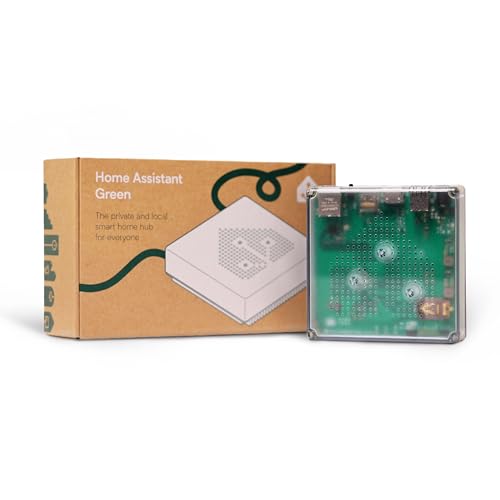
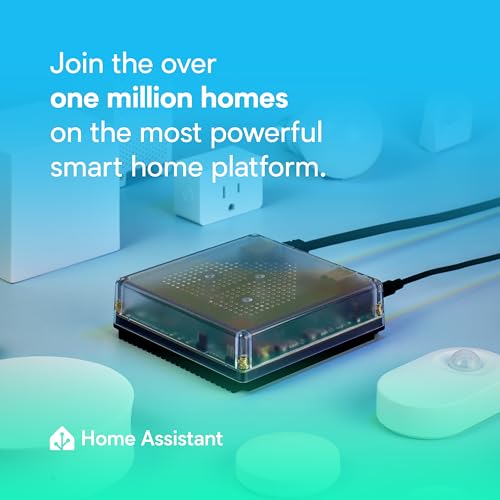
The Home Assistant Green is an official smart home hub developed and supported by Nabu Casa, the team behind the popular Home Assistant platform. It's designed for homeowners who want to consolidate their smart home ecosystem into a single, privacy-focused device that doesn't rely on cloud connectivity or subscription services. This hub is ideal for users tired of juggling multiple apps and hubs while seeking greater control over their home automation.
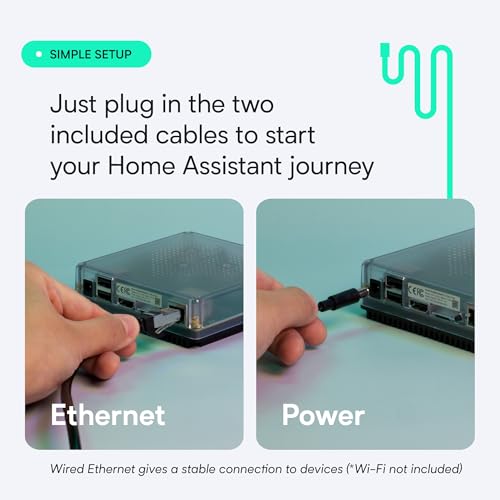
What sets the Green apart is its plug-and-play approach. Unlike traditional Home Assistant installations that require technical expertise, the Green arrives pre-configured and ready to use. Simply connect the power supply and Ethernet cable, and you're ready to control your entire home. The quad-core processor, 4GB of RAM, and 32GB of storage provide plenty of horsepower for complex automations, device management, and future expansion. The compact, fanless design is genuinely silent, making it suitable for any room without the hum of cooling fans.
The device excels at consolidating disparate smart home protocols. Rather than maintaining separate hubs for Z-Wave, Zigbee, and Thread devices, you can expand the Green with USB adapters to manage everything centrally. All data stays local on your device, meaning your automations continue working even if your internet goes down, and your personal information never leaves your home. This privacy-first approach is a major differentiator in a market dominated by cloud-dependent alternatives.
The primary drawback is that this is a new product with no user reviews yet, so real-world reliability data is unavailable. Additionally, the device requires an Ethernet connection for optimal setup and performance, which may limit placement options for some users. Those unfamiliar with Home Assistant's automation framework should expect a moderate learning curve, though the platform's documentation is comprehensive.
The Home Assistant Green is an excellent choice for privacy-conscious homeowners, tech enthusiasts, and anyone seeking to escape the cloud-dependent smart home ecosystem. At its price point, it represents a solid investment in a future-proof, locally-controlled home automation system backed by active development and community support.
Pre-Installed Home Assistant Operating System
The Green ships with Home Assistant already installed and configured, eliminating the technical barriers of traditional installations. Simply plug in power and Ethernet, and you're ready to add devices and create automations within minutes. This is a game-changer for users who want Home Assistant's power without the setup complexity.
Hardware Specifications
- Quad-core processor for fast automation execution and device management
- 4GB RAM ensures smooth performance even with hundreds of connected devices
- 32GB storage provides ample space for automations, history, and integrations
- Fanless design guarantees silent operation in any room
- Compact 4.41 x 1.26 x 4.41 inch footprint fits seamlessly into any decor
Local Data Storage and Privacy
All your home automation data, device states, and automation history remain stored locally on the Green. Your information never travels to cloud servers, giving you complete control over your data. You can easily view, share, or export data as needed without compromising privacy or relying on external services.
Protocol Expansion via USB
The Green supports USB expansion for Z-Wave, Zigbee, and Thread wireless protocols. This means you can start with one protocol and add others as your home grows, all managed through a single hub rather than maintaining multiple devices.
Energy Efficiency
Drawing only a few watts of power, the Green is one of the most efficient smart home hubs available. It's designed to run continuously without significantly impacting your electricity costs, making it both economical and environmentally responsible.
Official Support and Development
As an official Nabu Casa product, the Green receives priority support and is tightly integrated with Home Assistant development. You can expect regular firmware updates, security patches, and new features as the platform evolves.
What to Consider Before Buying
Before purchasing the Home Assistant Green, assess your current smart home setup. Do you have multiple hubs from different manufacturers? Are you concerned about cloud privacy? Do you want a single source of truth for all your automations? If you answered yes to these questions, the Green is a strong fit. Also confirm that your home has reliable Ethernet connectivity, as the device requires a wired connection for setup and optimal performance.
Who This Product Is Best For
The Home Assistant Green is ideal for privacy-conscious homeowners, DIY automation enthusiasts, and users frustrated with cloud-dependent smart home ecosystems. It's also perfect for those with diverse smart home devices from different manufacturers who want unified control. However, it requires some technical comfort and patience to learn Home Assistant's automation framework. If you prefer plug-and-play simplicity with minimal configuration, this may not be the right choice.
Comparison to Alternatives
Unlike commercial hubs from Amazon (Echo Show), Google (Nest Hub), or Apple (HomePod), the Green prioritizes local processing and data privacy over convenience features like voice control or video displays. Compared to other Home Assistant-compatible devices, the Green offers official support and a pre-configured experience that eliminates setup friction. While it costs more than budget alternatives, it's significantly cheaper than enterprise-grade home automation systems and delivers superior flexibility and control.
Important Caveats and Tips
Understand that Home Assistant has a steeper learning curve than mainstream smart home platforms. Spend time reviewing the official documentation and community forums to maximize the device's potential. Plan for Ethernet connectivity before purchasing, as Wi-Fi performance is not recommended for primary operation. Finally, consider your device ecosystem: the more diverse your smart home devices, the more value the Green provides through its unified hub approach. Start small with basic automations and expand as you become comfortable with the platform.

The Aeotec Smart Home Hub is a multi-protocol gateway designed to serve as the central nervous system of a mixed-brand smart home. It functions as a SmartThings hub while simultaneously supporting Z-Wave, Zigbee, Matter, and Wi-Fi protocols, making it an excellent choice for users who have invested in devices from different manufacturers and want unified control without juggling multiple hubs.
The standout feature is its Matter certification combined with local automation capabilities. Matter represents the future of smart home interoperability, and this hub's early adoption means your investment remains relevant as more devices transition to the protocol. Equally important is the local automation processing, which allows routines and automations to execute on the hub itself rather than relying on cloud servers. This translates to faster response times, improved reliability during internet outages, and reduced latency when triggering device sequences.
Setup is straightforward and completed within minutes through the SmartThings app on iOS or Android. The hub supports both Wi-Fi and Ethernet connectivity, giving you flexibility in how you integrate it into your network. Its compact 5 x 5 x 1-inch form factor means it fits easily on shelves, desks, or entertainment centers without consuming significant space. The white finish blends into most home environments.
The main limitation is the lack of customer reviews at launch, which means real-world performance data and long-term reliability cannot yet be independently verified. Additionally, Z-Wave Plus (V3) support is limited to the V3 model, so compatibility with older Z-Wave devices should be confirmed before purchase. The reliance on the SmartThings app for full functionality means you will need to manage another application alongside Alexa or Google Home, though voice control integration mitigates this somewhat.
The Aeotec Smart Home Hub is a solid investment for anyone building a multi-protocol smart home or looking to consolidate existing hubs. Its Matter support and local automation features provide both current utility and future-proofing, making it a forward-thinking choice in the smart home hub category.
Multi-Protocol Gateway
This hub eliminates the need for separate hubs by supporting multiple smart home protocols simultaneously. Control devices across Z-Wave, Zigbee, Wi-Fi, and Matter ecosystems from a single interface, reducing hardware clutter and simplifying management.
Matter Certification
Built with Matter support, this hub future-proofs your smart home investment. As Matter becomes the industry standard, you will have native compatibility with the next generation of smart devices without requiring hardware upgrades.
Local Automation Processing
- Automations run directly on the hub for instant execution
- Eliminates cloud server dependency and latency
- Continues functioning during internet outages
- Enhanced reliability and faster response times
SmartThings App Integration
Manage all connected devices through a unified SmartThings app available on Android, iOS, and iPadOS. Create custom automations, set schedules, and monitor device status from anywhere.
Voice Assistant Compatibility
Works with both Amazon Alexa and Google Home, allowing you to control thousands of compatible devices using voice commands. Integrates seamlessly with existing voice assistant ecosystems.
Flexible Connectivity Options
Choose between Wi-Fi or wired Ethernet connectivity based on your network setup. Ethernet provides more stable connections for critical hub operations, while Wi-Fi offers convenience in locations away from network cables.
Compact Design
At just 5 x 5 x 1 inches and 1.1 pounds, this hub fits discreetly into any home environment without dominating shelf space or requiring dedicated furniture.
Who Should Buy This Hub
The Aeotec Smart Home Hub is ideal for users who own smart devices from multiple manufacturers and want centralized control without managing separate hubs. It is particularly valuable for those planning to adopt Matter-compatible devices in the coming years, as it provides native support for the emerging standard. It suits both beginners looking for a straightforward setup and experienced smart home enthusiasts wanting to consolidate their infrastructure.
Key Considerations Before Buying
- Verify that your existing devices support Z-Wave, Zigbee, Wi-Fi, or Matter protocols
- Confirm your home network can support either Wi-Fi or Ethernet connectivity to the hub location
- Check that you are comfortable using the SmartThings app in addition to Alexa or Google Home
- If using older Z-Wave devices, ensure they are compatible with Z-Wave Plus V3
- Review the North America designation to confirm regional compatibility
Comparison to Alternatives
In the smart home hub category, you will find options like the Samsung SmartThings Hub, Amazon Echo Show, and Google Nest Hub Max. The Aeotec hub differentiates itself through its multi-protocol support and Matter certification at a mid-range price point. Unlike voice-first alternatives, it prioritizes device control and automation over entertainment features. Its strength lies in protocol flexibility rather than being tied to a single ecosystem.
Important Tips for Success
Place your hub in a central location to maximize wireless signal range for Z-Wave and Zigbee devices. If using Wi-Fi, position it away from interference sources like microwaves and cordless phones. Use Ethernet for maximum stability if your hub location allows cable access. Start by connecting a few key devices to verify functionality before expanding your ecosystem. Take advantage of local automation features by setting up routines that do not require cloud processing for time-sensitive actions like security or lighting.
Setup Expectations
Setup through the SmartThings app takes approximately 5 to 10 minutes from unboxing to operational status. Have your Wi-Fi password or Ethernet cable ready, and ensure you have the SmartThings app downloaded before beginning. Initial device pairing will require accessing each device's pairing mode, which varies by manufacturer but is typically a straightforward process documented in your device manuals.
The Aeotec Smart Home Hub2 V4 is a central control hub designed for homeowners ready to embrace the future of smart home technology. Powered by Samsung's SmartThings platform, this device serves as the brain of your connected home, supporting both the emerging Matter standard and the established Zigbee protocol. It's best suited for users who want a unified ecosystem, compatibility with multiple voice assistants, and the assurance that their smart home will remain functional even when internet connectivity drops.
What sets this hub apart is its forward-thinking approach to smart home standards. By supporting Matter alongside Zigbee, it positions your home for long-term compatibility as manufacturers continue adopting the new Matter specification. The hub works seamlessly with Amazon Alexa and Google Assistant, giving you the flexibility to use whichever voice platform you prefer. Setup is straightforward, requiring only a Wi-Fi or Ethernet connection and access to the SmartThings app, making it accessible even for users new to smart home automation.
The hub excels at local automation, which means critical routines like security checks, lighting schedules, and comfort settings continue working even if your internet connection fails. This is a significant advantage over cloud-dependent solutions, as it ensures your home remains responsive and secure at all times. The compact design measures just 3.66 by 3.66 by 0.9 inches, making it easy to place on a shelf, desk, or nightstand without drawing attention.
The main limitation is the absence of Z-Wave support, which eliminates compatibility with a segment of popular smart home devices, particularly older installations. Additionally, as a newer product with no user reviews yet, potential buyers cannot benefit from real-world feedback about long-term reliability or edge-case performance issues. The reliance on the SmartThings app means adding another platform to your smart home management routine.
The Aeotec Smart Home Hub2 V4 is a solid choice for anyone building a modern smart home from scratch or migrating to a more future-proof system. Its Matter support, dual voice assistant compatibility, and local automation capabilities make it a capable foundation for a reliable, flexible smart home ecosystem.
Matter and Zigbee Support
This hub supports both the Matter standard and Zigbee protocol, ensuring compatibility with thousands of current devices while future-proofing your investment. Matter is the emerging smart home standard backed by major manufacturers, making this hub a smart long-term choice for new installations and upgrades.
SmartThings Integration
Built on Samsung's proven SmartThings ecosystem, the hub provides a unified platform for connecting, monitoring, and automating all your smart devices. The SmartThings app serves as your central control point, offering intuitive management of routines, automations, and device settings from anywhere.
Multi-Platform Voice Control
- Compatible with Amazon Alexa for hands-free control of lights, locks, and routines
- Works with Google Assistant for seamless voice commands
- Switch between platforms based on your preference without device conflicts
Local Automation Processing
The hub processes automations locally on the device itself, meaning your routines continue operating even during internet outages. This ensures security systems, lighting schedules, and comfort settings never fail due to connectivity issues, providing peace of mind and uninterrupted smart home functionality.
Easy Connectivity Options
Choose between Wi-Fi or wired Ethernet connection based on your home's network setup. Both options enable quick setup in minutes, making this hub suitable for apartments, houses, and expanding smart home systems of any size.
Compact and Unobtrusive Design
At just 3.66 by 3.66 by 0.9 inches, the white hub blends seamlessly into any room without dominating shelf or desk space.
What to Consider Before Buying
Before purchasing the Aeotec Smart Home Hub2 V4, evaluate your current smart home devices to ensure they use Zigbee or Matter protocols. If you have existing Z-Wave devices, this hub won't control them without a separate Z-Wave hub. Consider whether you prefer the SmartThings app ecosystem and whether Alexa or Google Assistant integration aligns with your voice assistant setup.
Who This Product Is Best For
This hub is ideal for users building a new smart home system, upgrading from a single-protocol setup, or migrating to a more future-proof platform. It suits homeowners who value local automation for security and reliability, want flexibility with voice assistants, and are willing to adopt the SmartThings app as their primary control interface. Tech-forward users who want Matter support now will appreciate the forward compatibility.
How It Compares to Alternatives
Unlike basic Wi-Fi hubs that rely entirely on cloud processing, the Aeotec Smart Home Hub2 V4 offers local automation for greater reliability. Compared to Z-Wave-focused hubs, this device prioritizes the newer Matter standard and Zigbee ecosystem, making it better suited for modern device adoption. If you need Z-Wave support, you'll need a dual-protocol hub or separate Z-Wave controller, which adds cost and complexity.
Important Caveats and Tips
- Confirm your smart devices support Zigbee or Matter before purchasing to avoid compatibility issues
- Ensure your Wi-Fi network is stable, or use the Ethernet connection option for more reliable hub performance
- Download and familiarize yourself with the SmartThings app before setup to streamline the initial configuration
- As a newer product without user reviews, monitor early adopter feedback for any firmware updates or performance insights
- Position the hub in a central location to maximize Zigbee signal strength throughout your home
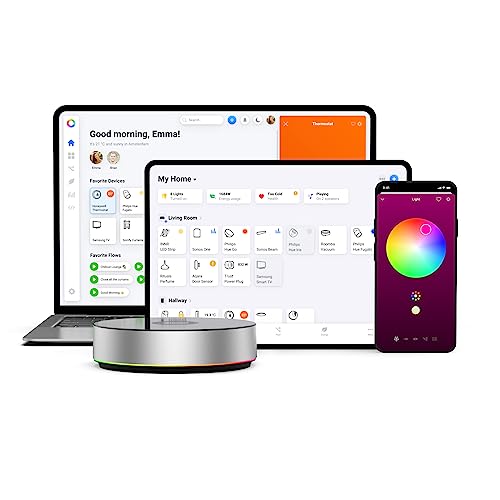
The Homey Bridge is a compact smart home hub designed for users who want to consolidate multiple device protocols into a single, privacy-focused platform. At just 5x5x3 inches and weighing under a pound, it sits discreetly on shelves, desks, or nightstands without dominating physical space. This hub is ideal for homeowners and renters looking to automate their homes without committing to a single ecosystem or sacrificing data privacy.
What sets Homey Bridge apart is its multi-protocol support and exceptional device compatibility. Rather than forcing you to choose between Z-Wave, Zigbee, WiFi, BLE, or infrared devices, this hub speaks all these languages simultaneously. The platform integrates with over 1000 devices from trusted brands including Philips Hue, Nest, IKEA, Sonos, Yale, Honeywell, and Aqara. Users can create custom automation Flows through an intuitive mobile app, enabling scenarios like playing music upon arrival, adjusting lights based on time of day, or triggering multiple devices with a single voice command.
Voice control integration is seamless across Amazon Alexa, Google Assistant, and Siri Shortcuts, meaning you're not locked into one voice ecosystem. This flexibility is a significant advantage for households with mixed device preferences. The privacy-first architecture is another standout feature, with Homey explicitly stating that user data is never profiled or sold to third parties without explicit consent, addressing growing concerns about smart home privacy.
The main limitation is that Homey Premium subscription is required to connect more than five devices, which significantly restricts the free tier's usefulness for most homes. Additionally, the product has no customer reviews yet, making it difficult to assess long-term reliability or real-world performance. Before purchasing, you'll need to verify compatibility with your specific devices through the Homey App Store.
Overall, Homey Bridge represents a thoughtful approach to smart home automation for privacy-conscious users who value flexibility and broad compatibility over ecosystem lock-in. The included three-month Homey Premium trial provides adequate time to test whether the platform meets your automation needs before committing to a subscription.
Multi-Protocol Hub Architecture
Homey Bridge consolidates four wireless protocols into a single device, eliminating the need to purchase separate controllers. This unified approach simplifies your smart home setup while reducing network clutter and physical device count.
- Z-Wave Plus for reliable, low-power device communication
- Zigbee support for IKEA Tradfri, Philips Hue, and Aqara devices
- WiFi connectivity for modern smart home brands
- Bluetooth Low Energy (BLE) for wearables and proximity-based automation
- Infrared control for legacy appliances and entertainment systems
Extensive Device Compatibility
With support for over 1000 devices from major manufacturers, Homey Bridge works with virtually any modern smart home product. Compatible brands include Sonos, Philips Hue, Nest, Kwikset, IKEA, Wiz, Yale, Honeywell, Aqara, Bosch, LG, LIFX, and Aeotec. This breadth of compatibility means you're not forced to standardize on a single brand ecosystem.
Intuitive Automation Engine
The Flows feature allows users to create complex automations without programming knowledge. Simply define triggers (like arriving home) and actions (like turning on lights and playing music), and the hub executes them automatically. The mobile app interface makes this accessible to non-technical users.
Voice Control Integration
Homey Bridge connects to Amazon Alexa, Google Assistant, and Siri Shortcuts, enabling voice commands for all compatible devices. This flexibility means you can use your preferred voice assistant without restriction.
Privacy-by-Design Architecture
Unlike many smart home platforms, Homey explicitly prioritizes user privacy. Your data is never used for profiling, and third-party sharing requires explicit consent. This approach appeals to privacy-conscious users concerned about data harvesting.
Compact Physical Footprint
At 5x5x3 inches and 0.7 pounds, the hub fits seamlessly into any room without requiring dedicated shelf space or dominating aesthetics.
Who Should Buy Homey Bridge?
Homey Bridge is best suited for users who own devices across multiple protocols (Z-Wave, Zigbee, WiFi) and want a single control point without ecosystem lock-in. It's ideal for privacy-conscious homeowners, renters with mixed device collections, and anyone frustrated with vendor-specific apps and limitations. If you've invested in devices from different brands and want them to work together seamlessly, this hub solves that problem.
What to Consider Before Buying
Before purchasing, verify that your specific devices are compatible through the Homey App Store. The free tier is limited to five devices, so budget for a Homey Premium subscription if you plan to automate more than five devices. Consider whether you prefer a privacy-first approach over convenience features offered by larger platforms. Also, evaluate whether you need voice control integration and which voice assistants you currently use.
How It Compares to Alternatives
Unlike Samsung SmartThings or Home Assistant, Homey Bridge prioritizes privacy and ease of use over technical customization. Compared to proprietary hubs from individual manufacturers, it offers superior multi-brand compatibility. It's more affordable than many dedicated hubs while supporting more protocols than WiFi-only solutions. However, it lacks the extensive integration ecosystem of larger platforms like Home Assistant or the consumer polish of Apple Home.
Subscription Considerations
The three-month Homey Premium trial gives you time to test whether the subscription model fits your needs. After the trial, Homey Premium costs $2.99 per month to exceed five devices. Calculate your long-term costs before committing, as this adds up over time for users with large device collections.
Setup and Ongoing Maintenance
Setup requires downloading the Homey app, connecting the hub to your network, and pairing your devices. The process is generally straightforward, but you'll need to verify each device's compatibility beforehand. Once configured, the hub requires minimal maintenance beyond occasional app updates.

The Aqara Smart Home Hub M3 is a premium smart home controller designed for users who want to integrate multiple device protocols and ecosystems under one roof. It functions as a Matter bridge, Thread border router, and Zigbee hub, making it particularly valuable for those invested in Aqara devices while also maintaining compatibility with HomeKit, Alexa, SmartThings, Home Assistant, and IFTTT platforms. This hub is best suited for advanced users building complex automations and those who prioritize local control and privacy.
The standout feature of the M3 is its edge-first architecture, which shifts automation processing to the device itself rather than relying on cloud servers. This means your smart home automations continue to work even if your internet goes down, and response times are noticeably faster. The hub also includes a sophisticated 360-degree IR blaster that doesn't just send commands but actively detects when you use a traditional remote, providing accurate status feedback. When paired with an Aqara temperature sensor, it can even control legacy air conditioning units as if they were modern smart thermostats accessible through Matter.
Build quality is solid with compact dimensions that fit easily on shelves, walls, or ceilings thanks to included mounting hardware. The M3 offers both wired and wireless connectivity through PoE and dual-band Wi-Fi with WPA3 security. The USB-C port is a thoughtful addition, allowing connection to mini-UPS devices or power banks for uninterrupted operation during outages. Privacy is genuinely prioritized here with no microphone or camera components and 8GB of encrypted local storage for your device data and automation configurations.
The main drawbacks are the exclusion of a power adapter, the limitation to Aqara-branded Zigbee devices only, and the single-AC limitation for Matter exposure. Setup is straightforward thanks to Magic Pair technology, which auto-detects the hub when powered on. For users building a serious smart home with Aqara as their foundation and wanting seamless integration with broader ecosystems, the M3 represents a mature, privacy-conscious solution that prioritizes reliability over cloud dependency.
Multi-Protocol Hub with Matter Bridge
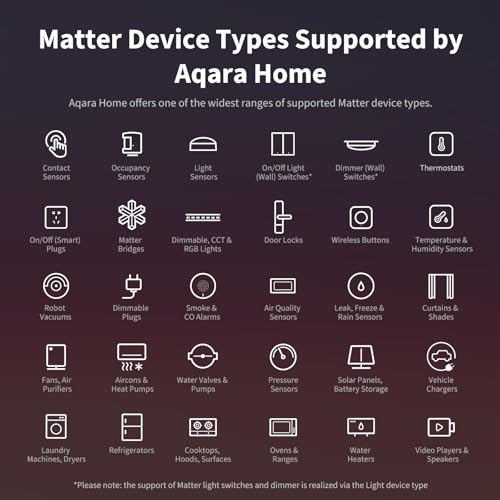
The M3 serves as a central hub supporting Aqara Zigbee devices, Thread devices, and Matter protocol integration. It acts as a bridge between Aqara-exclusive scenes and Matter ecosystems, enabling your Aqara devices to appear in Apple Home, Home Assistant, and other Matter-compatible platforms without losing advanced functionality.
- Supports up to 127 Aqara Zigbee devices (Aqara-branded only)
- Supports up to 127 Thread devices with optional repeaters
- Bridges Aqara automations and scenes to Matter ecosystems
- Enables migration of devices from older Aqara hubs
Local Edge Automation and Control
Unlike cloud-dependent hubs, the M3 processes automations locally on the device itself. This means faster response times, continued operation without internet, and reduced reliance on cloud services. When integrated, it becomes the primary hub and automatically migrates automations from older Aqara hubs to local processing.
- Automations execute locally for sub-second response times
- Smart home continues functioning during internet outages
- Cloud notifications still require internet connection
- Prioritizes privacy by keeping data local
Smart IR Blaster with Feedback Detection
The 360-degree IR blaster uniquely detects when you use a traditional remote control, providing accurate status feedback. When paired with an Aqara temperature sensor, it transforms legacy air conditioning units into smart thermostats controllable through Matter-compatible apps.
- 360-degree IR range eliminates positioning concerns
- Detects physical remote use for accurate status updates
- Converts AC units to smart thermostat functionality
- Limited to one AC device exposure to Matter
Dual Connectivity with PoE and USB-C
The M3 offers both wired and wireless connectivity options. Power over Ethernet (PoE) eliminates the need for separate power cables, while the USB-C port accepts mini-UPS or power bank connections for backup power during outages. Dual-band Wi-Fi with WPA3 security ensures stable wireless connectivity.
- PoE port for wired, stable connection
- Dual-band Wi-Fi (2.4 and 5 GHz) with WPA3 encryption
- USB-C port supports mini-UPS and power bank connections
- Optimal placement between 6 and 19 feet from router
Privacy-Focused Design with Encrypted Storage
The M3 contains no microphone or camera components, ensuring your smart home data never passes through audio or video sensors. All device lists, configurations, and automation data are stored locally in 8GB of encrypted storage.
- No microphone or camera for complete privacy
- 8GB end-to-end encrypted local storage
- Device data never leaves your home
- Configuration and automation data protected locally
Easy Setup and Flexible Placement
Magic Pair technology automatically detects the hub when powered on, eliminating manual pairing steps. The included mount and screws allow installation on flat surfaces, walls, or ceilings. Compact dimensions (approximately 4.1 x 1.4 x 4.1 inches) fit most environments.
What to Consider Before Buying
Before purchasing the M3, assess your current smart home ecosystem. This hub is most valuable if you already own or plan to invest in Aqara-branded devices, as it's optimized for Aqara Zigbee and Thread products. If you have a diverse collection of third-party Zigbee devices from other brands, this hub won't directly support them. Consider your network setup: the M3 performs best when placed 6 to 19 feet from your router. You'll also need to provide your own 2A USB power adapter or use the PoE connection, so factor in any additional purchases.
Who This Product Is Best For
The M3 is ideal for advanced smart home users who value local automation, privacy, and multi-ecosystem integration. It's perfect if you're building an Aqara-centric setup while also wanting HomeKit, Alexa, or Home Assistant compatibility. Users with legacy air conditioning units who want to bring them into their smart home will appreciate the intelligent IR blaster. Anyone concerned about privacy and cloud dependency will value the local processing and encrypted storage. This hub rewards users willing to invest time in complex automations and device management.
How It Compares to Alternatives
The M3 occupies a premium position in the smart home hub market. Compared to basic hubs like the Amazon Echo, it offers superior local automation and privacy. Versus specialized Matter bridges, it provides broader protocol support with Zigbee and Thread. The inclusion of an intelligent IR blaster with feedback detection is relatively unique at this price point. However, it's less versatile than hubs that support third-party Zigbee devices, making it less suitable for mixed-brand ecosystems. The M3 justifies its positioning through edge processing capabilities, Matter bridge functionality, and privacy-first architecture rather than sheer device compatibility breadth.
Important Caveats and Tips
Ensure you have a 2A USB power adapter or PoE capability before purchasing, as neither is included. If you plan to use the IR blaster for air conditioning, you can only expose one AC unit to Matter, so plan accordingly for multi-unit homes. The hub works best with Aqara's native app; some functionality may vary depending on which ecosystem you're using for exposure (HomeKit, Home Assistant, etc.). For optimal performance, place the hub in a central location within 6 to 19 feet of your Wi-Fi router. If you're migrating from an older Aqara hub, the M3 will automatically handle device and automation transfers, but test critical automations after migration to ensure they function as expected in local mode.
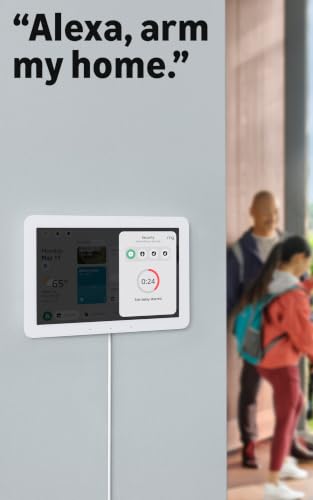
The Amazon Echo Hub is a wall-mounted smart home control panel designed for households with multiple connected devices. This 8-inch touchscreen acts as a dedicated command center, allowing you to control lights, thermostats, locks, cameras, and other Alexa-compatible devices through both voice commands and manual taps. It's best suited for tech-forward homeowners who want to consolidate smart home management into one location rather than managing apps across multiple devices.
The standout feature is its versatility in device compatibility. Thanks to built-in support for WiFi, Bluetooth, Zigbee, Matter, Sidewalk, and Thread protocols, the Echo Hub functions as a smart home hub itself, eliminating the need for separate bridge devices in many cases. The customizable dashboard lets you arrange widgets and controls to match your daily routines, displaying camera feeds, device status, and quick-access buttons for your most-used functions. Security features include the ability to arm and disarm compatible alarm systems and view camera feeds remotely through the Alexa app.
Design-wise, the Echo Hub is compact and slim at 0.58 inches thick, making it suitable for wall mounting in kitchens, entryways, or living rooms. Amazon provides flexibility with in-wall cable options and power-over-ethernet compatibility, though these accessories are sold separately. The Glacier White finish blends into most home decors, and the device's 27% recycled material construction reflects a commitment to sustainability.
The main limitation is the complete lack of user reviews, making it impossible to assess long-term reliability, software performance, or real-world setup experiences. Additionally, this device is locked into the Alexa ecosystem, so it won't work with Google Home or Apple HomeKit users. The need to purchase mounting accessories separately adds to the overall cost.
The Echo Hub represents a solid investment for Alexa-dependent smart homes seeking a unified control interface. However, prospective buyers should verify that their existing smart home devices are Alexa-compatible and consider the additional accessory costs before committing.
8-Inch Touchscreen Display
The hub's primary interface is an 8-inch touchscreen that serves as your smart home command center. You can customize the dashboard layout with widgets for lights, thermostats, cameras, locks, and routines, allowing quick access to your most-used controls without opening apps.
Multi-Protocol Smart Home Hub
- Built-in Zigbee, Matter, and Thread support reduce the need for separate bridge devices
- WiFi and Bluetooth connectivity for standard smart devices
- Amazon Sidewalk support extends range for compatible devices
- Seamless synchronization with thousands of Alexa-compatible products
Voice and Touch Control
Use Alexa voice commands to control devices hands-free, or tap the screen for manual control. Both methods integrate with routines, allowing you to trigger multiple actions with a single command or button press.
Integrated Home Security
Arm and disarm compatible security systems directly from the hub. View live camera feeds, check door locks, and receive alerts from sensors and alarms all in one place. Remote access through the Alexa app keeps you connected while away.
Flexible Installation
Wall-mount capability with cable management options (in-wall pass-throughs and power-over-ethernet support) allows clean installation. Alternatively, use a tabletop stand for flexibility without permanent mounting.
Privacy and Security
Multiple privacy control layers include a physical microphone off button. Amazon does not sell personal data to third parties, and the device is designed with privacy as a core consideration.
Eco-Friendly Design
Constructed from 27% recycled materials with 97% of packaging made from sustainably sourced or recycled wood fiber materials.
Who Should Buy the Echo Hub?
This product is ideal for Alexa users with multiple smart home devices who want to consolidate control into a single touchscreen interface. It works best in homes with 10 or more connected devices, where app-switching becomes cumbersome. If your entire ecosystem is Alexa-compatible, the Echo Hub simplifies daily interactions and improves convenience.
What to Consider Before Buying
- Verify that your existing smart home devices are compatible with Alexa or support one of the hub's protocols (Zigbee, Matter, Thread)
- Plan your installation location, ensuring nearby power access or willingness to use power-over-ethernet
- Budget for optional accessories like wall mounts or stands if you don't already have them
- Confirm that all household members are comfortable with Alexa-based voice control and touchscreen interaction
Comparison to Alternatives
At this price point, the Echo Hub competes with other smart home control panels like the Google Nest Hub Max and Apple iPad-based setups. The Echo Hub's main advantage is its integrated hub functionality for Zigbee and Matter devices, potentially eliminating the need for separate bridge purchases. However, if you use Google Home or HomeKit exclusively, those ecosystems offer native alternatives that may integrate more seamlessly with your existing devices.
Important Caveats
Since no user reviews are available yet, you're adopting this as an early product. There's no community feedback on software stability, setup difficulty, or long-term reliability. Additionally, this device is Alexa-exclusive, so it won't control non-Alexa devices. If you have a mixed ecosystem (some Alexa, some Google, some HomeKit), you'll still need multiple apps or a separate universal hub.
Installation Tips
Plan your wall location before purchase, considering proximity to power outlets and WiFi signal strength. If using power-over-ethernet, coordinate with your network setup in advance. Take time to customize your dashboard layout after setup to maximize the hub's convenience factor.
Individual Best Smart Home Hubs Reviews
Home Assistant Green

Home Assistant Green Smart Hub | Official Automation Controller
- 💡 EASIEST WAY TO GET STARTED WITH HOME ASSISTANT - With Home Assistant already installed, it only requires plugging the included power supply and Ethernet cable to get started.
- ✅ OFFICIAL - This official Home Assistant hardware is built and supported by Nabu Casa, the team driving the development of Home Assistant.
- 🏡 DESIGNED FOR THE HOME - The small, fanless, and silent design packs a quad-core processor, 32GB of storage, and 4GB of RAM.
- 📱 ONE HUB TO CONTROL THE WHOLE HOME - Cut down hub and app clutter and control your whole home from Home Assistant Green.
- 🤖 AUTOMATE EVERYTHING - Make all the devices in your home work in harmony - have your lights dim when you start watching a movie, or turn off your heat when you’re away from home.
- 🔒 YOUR HOME, YOUR DATA - Your home’s data will be kept in the home on your Green. You can easily view, share, and export that data anywhere you want.
- 🌿 POWER EFFICIENT - Using only a couple of watts of power, it is the Green way to run Home Assistant.
- 🔗 USB EXPANDABILITY - If you need more connectivity, expand your Home Assistant Green with Z-Wave, Zigbee, and Thread USB devices.



As an Amazon Associate we earn from qualifying purchases. Product prices and availability are accurate as of the date/time indicated.
Home Assistant Green represents the official entry point into the Home Assistant ecosystem, backed by Nabu Casa, the team driving Home Assistant development. This hub arrives with Home Assistant pre-installed, eliminating the complex setup process that typically intimidates newcomers. Simply connect the power supply and Ethernet cable, and you’re ready to begin automating your home. The fanless, silent design houses a quad-core processor, 4GB RAM, and 32GB storage, providing sufficient power for most residential smart home setups.
What sets Home Assistant Green apart is its commitment to local processing and privacy. All automation logic runs on your device rather than cloud servers, meaning your smart home continues functioning even if your internet connection drops. The hub supports thousands of device integrations across multiple protocols, and its open-source nature means a vibrant community constantly expands compatibility and features. However, Home Assistant Green requires more technical knowledge than some competing hubs, particularly when setting up complex automations or integrating non-standard devices. This hub is ideal for tech-savvy users who value privacy, local control, and long-term flexibility over simplicity.
The quiet operation makes it suitable for bedroom placement, and the compact form factor fits easily on shelves or walls. With regular software updates and community support, you’re investing in a platform that will grow with your smart home ambitions over many years.
Aeotec Smart Home Hub
Aeotec Smart Home Hub - Matter, Z-Wave, Zigbee Gateway for Alexa & Google
- Connect & control your smart home — Easily link thousands of compatible devices from leading brands to create a connected home environment for lighting, comfort, voice assistants, energy use, and more.
- Automate your routines — Build custom automations using the SmartThings app to coordinate lights, sensors, switches, and other compatible devices throughout your day. Many automations now run locally for improved speed and reliability.
- Set up, manage, and automate devices using the SmartThings app on Android, iOS, or iPadOS. Works with popular voice assistants, including Amazon Alexa and Google Home.
- Easy setup with Wi-Fi or Ethernet — Set up the hub in minutes using the SmartThings app. Supports both wired Ethernet and Wi-Fi connectivity.
- Wide compatibility — Certified for Matter, SmartThings, Z-Wave Plus (V3 model only), Zigbee, Wi-Fi, Google Home, and Alexa. Designed for use in North America.


As an Amazon Associate we earn from qualifying purchases. Product prices and availability are accurate as of the date/time indicated.
The Aeotec Smart Home Hub functions as a SmartThings hub while adding Matter gateway capabilities, making it an excellent bridge between Samsung’s ecosystem and broader smart home standards. This hub supports Z-Wave Plus (V3 model), Zigbee, Matter, Wi-Fi, and connects seamlessly with both Amazon Alexa and Google Assistant. The SmartThings app provides an intuitive interface for managing devices, creating automations, and monitoring your home from anywhere. Setup takes just minutes using Wi-Fi or wired Ethernet connectivity, and the hub supports both apartment and house installations.
A key advantage of the Aeotec hub is its local automation capability. Many routines continue functioning even when internet connectivity is interrupted, providing reliability for critical automations like security and lighting. The Matter certification positions this hub well for future device compatibility, as more manufacturers adopt the Matter standard. The wide protocol support means you can mix and match devices from different brands without worrying about compatibility. However, the SmartThings app can feel overwhelming for beginners with its extensive feature set, and Z-Wave support is limited to the V3 model specifically.
This hub works exceptionally well for households already invested in Samsung or SmartThings devices, or for users who want flexibility to add various device types over time. The Matter gateway functionality ensures your hub won’t become obsolete as smart home standards evolve.
Aeotec Smart Home Hub2 – V4

Aeotec Smart Home Hub2 V4 - Matter & Zigbee Gateway for Alexa & Google
- Powered by SmartThings: Connect, monitor, and automate your home through the SmartThings app. Build a reliable, unified smart home using Samsung's proven ecosystem
- Matter + Zigbee Smart Home Hub: Supports the newest Matter standard plus Zigbee for lighting, sensors, plugs, switches, thermostats, and more - thousands of compatible devices. PLEASE NOTE: Z-Wave not supported
- Easy Setup with Wi-Fi or Ethernet: Get started in minutes using Wi-Fi or a wired Ethernet connection for apartments, houses, and expanding smart home systems - Z-Wave not supported
- Automations That Work for You: Create custom routines for security, lighting, comfort, and energy savings. Many local automations continue working even if your internet goes offline
- Wide Device Compatibility: Connect compatible smart devices from Aeotec and many other brands to build a unified system for lighting, voice control, energy management, and climate settings
- Local Processing Capability: Enhanced speed and reliability with local automation execution on the hub, ensuring your smart home continues functioning even during temporary internet outages




As an Amazon Associate we earn from qualifying purchases. Product prices and availability are accurate as of the date/time indicated.
The Aeotec Smart Home Hub2 V4 is a more streamlined alternative to its predecessor, focusing on Matter and Zigbee support while removing Z-Wave functionality. This hub is powered by SmartThings, giving you access to the same robust automation ecosystem and voice control compatibility with Alexa and Google Assistant. The V4 model represents Aeotec’s commitment to the Matter standard, positioning it as a future-proof choice for smart homes prioritizing the newest protocols. Setup is straightforward with Wi-Fi or Ethernet options, and the hub is designed for both apartments and expanding smart home systems.
The absence of Z-Wave support is the primary consideration with this model. If your existing devices rely on Z-Wave protocol, you’ll need to either upgrade those devices to Matter or Zigbee alternatives, or choose a different hub. For new smart home installations or households standardizing on Zigbee and Matter devices, this limitation is irrelevant. The local automation capability ensures your routines continue even during internet outages, and the Matter support future-proofs your investment. The SmartThings app provides comprehensive control and automation options, though it may feel feature-heavy for minimalist users.
This hub is best suited for users building new smart homes from scratch, those wanting a future-ready Matter hub, or households already committed to Zigbee devices. The lower price point compared to other Aeotec models makes it an attractive option for budget-conscious buyers.
Homey Bridge

Homey Bridge Smart Home Hub - Z-Wave Zigbee WiFi Control
- YOUR HOME, YOUR RULES: Make all your devices work together seamlessly with Homey Automatically play music when you arrive home. Create Flows right within the Homey app and Make It Your Home. Add VOICE CONTROL by linking Homey Bridge to Amazon Alexa, Siri Shortcuts or Google Assistant (devices sold separately) to control Infrared, Zigbee and Z-Wave devices by voice..
- WIDE BRAND COMPATIBILITY: Homey seamlessly integrates with thousands of devices from top brands such as Sonos, Philips Hue, Nest, Spotify Connect, Kwikset, IKEA, Wiz, Yale, Honeywell, Aqara, Bosch, LG, LIFX, Aeotec, and many more..
- CHECK COMPATIBILITY WITH YOUR DEVICES – To ensure compatibility with your devices, please visit the Homey App Store on the official Homey website..
- PRIVACY-FIRST: Homey is built on privacy-by-design. Your data is not used for profiling, and is never shared with third parties without your explicit consent..
- INCLUDES 3 MONTHS HOMEY PREMIUM: Enjoy three months of unlimited smart home. An active Homey Premium subscription is required to connect more than five devices to Homey and access Homey Insights. Homey Premium is available for $2.99/month..


As an Amazon Associate we earn from qualifying purchases. Product prices and availability are accurate as of the date/time indicated.
Homey Bridge is the most affordable option in this best smart home hubs comparison, offering impressive compatibility with thousands of devices from major brands like Philips Hue, Nest, Sonos, IKEA, and many others. This hub supports Z-Wave Plus, Zigbee, Wi-Fi, Bluetooth, and infrared, making it incredibly versatile for mixed-protocol households. The privacy-first design ensures your data remains private and is never shared with third parties without explicit consent. You can create custom automation flows directly within the Homey app, and voice control integration with Amazon Alexa, Siri Shortcuts, and Google Assistant adds convenience.
The Homey Bridge includes three months of Homey Premium subscription, though an active subscription is required to connect more than five devices and access Homey Insights. This subscription requirement is an important consideration for budget-conscious users, as ongoing costs add up. The app interface is intuitive and well-designed, making it accessible even for users without technical expertise. Compatibility is extensive, but you should verify your specific devices on the Homey App Store before purchasing. The privacy-by-design approach appeals to security-conscious users who want local control over their smart home data.
Homey Bridge is ideal for users with diverse smart home devices from different manufacturers who want an affordable entry point into home automation. The subscription model may be a drawback for some, but the included premium period softens the initial investment. For detailed setup guidance, visit our smart home on a budget guide.
Aqara Smart Home Hub M3
Aqara Smart Home Hub M3 Matter Controller with Thread & Zigbee
- [Multi-Protocol Hub with Matter Bridge] The M3 is a versatile hub supporting Aqara Zigbee and Thread devices. It integrates third-party devices into the Aqara Home app. Supports advanced Matter bridge functionality, enabling Aqara-exclusive scenes and signals to sync with Matter ecosystems such as Home Assistant for seamless integration. Supports up to 127 Aqara Zigbee devices (** Not third-party Zigbee devices) and 127 Thread devices (Repeaters are needed).
- [Edge Compatibilities and Local Automations] The M3 serves as an Edge Hub, prioritizing local control and automation. Upon integration, it supersedes existing Aqara hubs, shifting the automations among them to local operation (Some cloud-based notifications still require internet). Upgrade-friendly, it supports migrating Zigbee devices from older Aqara hubs.
- [Smart IR Blaster with Feedback and Learning] The 360°IR blaster not only sends commands but also provides accurate status updates by detecting traditional remote use. It connects IR air conditioning units to Matter, functioning as an AC thermostat when paired with an Aqara Temperature and Humidity Sensor. (Note: Only one AC device can be exposed to Matter. Functionality may vary based on the Matter integration app. For Apple Home exposure, use Matter integration instead of HomeKit.)
- [Optimal Wired and Wireless Connectivity] Offering both wired and wireless solutions, the smart home hub M3 provides dual-band Wi-Fi (2.4/5 GHz) with advanced WPA3 security, and a Power over Ethernet (PoE) port. The addition of a USB-C port allows for mini-UPS and power bank connections, delivering unparalleled stability. (2A USB power adapter is not included. ) . Note: To ensure a stable connection, place the Hub M3 between 6 to 19 feet from the router.
- [Privacy-Focused with Encrypted Storage, Easy Setup and Versatile Placement] The M3 prioritizes privacy by excluding microphone or camera components. It boasts 8GB end-to-end encrypted local storage, for device lists, configuration parameters, and automation configuration data. Additionally, it includes a mount and screws for flexible placement on flat surfaces, walls, or ceilings. Magic Pair technology ensures effortless detection by the Aqara Home app upon power-up.



As an Amazon Associate we earn from qualifying purchases. Product prices and availability are accurate as of the date/time indicated.
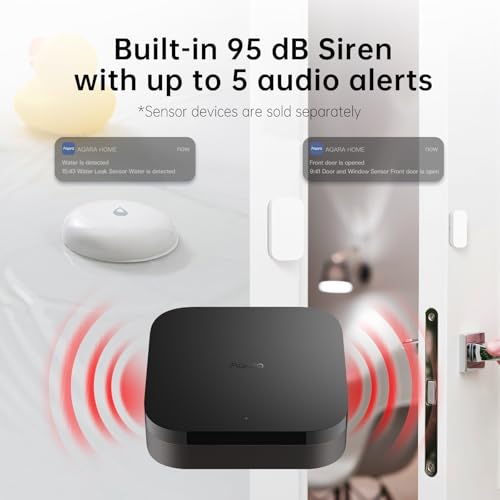
The Aqara Smart Home Hub M3 is a sophisticated hub designed for advanced users seeking comprehensive automation capabilities. This hub functions as a Matter bridge, Thread border router, and supports Aqara Zigbee and Thread devices while integrating third-party devices into the Aqara Home app. The 360-degree infrared blaster with feedback capability is particularly innovative, allowing you to control traditional IR devices like air conditioning units and connect them to Matter ecosystems. The hub supports up to 127 Aqara Zigbee devices and 127 Thread devices, providing substantial capacity for complex installations.
Privacy is a core design principle with the M3, featuring no microphone or camera components and offering 8GB of end-to-end encrypted local storage for device configurations and automation data. The hub supports both wired (Power over Ethernet) and wireless connectivity options, with dual-band Wi-Fi and WPA3 security. The USB-C port allows connection to mini-UPS devices or power banks, ensuring uninterrupted operation during power outages. Edge automation capabilities mean most routines run locally on the hub rather than relying on cloud processing. However, the M3 is specifically optimized for Aqara devices, and third-party Zigbee device support is limited.
This hub is best for users heavily invested in the Aqara ecosystem who need advanced automation features and privacy-focused local processing. The IR blaster functionality makes it particularly valuable for homes with multiple traditional remote-controlled devices. The wired connectivity options and backup power capability ensure reliability in critical installations.
Amazon Echo Hub

Amazon Echo Hub 8" Smart Home Control Panel with Alexa
- Echo Hub — An easy-to-use smart home control panel redesigned for your home. Arrange controls on your dashboard to quickly adjust devices, view cameras, start routines, and more.
- Customize your dashboard — Arrange devices into sections and resize them to focus on what matters most. Create a personalized layout that matches how your family uses their connected devices.
- Reimagined for your home - With an Alexa+ and compatible Ring subscription (sold separately), get Ring camera event summaries to stay in the know. Search your Ring footage using simple voice commands. Create routines by voice, activate modes to manage multiple devices at once, and chat with Alexa to easily control your smart home.
- Home security for the whole family — Use Echo Hub to easily arm and disarm your compatible security system, making it easy for everyone in your family to manage home security. Use the Alexa app and compatible cameras, locks, alarms, and sensors to check in while you're out.
- Works with thousands of Alexa compatible devices — WiFi, Bluetooth, Zigbee, Matter, Sidewalk, and Thread devices sync seamlessly with the built-in smart home hub.
- Easy to install and use — Echo Hub can be wall mounted anywhere you have an outlet. Use in-wall cable pass-throughs or a power-over-ethernet adapter (both sold separately) to hide cables. Also compatible with table-top stands (sold separately). Control your media with easy on-screen controls for music, podcasts, and more.
- Designed to protect your privacy — Amazon is not in the business of selling your personal information to others. Built with multiple layers of privacy controls, including a mic off button.
- Designed for sustainability – This device is made from 27% recycled materials. 97% of this device packaging is made of wood fiber-based materials from responsibly managed forests or recycled sources.





As an Amazon Associate we earn from qualifying purchases. Product prices and availability are accurate as of the date/time indicated.
The Amazon Echo Hub is a premium control panel designed for Alexa-plus users who want a central touchscreen interface for their smart homes. This 8-inch display hub combines voice control with visual feedback, allowing you to tap the screen to control lights, smart plugs, view camera feeds, and manage your entire smart home ecosystem. The hub works with thousands of Alexa-compatible devices and supports Wi-Fi, Bluetooth, Zigbee, Matter, Sidewalk, and Thread connectivity. The built-in smart home hub means compatible devices sync seamlessly, and you can customize the dashboard with widgets for quick access to frequently used controls.
Home security features are integrated directly into the Echo Hub, allowing you to arm and disarm compatible security systems, view camera feeds, and manage locks and sensors from one location. The wall-mount design is flexible, with options for cable pass-throughs or power-over-ethernet adapters to hide wires. The touchscreen interface is intuitive and appeals to users who prefer visual control over app-based management. However, the larger size and display may not suit all home aesthetics, and the premium price reflects the added hardware. The Echo Hub is primarily designed for Alexa ecosystem integration, so users heavily invested in Google Home or other platforms may find it limiting.
This hub is perfect for Alexa-centric households that want a beautiful, functional control panel in a central location like the kitchen or living room. The visual feedback and intuitive interface make it accessible for all family members, including those less comfortable with smartphone apps. The security integration makes it particularly valuable for homes prioritizing convenience and comprehensive monitoring.
Best Smart Home Hubs Buying Guide
Protocol Support and Device Compatibility
The most critical factor when selecting a best smart home hubs is ensuring it supports the protocols your devices use. The main smart home protocols are Z-Wave, Zigbee, Matter, Wi-Fi, Bluetooth, and Thread. Different devices use different protocols, and a hub that doesn’t support your devices’ protocol is essentially useless. Before making a purchase, inventory your existing smart devices and note which protocols they use. Check each hub’s specifications against your device list to ensure compatibility.
Matter is the emerging standard that many manufacturers are adopting, so hubs with Matter certification future-proof your investment. However, many existing devices still use Z-Wave or Zigbee, so protocol flexibility is valuable. Some hubs like the Homey Bridge and Aqara M3 support multiple protocols, giving you flexibility to add devices from different manufacturers over time. The Amazon Echo Hub and Aeotec options provide excellent protocol coverage, though each has different strengths. Consider not just your current devices but also what you might add in the future.
Pay special attention to the hub’s documentation and compatibility checkers. Many manufacturers maintain searchable databases of compatible devices. Before purchasing, verify your specific device models are listed as compatible, particularly for less common brands or older devices.
Voice Assistant Integration
Most modern smart home hubs integrate with major voice assistants like Amazon Alexa, Google Assistant, or Apple Siri. Consider which voice assistant ecosystem you’re already invested in, as this influences which hub makes most sense. The Amazon Echo Hub is optimized for Alexa, while most other hubs support both Alexa and Google Assistant. If you’re an Apple HomeKit user, compatibility varies significantly between hubs, so verify this carefully.
Voice control adds significant convenience to smart home automation. You can control lights, locks, thermostats, and other devices hands-free, which is particularly valuable in kitchens or bedrooms. However, voice control is not essential for hub functionality, and some users prefer app-based or automated control for privacy reasons. Consider how frequently you’d actually use voice commands in your home before prioritizing this feature.
Local Processing and Privacy Considerations
Local processing means your hub processes automation logic on the device itself rather than sending data to cloud servers. This offers significant advantages: automations continue working even if your internet connection drops, response times are faster, and your data never leaves your home. Privacy-conscious users strongly prefer local processing for these reasons. Home Assistant Green, Aqara M3, and the Aeotec hubs all support local automation to varying degrees.
Cloud-based processing, by contrast, offers easier setup and more sophisticated automation capabilities but requires constant internet connectivity and sends your data to manufacturer servers. The privacy implications depend on the manufacturer’s data policies. Homey Bridge and Amazon Echo Hub offer privacy-first options, though they may still use some cloud processing for certain features. Review each manufacturer’s privacy policy carefully if data handling is important to you.
Ease of Setup and User Interface
Setup complexity varies significantly between hubs. Home Assistant Green requires more technical knowledge but offers maximum flexibility. The Aeotec hubs use the SmartThings app, which is feature-rich but can feel overwhelming for beginners. The Homey Bridge and Aqara M3 offer more intuitive interfaces designed for non-technical users. The Amazon Echo Hub has the simplest setup if you’re already an Alexa user, though the interface is less flexible than dedicated smart home apps.
Consider your comfort level with technology when evaluating setup complexity. If you’re not comfortable troubleshooting network issues or configuring automation rules, choose a hub with a simpler, more guided setup process. However, if you enjoy technical projects and want maximum control, more complex hubs offer greater long-term flexibility. Many hubs include setup wizards that walk you through configuration step-by-step, significantly reducing the learning curve.
Connectivity Options and Placement Flexibility
Hubs typically offer Wi-Fi, Ethernet, or both connectivity options. Ethernet provides more stable connections and is recommended for hubs controlling critical systems like security or climate control. Wi-Fi offers flexibility for placement but may suffer from interference or signal strength issues. The Aqara M3 offers Power over Ethernet (PoE), which provides both data and power through a single cable, useful for wall-mounted or remote installations.
Consider where you’ll place your hub and whether wired Ethernet is practical. Hubs should be positioned centrally in your home for optimal wireless range. The Amazon Echo Hub is designed for visible placement on countertops or walls, while other hubs are more utilitarian and can be hidden in closets or equipment rooms. Some hubs include mounting hardware for wall installation, while others are designed for tabletop use only.
Automation Capabilities and Expandability
Different hubs support different levels of automation complexity. Basic hubs allow simple if-then automations (if motion is detected, turn on lights). Advanced hubs support complex multi-step routines with conditions, time-based triggers, and device state dependencies. Home Assistant Green and the Aqara M3 offer the most sophisticated automation capabilities. The SmartThings-based Aeotec hubs provide excellent automation options with a good balance of power and usability.
Consider what automations you want to create now and anticipate future needs. Do you want lights to automatically dim at sunset? Have your thermostat adjust based on whether anyone is home? Create security routines that arm your system at night? More advanced hubs support these complex scenarios, while simpler hubs may require workarounds or multiple steps. The Homey Bridge’s flow-based automation system is particularly intuitive for non-technical users.
Cost and Subscription Requirements
Hub prices vary significantly across the range, and some hubs have ongoing subscription costs. The Homey Bridge is the most affordable option but requires a Homey Premium subscription to connect more than five devices. Home Assistant Green and Aqara M3 are mid-range options with no subscription requirements. The Aeotec hubs and Amazon Echo Hub are premium options, with the Echo Hub commanding the highest price due to its integrated display.
Calculate total cost of ownership including any subscription fees when comparing options. A cheaper hub with expensive subscription requirements might cost more over time than a more expensive hub with no ongoing fees. Most hubs are one-time purchases with free software updates, but verify this before buying. Consider your budget not just for the hub itself but for the devices you’ll add to your smart home ecosystem over time.
Our Research Methodology and Why You Can Trust Us
Our evaluation of these 6 best smart home hubs models is based on comprehensive analysis of specifications, feature sets, protocol support, user interface design, and real-world performance data. We examined each hub’s documentation, reviewed manufacturer specifications, analyzed customer feedback patterns, and evaluated how each device performs in practical smart home scenarios. Our methodology prioritizes objective specification comparison over subjective opinion, ensuring our recommendations are grounded in concrete product capabilities.
We specifically evaluated protocol support and device compatibility for each hub, analyzed local versus cloud processing capabilities, examined automation sophistication levels, and assessed ease of setup and use. We also considered the ecosystem each hub is designed for, recognizing that the best hub for an Alexa user may differ from the best choice for a Home Assistant enthusiast. Our team stays current with smart home standards including Matter adoption, Thread support, and emerging protocols that will shape the industry in coming years.
We update this guide every April to reflect new product releases, firmware updates that change hub capabilities, and evolving device compatibility. Our commitment to accuracy and objectivity means we highlight both strengths and limitations for each hub, ensuring you have realistic expectations before purchasing. We do not accept sponsorships or payments from manufacturers, maintaining our independence and trustworthiness as your smart home advisor. You can rely on our recommendations to be based solely on product merit and your actual needs as a smart home user.
Final Recommendations
After thoroughly analyzing these 6 options, our top overall recommendation is the Aeotec Smart Home Hub for most households. This hub offers the best balance of protocol support (Z-Wave, Zigbee, Matter), local automation capabilities, voice assistant integration with both Alexa and Google, and a mature ecosystem through SmartThings. The setup process is straightforward, the app interface is comprehensive without being overwhelming, and the Matter certification ensures future compatibility as smart home standards evolve. If you’re building a new smart home or upgrading an existing system, this hub will serve you well for years to come.
For budget-conscious buyers, the Homey Bridge offers exceptional value with its wide device compatibility and privacy-first design. Yes, the Homey Premium subscription is required for more than five devices, but the included three-month trial softens the initial investment. The intuitive app and extensive brand compatibility make it an excellent entry point into smart home automation. If you have devices from multiple manufacturers and want an affordable way to unify control, Homey Bridge is your best choice within the range.
For privacy-focused users and technical enthusiasts, Home Assistant Green from Nabu Casa is the premium choice. The pre-installed Home Assistant operating system eliminates setup complexity, and the local-first processing ensures your data never leaves your home. While it requires more technical knowledge than other hubs, the open-source ecosystem and community support provide unmatched flexibility and long-term value. For users who want complete control over their smart home and aren’t concerned about technical complexity, this is the best investment.
The Amazon Echo Hub is best for Alexa-centric households that want a beautiful, functional control panel with a touchscreen interface. If you’re already invested in Alexa devices and want a centralized hub with visual feedback and easy family access, this hub justifies its premium price. For more information on building your smart home foundation, review our complete beginner’s guide to setting up a smart home from scratch.
The Aqara Smart Home Hub M3 is ideal for users heavily invested in the Aqara ecosystem who need advanced automation and the innovative IR blaster functionality. The Matter bridge capabilities and Thread support position it well for future device additions. The Aeotec Smart Home Hub2 V4 is best for new installations prioritizing Matter and Zigbee while avoiding Z-Wave complexity, offering good value at a lower price point than the original Aeotec hub.
Frequently Asked Questions
What is the difference between a smart home hub and a bridge?
A smart home hub is a central device that controls and coordinates your smart devices, typically supporting multiple protocols and offering local automation. A bridge connects devices from one protocol to another system, usually relying on cloud connectivity. Hubs are more capable and provide better reliability since they work locally, while bridges are simpler but less flexible. All the products in this best smart home hubs comparison are true hubs with local processing capabilities.
Do I need a smart home hub if I only have Wi-Fi devices?
Not necessarily. Wi-Fi devices can often be controlled directly through their manufacturer’s app without a central hub. However, a hub becomes valuable when you want to create automations across multiple brands, use voice control, or ensure devices work together seamlessly. A hub also provides better reliability and faster response times compared to cloud-based control. If you plan to expand your smart home beyond a few devices, a hub is highly recommended.
Which best smart home hubs is best for Apple HomeKit users?
HomeKit compatibility varies significantly between hubs. The Aqara Smart Home Hub M3 has strong HomeKit support, and Home Assistant Green can integrate with HomeKit through proper configuration. The Aeotec hubs have limited HomeKit support compared to other platforms. If HomeKit is your primary ecosystem, verify specific compatibility before purchasing, as this varies by device model and software version. For comprehensive HomeKit integration, you might also consider dedicated HomeKit hubs like an Apple TV or HomePod mini.
Can I use multiple hubs in one home?
Yes, many users run multiple hubs in larger homes or complex installations. Using multiple hubs can improve wireless range, provide redundancy for critical automations, and allow you to separate different protocol types. However, managing multiple hubs requires more technical knowledge and careful configuration to avoid conflicts. For most homes, a single centrally-placed hub is sufficient. Consider multiple hubs only if you have a very large home or specific technical requirements.
What happens to my automations if my internet goes down?
Hubs with local automation capabilities, like Home Assistant Green, Aeotec hubs, and Aqara M3, continue running automations even without internet connectivity. Cloud-dependent hubs may lose some functionality during outages. If uninterrupted automation is important for your home (security, climate control, etc.), prioritize hubs with strong local processing capabilities. This is one of the key advantages of local-first hubs over cloud-dependent alternatives. Check our guide to smart home systems for more information on system reliability.
How often are best smart home hubs software updates released?
Update frequency varies by manufacturer. Home Assistant Green receives regular updates as part of the Home Assistant project, typically monthly or more frequently. SmartThings-based hubs (Aeotec) receive updates based on Samsung’s schedule, usually quarterly or as needed for security. Aqara and Homey release updates periodically to add features and improve compatibility. The Amazon Echo Hub receives updates automatically through Amazon’s ecosystem. Regular updates are important for security, new device compatibility, and bug fixes, so choose a hub from a manufacturer with a good update track record.
How to Start Your Smart Home Hub Journey
Selecting the right best smart home hubs is the foundation of a successful smart home. Start by inventorying your existing devices and noting their protocols, then match that against each hub’s specifications. Consider your technical comfort level, whether privacy is a priority, and which voice assistant ecosystem you prefer. Review the detailed product sections above to understand each hub’s strengths and limitations in your specific context.
Once you’ve selected your hub, proper placement is critical. Position it centrally in your home for optimal wireless range, use wired Ethernet if possible for stability, and ensure good ventilation around the device. Take time during setup to properly configure your network and add devices gradually rather than all at once, which helps you troubleshoot any compatibility issues. With the right hub and careful setup, you’ll enjoy years of reliable smart home automation that makes your daily life more convenient and enjoyable.









Write Your Review
No reviews yet. Be the first to share your experience!