

What Is the Best Smart Lock for Renters in 2026?
Quick Answer: The eufy Security Smart Lock C220 is the best smart lock for renters in 2026, offering built-in Wi-Fi, fingerprint recognition, and six unlock methods without requiring a bridge or permanent installation. For budget-conscious renters, the Philips Wi-Fi Door Lock delivers excellent value with flexible unlock options and auto-locking features. The ULTRALOQ Bolt SE is ideal for renters wanting Matter integration and extended battery life up to 18 months. Most renter-friendly smart locks range from $79.98 to $109.99 and feature temporary access codes, easy removal, and compatibility with standard US and Canadian deadbolts. The key takeaway: prioritize locks with built-in Wi-Fi (no hub required), temporary passcode sharing, and non-invasive installation to protect your security deposit.
Smart locks have become increasingly popular among renters seeking to upgrade their home security without violating lease agreements. Unlike traditional locks that require permanent modifications, modern renter-friendly smart locks install over existing deadbolts in minutes, leaving no damage when you move. The market in 2026 offers three standout options that balance security, convenience, and lease compliance. Each lock features fingerprint recognition, smartphone app control, and voice assistant compatibility—features once reserved for premium smart home systems. The challenge for renters lies in finding a lock that doesn’t require a separate hub, supports temporary access codes for guests, and installs without drilling into door frames. The three products reviewed here address these concerns while maintaining affordable price points and reliable performance.
Which Smart Locks Stand Out for Renters in 2026?
eufy Security Smart Lock C220: Best Overall for Renters

eufy Security Smart Lock C220: Wi-Fi Fingerprint Deadbolt
- 6 Ways to Unlock: Unlock with a touch for less than 1s with fingerprint lock. You can also open your front door lock via the eufy Security app, using the keypad or physical key, from Apple Watch, or use your voice with Alexa/Google Voice Assistant.
- 8 Months Battery Life: With 8 AA batteries, Smart Lock C220 runs around 8 months. Experience ultimate convenience and peace of mind with our long-lasting power solution. *May vary depending on the frequency of the lock being used.
- Self-learning AI: Fingerprint door lock recognition gets more precise with every touch, so you don't have to try agian and again to get in. Never be awkward or upset at unlocking the door.
- Control from Anywhere with Built-in Wi-Fi: No bridge required, you can control your wifi smart lock from anywhere via the eufy Security app. Easy setup.
- Integrated eufy ecosystem: If you have a eufy doorbell, you can add your wifi door lock to your routines and control devices together for keyless entry within the eufy Security app.
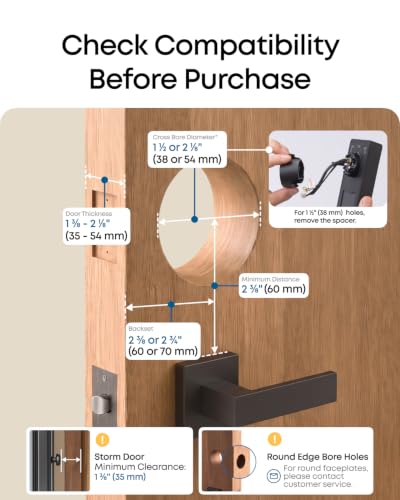
- Easy Installation: Compatible with most standard deadbolts, and easily fits bores under 54mm just by removing the spacer. 15-minute easy install without drilling.
- Security and Durability: BHMA Grade 3 Certified after being locked and unlocked more than 100,000 times. Send an alarm triggered by an unusual attempt to open your smart deadbolt lock. Operating temperatures range from -22℉ to 158℉ (-30℃ to 70℃). IP53 Waterproof.


As an Amazon Associate we earn from qualifying purchases. Product prices and availability are accurate as of the date/time indicated.
The eufy Security Smart Lock C220 emerges as the top choice for renters in 2026 due to its combination of ease-of-use, built-in Wi-Fi, and non-invasive installation. This fingerprint-enabled deadbolt requires no bridge or hub, eliminating additional hardware costs and setup complexity. The lock supports six unlock methods: fingerprint recognition (under 1.5 seconds), smartphone app control, physical keypad, mechanical key, Apple Watch, and voice commands via Alexa or Google Assistant. The self-learning fingerprint AI improves recognition accuracy over time, reducing frustration from failed unlock attempts—a critical feature for busy renters managing multiple household members.
Installation takes approximately 15 minutes without drilling, making it ideal for rental properties where landlords prohibit permanent modifications. The lock is compatible with most standard US and Canadian deadbolts, though you should verify your door type before purchasing. The eufy ecosystem integration allows you to combine the smart lock with eufy doorbells and other security devices within a single app, streamlining smart home management. Battery life reaches approximately 8 months on eight AA batteries, meaning you’ll replace batteries roughly once per year—a manageable maintenance schedule for most households.
Pros: Built-in Wi-Fi eliminates the need for a separate hub or bridge, reducing setup complexity and additional costs. Self-learning fingerprint technology improves recognition accuracy with each use. Six unlock methods provide flexibility for different situations and household members. Fast fingerprint recognition in under 1.5 seconds ensures quick access without delays. Impressive 8-month battery life minimizes maintenance frequency. Easy 15-minute installation without drilling protects your security deposit.
Cons: No customer reviews available yet, making it difficult to assess real-world reliability and long-term durability. Installation requires compatibility with standard US/CA deadbolts, potentially limiting options for non-standard or specialty doors. Actual battery life varies based on usage frequency, so performance may differ from the manufacturer’s 8-month estimate. Temperature operating range (-22°F to 158°F) may affect performance in extreme climates.
Best for: Renters prioritizing ease of installation, built-in Wi-Fi connectivity, and flexibility in access methods. Ideal for households with multiple family members or frequent guests who need temporary access codes.
Philips Wi-Fi Door Lock: Best Budget Option for Renters

Philips Wi-Fi Smart Door Lock with Fingerprint & Voice Control
- 𝐅𝐥𝐞𝐱𝐢𝐛𝐥𝐞 𝐖𝐚𝐲𝐬 𝐭𝐨 𝐔𝐧𝐥𝐨𝐜𝐤: Unlock the way you want: app, passcode, fingerprint, physical key, or voice via Alexa/Google Assistant. Everyone in the family can choose what works best — convenience meets flexibility. Batteries are not included.
- 𝐔𝐧𝐥𝐨𝐜𝐤 𝐅𝐫𝐨𝐦 𝐀𝐧𝐲𝐰𝐡𝐞𝐫𝐞: Built-in Wi-Fi lets you lock and unlock your door remotely anytime, anywhere from your smartphone — no extra hub needed. Stay connected and in control, even when you’re at work or on vacation. Only support 2.4Ghz network. Keep the router and lock with 65ft for better remote control.
- 𝗩𝗼𝗶𝗰𝗲 𝗖𝗼𝗻𝘁𝗿𝗼𝗹 𝗥𝗲𝗮𝗱𝘆: Pair with Alexa or Google Assistant to unlock or lock with your voice. Great for when your hands are full or you're relaxing at home and still welcome who’s at the door. Note: Please log in to your own Google or Alexa account first before use Voice Control and make sure your network connection is stable.
- 𝗬𝗼𝘂𝗿 𝗙𝗶𝗻𝗴𝗲𝗿𝘀 𝗶𝘀 𝗬𝗼𝘂𝗿 𝗞𝗲𝘆: Just one touch unlocks the door instantly. No need to search for keys — Your fingers is your keys, perfect for busy mornings. Philips wifi lock store multiple prints for easy family access.
- 𝐂𝐨𝐝𝐞 𝐀𝐜𝐜𝐞𝐬𝐬 𝐌𝐚𝐝𝐞 𝐒𝐢𝐦𝐩𝐥𝐞: Create up to 100 custom passcodes for family, friends, or renters. Easily share unlimited one-time or scheduled codes to guests, cleaners, or deliveries— no need to be home to open the door.
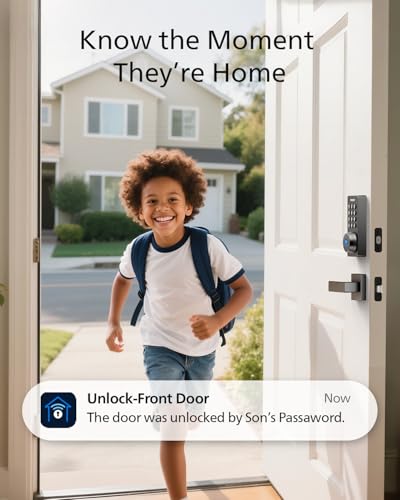
- 𝗚𝗲𝘁 𝗡𝗼𝘁𝗶𝗳𝗶𝗲𝗱 𝗜𝗻𝘀𝘁𝗮𝗻𝘁𝗹𝘆: Always know who’s coming and going when your door opens, locks. Real-time alerts keep you in the loop, even when you're away. Check a full history of who accessed your home and when if you want. Note: To ensure proper operation, please use AA alkaline (LR6) batteries only.
- 𝗔𝘂𝘁𝗼-𝗟𝗼𝗰𝗸 𝗳𝗼𝗿 𝗔𝗱𝗱𝗲𝗱 𝗦𝗲𝗰𝘂𝗿𝗶𝘁𝘆: Set your door to lock automatically after 10 to 180 seconds. Whether you’re rushing out or have your hands full, your home stays secure without extra steps. It doesn't have door sensor.
- 𝐄𝐱𝐭𝐫𝐚 𝐏𝐫𝐨𝐭𝐞𝐜𝐭𝐢𝐨𝐧 𝐰𝐢𝐭𝐡 𝐀𝐰𝐚𝐲 𝐌𝐨𝐝𝐞: Going out of town? Activate Away Mode to disable all unlock methods except the master code. A simple way to add extra security while you’re away or on long trips.
- 𝗘𝗮𝘀𝘆 𝗜𝗻𝘀𝘁𝗮𝗹𝗹𝗮𝘁𝗶𝗼𝗻: Install it yourself in minutes using just a screwdriver. Compatible with most doors 1-3/8" to 2" (38mm to 50mm) thick. Follow the instruction manual or installation video and install the lock step by step. Proper installation ensures reliable lock operation. Note: Please Route the cable underneath the latch and insert the tailpiece into the latch slot to ensure proper lock operation.
- 𝐓𝐢𝐦𝐞𝐥𝐲 𝐂𝐮𝐬𝐭𝐨𝐦𝐞𝐫 𝐒𝐞𝐫𝐯𝐢𝐜𝐞: Philips US-based team is available by phone Mon-Fri 9AM - 9PM & Sat 10AM -6PM EST, plus 24/7 via email. We’re here when you need us. Note: 𝗣𝗹𝗲𝗮𝘀𝗲 𝗰𝗵𝗲𝗰𝗸 𝘆𝗼𝘂𝗿 𝗱𝗼𝗼𝗿 𝘀𝗶𝘇𝗲 𝗯𝗲𝗳𝗼𝗿𝗲 𝗽𝘂𝗿𝗰𝗵𝗮𝘀𝗲.




As an Amazon Associate we earn from qualifying purchases. Product prices and availability are accurate as of the date/time indicated.
The Philips Wi-Fi Door Lock offers exceptional value at $79.97, making it the most affordable option among the three reviewed smart locks. Despite the lower price point, this lock delivers comprehensive features including fingerprint recognition, passcode entry (up to 100 custom codes), smartphone app control, voice commands via Alexa or Google Assistant, and a physical key backup. The auto-lock feature automatically secures your door within 10 to 180 seconds, eliminating the worry of forgetting to lock up—a practical safety feature for busy renters.
Built-in Wi-Fi connectivity requires no separate hub, though the lock only supports 2.4GHz networks and requires the router to be within 65 feet for reliable remote control. The passcode management system is particularly valuable for renters hosting guests or service providers; you can create unlimited one-time or scheduled access codes without being home to grant entry. This feature is especially useful for rental situations where you might need to grant temporary access to cleaners, maintenance personnel, or overnight guests. The lock stores multiple fingerprints for family members, and real-time notifications alert you to all door activity.
Pros: Affordable price makes smart lock technology accessible to budget-conscious renters. Multiple unlock methods (fingerprint, passcode, app, voice, key) accommodate different household needs. Support for up to 100 custom passcodes with one-time or scheduled access ideal for guests and service providers. Built-in Wi-Fi eliminates hub requirements. Auto-lock feature ensures doors lock automatically without manual intervention. Real-time notifications and access history provide security awareness.
Cons: Batteries not included, requiring separate purchase of 4-8 AA alkaline batteries. Only supports 2.4GHz Wi-Fi networks, limiting compatibility with newer dual-band routers. No door sensor included, preventing detection of whether the door is physically open or closed. Requires 65-foot proximity between router and lock for reliable performance. No customer reviews available yet, making durability assessment difficult. Installation requires measuring door thickness (1-3/8″ to 2″) beforehand for compatibility.
Best for: Renters with limited budgets who still want comprehensive smart lock features. Ideal for those who frequently share temporary access codes with guests, cleaners, or service providers. Suitable for apartments or rental homes with strong Wi-Fi signals near the front door.
ULTRALOQ Bolt SE Smart Lock: Best for Matter Integration and Extended Battery Life

ULTRALOQ Bolt SE Smart Lock - 7-in-1 Keyless Entry
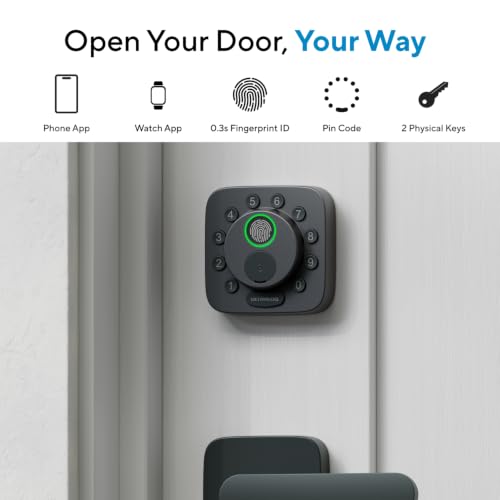
- 7 in 1 Keyless Entry Door Lock: Fingerprint ID(stores up to 50 fingerprints) + Passcodes(up to 50) + Smartphone App(compatible with Android and iOS) + Web Portal + EKey / Code Sharing + Voice Control with Siri, Alexa or Google Assistant + 2 Mechanical Keys
- App Control via Built-in WiFi: Remotely lock, unlock, and manage your smart lock from anywhere. Share permanent, scheduled, or temporary eKeys and passcodes with family, guests, or service providers. Manage up to 50 fingerprints and 50 access codes, view activity history, and receive real-time notifications—all without a hub. Supports 2.4 GHz Wi-Fi only. For optimal connectivity, keep your router within 70 ft of the lock.
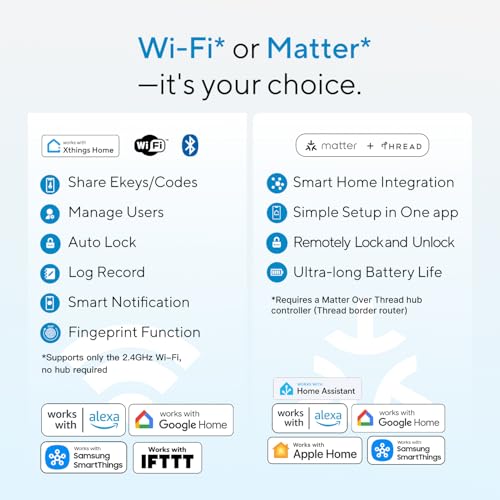
- Remote Access via Matter over Thread: Remotely lock, unlock, and manage your smart lock through Apple Home or other Matter-compatible apps. Enjoy simple setup, real-time notifications, event history, and secure access management—all from your smartphone. Requires a compatible Matter over Thread hub (Thread Border Router).
- Effortless Matter Smart Home Integration: Ultraloq matter smart lock seamlessly integrates with all matter-enabled ecosystems. Voice control with Siri, Alexa and Google Assistant. It can be used to automate your smart home by pairing multiple matter-enabled devices through the one app. No more compatibility headaches. Requires a compatible Matter over Thread hub (Thread Border Router).
- Reliable Connection: Enjoy fast, stable, and responsive communication with Matter over Thread. The self-healing mesh network automatically reroutes connections if a device becomes unavailable, helping keep your smart home connected with minimal interruptions. Requires a compatible Matter over Thread hub (Thread Border Router).
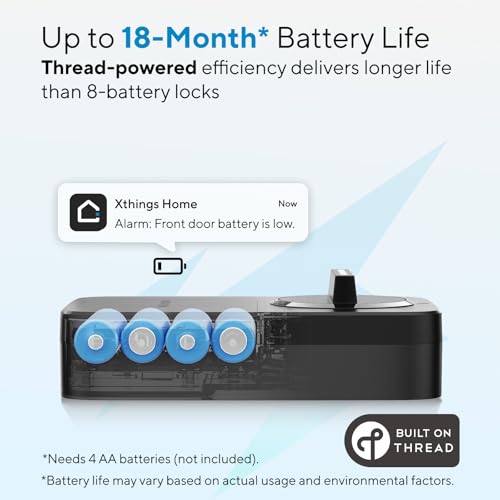
- Ultra-long 18 Months Battery Life: Thread’s low-energy mesh network helps extend battery life up to 18 months, so you change batteries less often. Enjoy a smarter, greener, and more sustainable way to secure your home without sacrificing speed or stability.
- Auto Lock: Set a preset timer for auto-lock, or press the “ULTRALOQ” button to lock instantly. Stay informed with real-time low battery alerts so you're never caught off guard. Door sensor not included
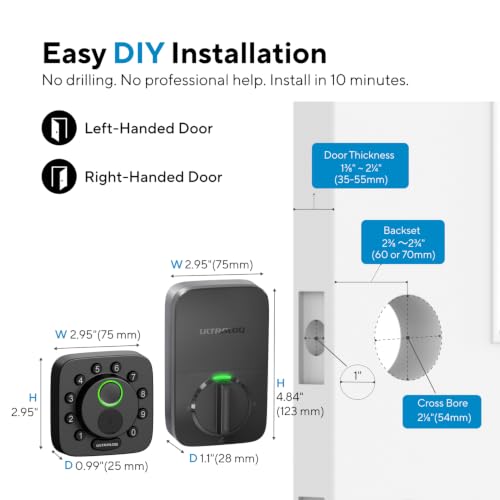
- ANSI BHMA Certified & Easy DIY Installation: Built to last with zinc alloy materials and a weather-resistant design (suitable for exterior home doors, IP65 Waterproof), ensuring reliable performance in any climate. Install the smart deadbolt lock in 10 minutes with simple step-by-step instructions, no professional help need
- Timely Customer Service: Lifetime mechanical coverage, 18-month electronic protection, plus lifetime phone support (Mon–Fri, 7 AM–6 PM PST) and 24/7 after-sales email service. Questions or need assistance? Feel free to contact us anytime.




As an Amazon Associate we earn from qualifying purchases. Product prices and availability are accurate as of the date/time indicated.
The ULTRALOQ Bolt SE represents the most advanced option for tech-forward renters seeking Matter integration and exceptional battery longevity. This seven-in-one keyless entry system combines fingerprint ID (up to 50 fingerprints), passcodes (up to 50), smartphone app control, web portal access, eKey sharing, voice control with Siri/Alexa/Google Assistant, and two mechanical keys. The standout feature is Matter over Thread support, enabling seamless integration with Apple Home, Alexa, and Google ecosystems—a significant advantage for renters invested in cross-platform smart home automation.
Battery life extends to 18 months thanks to Thread’s low-energy mesh network, substantially reducing maintenance compared to typical smart locks requiring quarterly battery changes. The lock supports 2.4GHz Wi-Fi for remote control without requiring a hub, though Matter features do require a compatible Thread hub or border router. The comprehensive access management system allows you to store up to 50 fingerprints and 50 passcodes with detailed activity logs, providing granular control over who accesses your rental property and when. BHMA certification and IP65 waterproof rating ensure durability across various climates and weather conditions.
Pros: Seven access methods provide maximum flexibility for different users and situations. Matter over Thread integration works seamlessly with Apple Home, Alexa, and Google Assistant for broad smart home compatibility. 18-month battery life significantly reduces maintenance compared to quarterly replacements required by other locks. No hub required for Wi-Fi connectivity, though Matter features benefit from a compatible Thread hub. BHMA certified with IP65 waterproof rating and durable zinc alloy construction ensures long-term reliability. Comprehensive access management supports up to 50 fingerprints and 50 passcodes with detailed activity logs.
Cons: Wi-Fi connectivity requires router within 70 feet, potentially problematic for some door locations or larger homes. Matter features require a separate compatible Thread hub or border router, adding to overall smart home setup costs. No door sensor included, limiting automation capabilities like auto-lock confirmation or entry alerts. New product with no customer reviews yet, making real-world reliability assessment difficult. 2.4GHz Wi-Fi only support may experience interference in congested wireless environments.
Best for: Tech-savvy renters already invested in Apple Home, Alexa, or Google smart home ecosystems. Ideal for those prioritizing Matter integration and extended battery life. Suitable for renters seeking maximum access management options and detailed activity tracking. Best for rental properties where you want to grant various family members or service providers different access levels and schedules.
What Should You Look for When Choosing the Best Smart Lock for Renters?
Selecting a smart lock as a renter requires prioritizing features that balance security, convenience, and lease compliance. Unlike homeowners who can permanently modify their doors, renters must choose locks that install non-invasively and remove cleanly without leaving damage. The following factors should guide your decision-making process to ensure you find a lock that meets your needs while protecting your security deposit.
Installation Method and Damage Prevention: The most critical factor for renters is installation that doesn’t violate lease agreements. All three reviewed locks install over existing deadbolts without drilling into door frames, making them ideal for rental properties. Verify that the lock is compatible with your specific door type (standard US/CA deadbolts are most common) and measure your door thickness beforehand—most smart locks accommodate doors between 1-3/8″ and 2″ thick. Installation should take 15 minutes or less without requiring special tools or professional installation. Before purchasing, confirm with your landlord that adding a smart lock is permitted; most landlords allow non-invasive modifications, but it’s better to verify upfront.
Connectivity and Hub Requirements: Choose a smart lock with built-in Wi-Fi to avoid purchasing a separate hub or bridge—additional hardware adds cost, complexity, and setup time. Built-in Wi-Fi allows you to control your lock remotely from your smartphone, a critical feature when you’re away from home or need to grant emergency access to guests. However, be aware that most smart locks support only 2.4GHz networks, not newer 5GHz or Wi-Fi 6 standards. Ensure your router is positioned within 65-70 feet of your front door for reliable connectivity. If you’re interested in Matter integration (the emerging smart home standard), verify that your existing smart home hub or router supports Matter over Thread, as this requires additional hardware.
Temporary Access Codes and Guest Management: Renters frequently need to grant temporary access to guests, cleaners, maintenance personnel, or service providers. Look for locks supporting unlimited one-time or scheduled passcodes that expire automatically—this eliminates the need to be home to grant access and maintains security by preventing permanent code sharing. The Philips lock supports up to 100 custom passcodes, while the ULTRALOQ Bolt SE stores up to 50, both exceeding typical renter needs. Temporary code features should allow you to set expiration dates and times, view access history, and revoke codes remotely via the smartphone app.
Multiple Unlock Methods: Flexibility in unlock methods ensures that all household members can access the door conveniently. Fingerprint recognition is the most convenient method, requiring no keys or codes to remember. Passcode entry provides a backup when fingerprints aren’t recognized or when guests need temporary access. Smartphone app control enables remote unlocking from anywhere, while voice control via Alexa or Google Assistant offers hands-free operation when your hands are full. Mechanical keys provide a failsafe backup if batteries die or technology fails. The best smart locks for renters offer at least four unlock methods, with fingerprint and passcode being essential.
Battery Life and Maintenance: Smart locks powered by AA or AAA batteries require periodic replacement—typically every 6 to 18 months depending on usage frequency. Longer battery life reduces maintenance burden and the risk of being locked out due to dead batteries. The eufy lock offers 8-month battery life, while the ULTRALOQ Bolt SE extends to 18 months, both reasonable for renters. The Philips lock doesn’t specify battery life but typically requires replacement every 6-9 months. Choose a lock that alerts you via smartphone notification when battery levels are low, giving you time to replace batteries before they die completely.
Smart Home Ecosystem Compatibility: If you’re building a smart home, ensure your smart lock integrates with your preferred ecosystem. All three reviewed locks work with Alexa and Google Assistant, making them compatible with Amazon and Google smart home systems. The ULTRALOQ Bolt SE uniquely supports Matter integration and Apple Home, offering broader compatibility with future smart home devices. If you’re invested in Apple’s ecosystem, the ULTRALOQ Bolt SE is the better choice despite its higher price.
Security Features and Certifications: Look for locks certified by the Builders Hardware Manufacturers Association (BHMA), which ensures the lock meets industry standards for durability and security. IP53 or IP65 waterproof ratings indicate the lock can withstand rain, snow, and extreme weather without failing. Encryption of app-to-lock communication prevents unauthorized remote access. Real-time notifications alert you to all lock activity, helping you detect suspicious access attempts. Auto-lock features ensure your door locks automatically even if you forget, adding an extra layer of security.
Price and Value Comparison: Smart locks for renters range from to $109.99, a relatively narrow price range for the features offered. The Philips lock at $79.97 offers exceptional budget value, while the eufy and ULTRALOQ locks at $109.99 justify their slightly higher cost through additional features like self-learning fingerprint AI and Matter integration. Consider the long-term value: a lock with longer battery life reduces replacement costs over time, while comprehensive access management features may save money by reducing the need to call locksmiths for guest access.
Frequently Asked Questions
Can I use a smart lock in a rental apartment without damaging my lease?
Yes, modern renter-friendly smart locks like the eufy, Philips, and ULTRALOQ models install over existing deadbolts without drilling or permanent modifications. They remove cleanly when you move, leaving no damage. However, always confirm with your landlord first, as lease agreements vary. Most landlords permit non-invasive smart locks since they enhance security without altering the property structure. Keep your original lock for reinstallation when you move.
Do smart locks for renters require a separate hub or Wi-Fi bridge?
No, all three reviewed locks feature built-in Wi-Fi, eliminating the need for a separate hub. This reduces setup complexity and additional costs. However, they require a 2.4GHz Wi-Fi network within 65-70 feet of your door. If you want Matter integration features, you’ll need a compatible Matter hub or Thread border router, which is an optional additional purchase for advanced smart home automation.
How long do smart lock batteries last, and how often do I need to replace them?
Battery life varies by model and usage frequency. The eufy lock lasts approximately 8 months on eight AA batteries, the Philips lock typically requires replacement every 6-9 months, and the ULTRALOQ Bolt SE extends to 18 months thanks to Thread technology. Most locks send smartphone notifications when battery levels are low, giving you time to replace batteries before they die. Keep spare batteries on hand to avoid being locked out.
Can I create temporary access codes for guests in a rental property?
Yes, all three reviewed locks support temporary passcodes for guests, cleaners, and service providers. The Philips lock allows up to 100 custom codes with one-time or scheduled expiration, while the ULTRALOQ Bolt SE supports up to 50 codes. You can set specific dates and times for code validity, then revoke access remotely via the smartphone app. This feature eliminates the need to be home to grant entry and maintains security by automatically expiring codes.
Which smart lock is best for renters using Apple Home?
The ULTRALOQ Bolt SE is the best choice for Apple Home users, as it’s the only reviewed lock supporting Matter over Thread integration with Apple Home. This enables remote access, automation, and voice control via Siri. The eufy and Philips locks work with Alexa and Google Assistant but not Apple Home, making them less ideal for Apple-focused smart home ecosystems.
What happens to my smart lock data when I move out of a rental?
When you move, simply remove the smart lock from your door and reinstall your original deadbolt—no damage remains. Delete all access codes and fingerprints from the lock’s memory via the smartphone app before removal. If you’re selling or transferring the lock to a new renter, factory reset the device to erase all personal data. Most smart lock apps allow you to export access history for your records before deleting the lock profile.
Which Smart Lock Should You Buy for Your Rental in 2026?
Choosing the best smart lock for your rental depends on your priorities, budget, and smart home ecosystem. Each of the three reviewed options excels in different areas, making them suitable for different renter profiles and needs.
Choose the eufy Security Smart Lock C220 if you want the best overall balance of features, ease of installation, and reliability. At $109.99, it offers built-in Wi-Fi, six unlock methods, self-learning fingerprint AI, and an impressive 8-month battery life. The 15-minute installation without drilling makes it ideal for renters concerned about lease compliance. The eufy ecosystem integration allows you to combine the lock with eufy doorbells and other security devices in a single app. This lock is perfect for renters seeking a comprehensive smart lock solution without unnecessary complexity or additional hub purchases.
Choose the Philips Wi-Fi Door Lock if you prioritize budget and don’t want to sacrifice core smart lock features. It’s the most affordable option, offering fingerprint recognition, up to 100 custom passcodes, app control, voice commands, and auto-locking. The comprehensive passcode management system is ideal for renters who frequently grant temporary access to guests or service providers. This lock delivers excellent value and is perfect for budget-conscious renters or those living in apartments with strong Wi-Fi signals near the front door. The auto-lock feature adds convenience and security without requiring manual locking.
Choose the ULTRALOQ Bolt SE if you’re a tech-forward renter already invested in Apple Home or Matter smart home ecosystems. At $109.99, it justifies its price through seven unlock methods, Matter over Thread integration, and exceptional 18-month battery life. This lock is ideal for renters who want maximum flexibility in access management and seamless integration with their existing smart home setup. The comprehensive fingerprint and passcode storage (up to 50 each) provides granular control over who accesses your rental property and when. This lock is perfect for renters seeking future-proof smart home compatibility and extended battery life to minimize maintenance.
Final Recommendation: For most renters in 2026, the eufy Security Smart Lock C220 represents the optimal choice, balancing ease of installation, feature completeness, and long-term reliability. Its built-in Wi-Fi, six unlock methods, and self-learning fingerprint AI address the core needs of rental households. However, if your budget is limited, the Philips lock delivers exceptional value. If you’re deeply invested in Apple Home or Matter automation, the ULTRALOQ Bolt SE’s advanced integration justifies the investment. All three locks are renter-friendly, install without permanent modifications, and support temporary access codes for guests—making any of them a solid upgrade over traditional locks. Before purchasing, verify compatibility with your door type, confirm your landlord permits smart lock installation, and ensure your Wi-Fi network is strong near your front door.
For additional renter-friendly smart home options, explore our guides on best smart thermostat for apartments, best smart home devices for renters, and best smart energy devices for renters.


Write Your Review
No reviews yet. Be the first to share your experience!