

Which Smart Lock with Fingerprint Scanner Is Best for Your Home in July 2026?
Quick Answer: The Veise VE017 Fingerprint Smart Door Lock stands out as the top pick for comprehensive biometric security, offering eight unlock methods including advanced AI fingerprint recognition with 99.99% accuracy, local AES128 encryption, and DIY installation for under $50. If you need built-in Wi-Fi and voice control without a separate hub, the Philips Wi-Fi Door Lock at $59.99 provides excellent value with fingerprint, passcode, and app access. Most smart locks with fingerprint scanners in July 2026 range from $25 to $120, with prices reflecting features like Wi-Fi connectivity, app integration, and battery life. The key takeaway: prioritize locks combining fast biometric recognition, multiple unlock methods, and local data encryption for the best balance of convenience and security.
Smart locks with fingerprint scanners have evolved dramatically by July 2026, transforming from luxury gadgets into practical home security solutions. Biometric technology now offers faster recognition speeds, improved accuracy, and more affordable price points than ever before. The fingerprint scanner category has expanded significantly, with manufacturers integrating advanced AI learning systems that adapt to your unique fingerprint patterns over time. These locks eliminate the need to carry physical keys while providing multiple backup access methods—codes, apps, voice commands, and mechanical keys—ensuring you never get locked out. Whether you’re securing a front door, bedroom, apartment, or office space, fingerprint smart locks deliver the convenience of keyless entry combined with enhanced security through biometric authentication. This comprehensive guide reviews six leading models available in July 2026, examining their features, performance, installation requirements, and ideal use cases to help you choose the perfect fingerprint smart lock for your needs.
Which Smart Locks with Fingerprint Scanners Stand Out in July 2026?
Veise VE017 Fingerprint Smart Door Lock
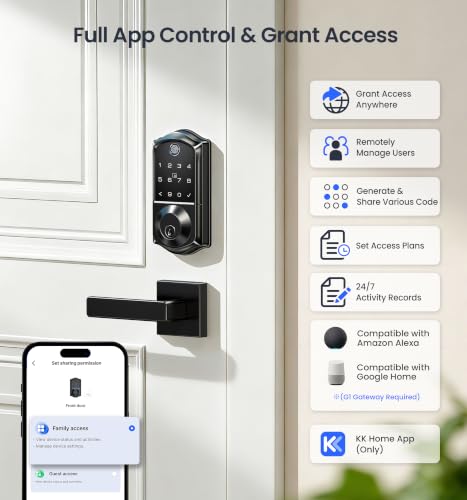
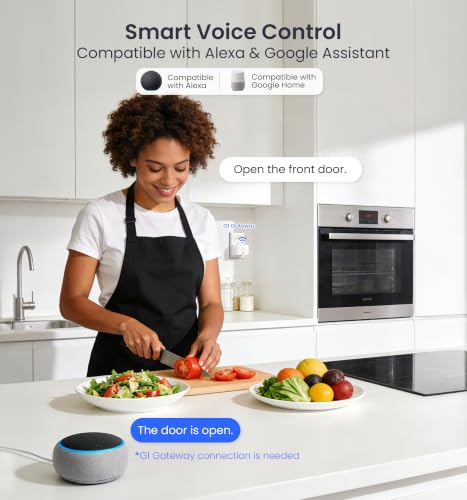
The Veise VE017 represents the most feature-rich option in the fingerprint smart lock category, delivering eight distinct unlock methods at an exceptionally competitive price point. Its self-learning AI fingerprint recognition system uses a dedicated on-device AI chip to verify and grant access in under 0.2 seconds with claimed 99.99% accuracy. Unlike standard biometric systems, the Veise continuously learns and refines its recognition patterns with each use, meaning accuracy improves over time as family members use the lock regularly. The lock supports Swedish FPC fingerprint technology, which stands out for reliability and speed in the industry. Beyond fingerprint access, you can unlock via app, authorized access codes, fob card, PIN code, code sharing, voice commands through Alexa or Google Assistant (with G1 Gateway), or mechanical key. The smart user management system allows remote control of property access through the KK Home App, enabling you to grant, modify, or revoke access instantly. Auto-lock functionality adjusts from zero to 180 seconds, ensuring your door secures automatically. The innovative Anti-Peeping Privacy Code feature lets you enter any numbers before or after the correct sequence to prevent password leakage. On-device AES128 encryption stores all credentials locally rather than in the cloud, significantly reducing privacy risks. IP55 waterproof rating and temperature tolerance from -35°F to 160°F suit various climates. DIY installation requires only a screwdriver with no drilling, completing in approximately 15 minutes. The primary limitation is the lack of customer reviews for real-world validation, plus you’ll need to purchase the Veise G1 Gateway separately for remote access and voice control features. Batteries (4 AA alkaline) are not included.

Veise VE017 Smart Door Lock: 8-in-1 Fingerprint & App Control
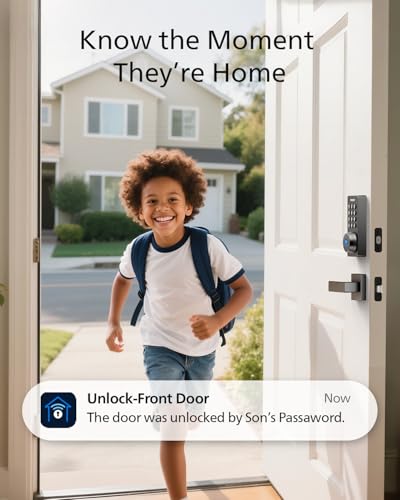
- Smart User Management: Our smart user management system empowers you to take full, remote control of your property access anytime, anywhere, via KK Home App; Designed with multi-tenant properties in mind, it provides a complete solution for authorizing users, managing their permissions; You can remotely grant access to new users, seamlessly change existing permissions, instantly pause access, or permanently delete it—all with a few taps; To ensure security and transparency, every entry is tracked in detailed activity logs, giving you a clear overview of who accessed your property and when
- 8-in-1 Smart Unlock & Locking: Unlock via fingerprint (Swedish FPC tech), App, authorized access, Fob card, code, code sharing, compatible with Alexa/Google Voice Assistant (* G1 Gateway required), or mechanical key for versatile use; Includes 5 locking methods: Auto lock (set 0–180 seconds directly in the app) + Fingerprint + Any Key + App + Mechanical Key; Ensures your door is always secure, offering unmatched flexibility and convenience
- Self-learning AI Fingerprint Recognition: Unlock your door in a blink with our advanced fingerprint system; Powered by a dedicated on-device AI chip, it verifies and grants access in under 0.2 seconds with 99.99% accuracy; Unlike ordinary locks, our AI continuously learns and refines its recognition patterns with each use, meaning accuracy improves over time; Let the whole family skip keys entirely; For ultimate control, you can add, rename, or delete fingerprints via the app, offering security and flexibility that redefine smart access
- 4 Password Modes & Intelligent Protection: Easily generate and share unlimited remote one-time codes for single use, unlimited remote duration codes for guests or sitters, permanent codes for family, and recurring codes for regular visitors—allowing for custom creation, one-click sharing, and instant deletion; The innovative Anti-Peeping Privacy Code feature lets you disguise your PIN by entering any numbers before or after the correct sequence, effectively preventing password leakage; Plus active intrusion defense that triggers real-time alarms and temporary lockouts on unauthorized attempts; This delivers ultimate access flexibility with complete security peace of mind
- On-Device Security with Proactive Alerts: Your access data — including entry records, user credentials, and fingerprints — is locally AES128 encrypted and stored directly on the lock, eliminating cloud leakage risks and ensuring complete privacy; Receive alerts for all door events and maintain visible, traceable activity logs; Enable “Silent Mode” to mute sounds quietly; When you're away, enable “Away Mode” to restrict access to your master credentials, the app, or physical keys only; This combination of encrypted local storage, smart notifications, and configurable control modes provides security that’s both robust and responsive to your life
- ≥12 Months Battery Life: Veise smart door lock runs on 4 AA/LR6 alkaline batteries (not included) for about 12 months; Battery life may vary based on how often you use the lock Durable & Secure: With low battery indicator light alerts, USB-C emergency port and safe mode to ensure home security
- Smart Home Integration: Use Veise G1 Gateway (sold separately) for remote access, compatible with Alexa/Google voice control, real-time logs, and lock status monitoring
- Lifetime US Customer Support: Includes a 1-year limited warranty, plus a free 1-year extension with product registration (2 years total). US phone support is available Mon–Fri 9 AM–5 PM and Sat 7 AM–3 PM PST, and 24/7 email support is available from the Veise support team
- Effortless Setup: Auto-detects left-/right-handed doors; Quick DIY installation in just 15 minutes with only a screwdriver– no drilling, professional or hardwire connection needed; Comes with a all-zinc alloy, all-metal, scratch-resistant and wear-resistant smart lock, meeting BHMA/ANSI certification standards; IP55 waterproof and dustproof design, withstands extreme temps (-35℉ to 160℉), resistant to wind, rain, and sun exposure, suitable for both interior and entrance doors; Compatible lock hole diameter: 1-1/2" or 2-1/8" (38mm or 54mm); Fits most standard door thicknesses from 1-3/8" to 2"(35mm-50mm); Includes installation instructions and video tutorials
- NOTE:1. During installation, ensure that the door leaf remains parallel and symmetrical to the door frame, so that the latch can properly align with and insert into the strike plate hole 2. Before operation, gently touch the keypad to wake up the door lock, then enter the password. If the app fails to discover or connect to the lock, please check whether your mobile phone is within effective Bluetooth range, or try resetting the lock 3. Remote unlocking and locking functions require the use of the Veise G1 gateway




As an Amazon Associate we earn from qualifying purchases. Product prices and availability are accurate as of the date/time indicated.
Evanshow Fingerprint Door Lock Biometric Door Knob
The Evanshow Fingerprint Door Lock offers exceptional value as an ultra-affordable option designed primarily for bedrooms, offices, and apartments rather than primary front doors. This 4-in-1 smart lock combines fingerprint recognition, password entry, two mechanical keys, and four IC card slots, supporting up to 100 fingerprints and 50 passwords across different family members and guests. The upgraded fingerprint sensor recognizes prints in less than 0.5 seconds with minimal false rejections, providing quick and reliable access. The door knob design fits wooden doors measuring 1.18 to 1.97 inches thick, accommodating both left and right-swing configurations. Installation requires no drilling or wiring—the lock installs in minutes using included tools and video tutorials without professional help. One critical setup requirement: you must register an administrator fingerprint before first use, as any fingerprint will unlock the door until an admin is designated. The lock includes a USB port for emergency power using an external power bank, though this cannot charge the lock’s internal batteries. This model lacks built-in Wi-Fi or app control, making it unsuitable for remote access scenarios. There are no existing customer reviews available, making it difficult to assess long-term reliability. The Evanshow excels for renters, bedroom locks, or office spaces where Wi-Fi connectivity isn’t essential, but homeowners wanting remote access should consider alternatives.

Evanshow Fingerprint Door Lock - 4-in-1 Keyless Entry Knob
- 4-IN-1 Smart Lock: Fingerprint + Password + 2 Mechanical Keys +4 IC Card; Our door lock provides add up to 100 fingerprints and 50 passwords to suit different family members and guests
- Upgrade Fingerprint Sensor & 0.5S Recognizing: Say goodbye to false rejections and enjoy effortless access; The fingerprint scanner is fast and accurate, recognizing your prints in less than a second; Ideal for front doors, bedrooms, or offices
- Important First-Step Setup:Before first use, you MUST register an administrator fingerprint. Until an admin is set, ANY fingerprint will be able to unlock the door.The door lock have a USB port for emergency power (using an external power bank), but it cannot be used to charge the lock's internal batteries.
- Easy Installation: No drilling/wiring! Our fingerprint door handle fits 1.18"-1.97" thick wooden doors (left/right swing);fingerprint doorknob installs in minutes without professional help( smart lock comes with video tutorials and all tools )
- Home Security Smart Lock: The biometric door knob utilizes advanced fingerprint technology to prevent unauthorized access


As an Amazon Associate we earn from qualifying purchases. Product prices and availability are accurate as of the date/time indicated.
Philips Wi-Fi Door Lock
The Philips Wi-Fi Door Lock delivers impressive smart home integration at a mid-range price point, making it ideal for homeowners wanting fingerprint access combined with remote control. Built-in Wi-Fi eliminates the need for a separate hub, connecting directly to your 2.4GHz network for straightforward setup and smartphone control through the Philips Home Access App. You can unlock via five methods: app, passcode, fingerprint, physical key, or voice commands through Alexa or Google Assistant. The fingerprint system stores multiple prints for easy family access, while the passcode feature supports up to 100 custom codes—perfect for guests, cleaners, deliveries, and service providers. You can create one-time codes, scheduled access windows, or permanent codes with a single tap in the app. Auto-lock functionality adjusts from 10 to 180 seconds, automatically securing your door without manual intervention. Real-time notifications alert you to all door events, and detailed access history logs help you monitor who entered and when. The lock maintains a 65-foot operating range from your router for reliable remote control, though performance depends on minimal obstacles like walls and metal objects. Important limitations include no included batteries (requires 4-8 AA alkaline), no door sensor to detect if the door is physically open, and 2.4GHz-only support which may conflict with newer dual-band routers. Installation requires measuring door thickness (1-3/8″ to 2″) beforehand. This lock provides excellent value for homeowners prioritizing Wi-Fi connectivity and app-based access management.

Philips Wi-Fi Smart Door Lock with Fingerprint & Voice Control
- 𝐅𝐥𝐞𝐱𝐢𝐛𝐥𝐞 𝐖𝐚𝐲𝐬 𝐭𝐨 𝐔𝐧𝐥𝐨𝐜𝐤: Unlock the way you want: app, passcode, fingerprint, physical key, or voice via Alexa/Google Assistant. Everyone in the family can choose what works best — convenience meets flexibility. Batteries are not included.
- 𝐔𝐧𝐥𝐨𝐜𝐤 𝐅𝐫𝐨𝐦 𝐀𝐧𝐲𝐰𝐡𝐞𝐫𝐞: Built-in Wi-Fi lets you lock and unlock your door remotely anytime, anywhere from your smartphone — no extra hub needed. Stay connected and in control, even when you’re at work or on vacation. Only support 2.4Ghz network. Keep the router and lock with 65ft for better remote control.
- 𝗩𝗼𝗶𝗰𝗲 𝗖𝗼𝗻𝘁𝗿𝗼𝗹 𝗥𝗲𝗮𝗱𝘆: Pair with Alexa or Google Assistant to unlock or lock with your voice. Great for when your hands are full or you're relaxing at home and still welcome who’s at the door. Note: Please log in to your own Google or Alexa account first before use Voice Control and make sure your network connection is stable.
- 𝗬𝗼𝘂𝗿 𝗙𝗶𝗻𝗴𝗲𝗿𝘀 𝗶𝘀 𝗬𝗼𝘂𝗿 𝗞𝗲𝘆: Just one touch unlocks the door instantly. No need to search for keys — Your fingers is your keys, perfect for busy mornings. Philips wifi lock store multiple prints for easy family access.
- 𝐂𝐨𝐝𝐞 𝐀𝐜𝐜𝐞𝐬𝐬 𝐌𝐚𝐝𝐞 𝐒𝐢𝐦𝐩𝐥𝐞: Create up to 100 custom passcodes for family, friends, or renters. Easily share unlimited one-time or scheduled codes to guests, cleaners, or deliveries— no need to be home to open the door.
- 𝗚𝗲𝘁 𝗡𝗼𝘁𝗶𝗳𝗶𝗲𝗱 𝗜𝗻𝘀𝘁𝗮𝗻𝘁𝗹𝘆: Always know who’s coming and going when your door opens, locks. Real-time alerts keep you in the loop, even when you're away. Check a full history of who accessed your home and when if you want. Note: To ensure proper operation, please use AA alkaline (LR6) batteries only.
- 𝗔𝘂𝘁𝗼-𝗟𝗼𝗰𝗸 𝗳𝗼𝗿 𝗔𝗱𝗱𝗲𝗱 𝗦𝗲𝗰𝘂𝗿𝗶𝘁𝘆: Set your door to lock automatically after 10 to 180 seconds. Whether you’re rushing out or have your hands full, your home stays secure without extra steps. It doesn't have door sensor.
- 𝐄𝐱𝐭𝐫𝐚 𝐏𝐫𝐨𝐭𝐞𝐜𝐭𝐢𝐨𝐧 𝐰𝐢𝐭𝐡 𝐀𝐰𝐚𝐲 𝐌𝐨𝐝𝐞: Going out of town? Activate Away Mode to disable all unlock methods except the master code. A simple way to add extra security while you’re away or on long trips.
- 𝗘𝗮𝘀𝘆 𝗜𝗻𝘀𝘁𝗮𝗹𝗹𝗮𝘁𝗶𝗼𝗻: Install it yourself in minutes using just a screwdriver. Compatible with most doors 1-3/8" to 2" (38mm to 50mm) thick. Follow the instruction manual or installation video and install the lock step by step. Proper installation ensures reliable lock operation. Note: Please Route the cable underneath the latch and insert the tailpiece into the latch slot to ensure proper lock operation.
- 𝐓𝐢𝐦𝐞𝐥𝐲 𝐂𝐮𝐬𝐭𝐨𝐦𝐞𝐫 𝐒𝐞𝐫𝐯𝐢𝐜𝐞: Philips US-based team is available by phone Mon-Fri 9AM - 9PM & Sat 10AM -6PM EST, plus 24/7 via email. We’re here when you need us. Note: 𝗣𝗹𝗲𝗮𝘀𝗲 𝗰𝗵𝗲𝗰𝗸 𝘆𝗼𝘂𝗿 𝗱𝗼𝗼𝗿 𝘀𝗶𝘇𝗲 𝗯𝗲𝗳𝗼𝗿𝗲 𝗽𝘂𝗿𝗰𝗵𝗮𝘀𝗲.




As an Amazon Associate we earn from qualifying purchases. Product prices and availability are accurate as of the date/time indicated.
Philips WiFi Keypad Door Lock with Handle
The Philips WiFi Keypad Door Lock with Handle represents the premium option among Philips offerings, including a complete handle set that eliminates additional hardware purchases during installation. This model connects directly to 2.4GHz Wi-Fi without requiring a hub, providing remote control via the Philips Home Access App from anywhere. The standout feature is its ultra-fast 0.3-second fingerprint unlock—the quickest in this comparison—combined with support for multiple stored fingerprints for family members and trusted visitors. Passcode flexibility includes permanent codes for family, one-time codes for guests, periodic codes for housekeepers, and recurring codes for Airbnb renters or service providers. Voice assistant compatibility with Alexa and Google Assistant lets you lock or check door status hands-free. Real-time app control allows you to lock/unlock, manage user codes and fingerprints, check door status, and monitor access history. The complete handle set included with this model simplifies installation compared to deadbolt-only options. Extended 6-month battery life with low-battery alerts ensures reliable long-term operation. Wi-Fi connectivity requires the router within 33 feet with minimal obstacles for optimal performance. Setup includes an important caveat: auto-lock is disabled by default and must be manually activated through the app, adding an extra configuration step. Installation is limited to standard door thicknesses (1-3/8″ to 1-3/4″) and requires manual reconfiguration for left-opening doors. This lock suits homeowners wanting the fastest fingerprint recognition and a complete hardware solution without additional purchases.

Philips WiFi Smart Door Lock with Fingerprint & App Control
- Connect to 2.4GHz WiFi, No Hub Needed:Connect your Philips 4200 Series Wifi Door Lock Deadbolt directly to your home WiFi network—no extra hub or bridge required. Manage your door anytime, anywhere through your smartphone. 𝙉𝙊𝙏𝙀: Please keep the smart lock within 33 ft (10 m) of your Wi-Fi router. Minimize obstacles such as walls, metal objects, and interference sources for a stronger connection.
- App Control with Real-Time Access:Control smart lock remotely via the Philips Home Access App: lock/unlock, manage user codes/fingerprints, check your door lock status, and monitor access history in real time, etc, whether you’re at work or on vacation.
- Voice Assistant Compatible:Hands full? No problem. Use voice commands with Alexa or Google Assistant to lock or check the status of your front door lock set effortlessly.
- Versatile Passcode Options: This Keypad deadbolt supports permanent, one-time, periodic, and recurring PIN codes—perfect for family, guests, housekeepers, or Airbnb use. Easily manage and share access through the app for ultimate convenience and control.
- 0.3S Fingerprint Fast Access:With this fingerprint keyless entry door lock, unlock your door in 0.3 seconds with fast, secure biometric access. Store multiple fingerprints for family and trusted visitors.
- No More Forgotten Lock: Set your door to auto-lock in 0–180 seconds through the app—perfect for busy mornings or forgetful moments. Easily check your lock status anytime in the app, so you’ll never worry about whether the door was locked again. 𝙉𝙊𝙏𝙀: 1. Auto-Lock Feature OFF by Default. Please turn on Auto-Lock manually via the app; 2. The door lock will automatically lock after the time you set.
- Long-Lasting 6-Month Battery Life: This smart door lock delivers up to 6 months of reliable daily performance, featuring an intelligent low-battery alert to remind you of timely replacements. 𝙉𝙊𝙏𝙀: Batteries Not Included. For optimal stability and to prevent potential damage, please use standard 1.5V alkaline batteries only—do not use rechargeable or high-power lithium batteries.
- Complete Handle Set Included:Comes with a matching handle set for a sleek, all-in-one front door lock set — the perfect smart lock for front door upgrade with no need to buy extra hardware.
- 𝗘𝗮𝘀𝘆 𝗜𝗻𝘀𝘁𝗮𝗹𝗹𝗮𝘁𝗶𝗼𝗻: Compatible with most doors 1-3/8" to 1-3/4" (38mm to 50mm) thick. 𝗣𝗹𝗲𝗮𝘀𝗲 𝗰𝗵𝗲𝗰𝗸 𝘆𝗼𝘂𝗿 𝗱𝗼𝗼𝗿 𝘀𝗶𝘇𝗲 𝗯𝗲𝗳𝗼𝗿𝗲 𝗽𝘂𝗿𝗰𝗵𝗮𝘀𝗲. Install it yourself in minutes using just a screwdriver. 𝙉𝙊𝙏𝙀: 1. Do Not Overtighten the Screws. It may cause difficulty locking or unlocking. 2. Please Follow the Installation Video. Ensure wires are properly positioned during installation. 3. It is designed for right-opening doors by default. For left-opening doors, please reset the door lock to accommodate the opening direction.
- 𝐓𝐢𝐦𝐞𝐥𝐲 𝐂𝐮𝐬𝐭𝐨𝐦𝐞𝐫 𝐒𝐞𝐫𝐯𝐢𝐜𝐞:Philips US-based team is available by phone Mon-Fri 9AM - 9PM & Sat 10AM - 6PM PST, plus 24/7 via email. We’re here when you need us.


As an Amazon Associate we earn from qualifying purchases. Product prices and availability are accurate as of the date/time indicated.
Evanshow Smart Door Lock with Knob
The Evanshow Smart Door Lock with Knob serves budget-conscious homeowners seeking keyless entry through a knob-style lock with fingerprint, keypad, NFC card, and mechanical key access. This model connects to the Tuya app for seamless management of your door’s security, allowing you to assign permanent or temporary access for family members, guests, and delivery personnel while tracking detailed entry logs. The app interface includes a silent mode option for privacy, letting you disable audio notifications when needed. Auto-lock functionality automatically secures the door after a preset time interval, enhancing security without manual intervention. Installation requires no drilling or wiring, fitting wooden doors from 1.18 to 1.97 inches thick with both left and right-swing configurations. The complete knob design includes all necessary hardware for straightforward DIY installation in minutes. Critical setup requirement: you must designate an administrator fingerprint before first use, as any fingerprint will unlock until an admin is established. The lock includes a USB port for emergency power using an external power bank, though this cannot charge internal batteries. This model lacks built-in Wi-Fi, limiting remote access capabilities to Tuya app functionality. The Evanshow knob lock offers exceptional value for renters, apartments, or secondary doors where Wi-Fi connectivity isn’t essential, though homeowners prioritizing remote control should consider the Philips Wi-Fi options.

Evanshow Smart Door Knob with Fingerprint & App Control
- Smart Door Lock: Enjoy keyless entry door lock convenience via tuya app; fingerprint, keypad passcode,nfc card mechanical key; Perfect for keyless entry door locks, our system ensures effortless control over your home’s security
- Important First-Step Setup:Before first use, you MUST register an administrator fingerprint. Until an admin is set, ANY fingerprint will be able to unlock the door.The door lock have a USB port for emergency power (using an external power bank), but it cannot be used to charge the lock's internal batteries.
- Advanced App Management: Seamlessly manage your deadbolt lock via the app: assign permanent/temporary access for family, guests, or deliveries, track entry logs, and enable silent mode for privacy
- Convenient Auto-Lock Feature: With the auto-lock function, this door knob automatically secures itself after a pre-set time, make your home more security
- Easy Installation: No drilling/wiring! Our fingerprint door handle fits 1.18"-1.97" thick wooden doors (left/right swing);fingerprint doorknob installs in minutes without professional help


As an Amazon Associate we earn from qualifying purchases. Product prices and availability are accurate as of the date/time indicated.
Wyze Auto-Lock Bolt v2
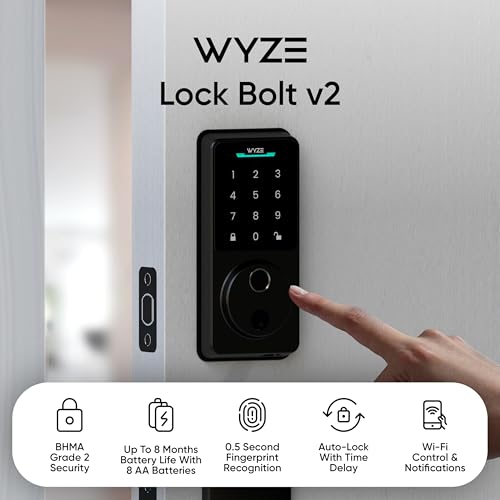
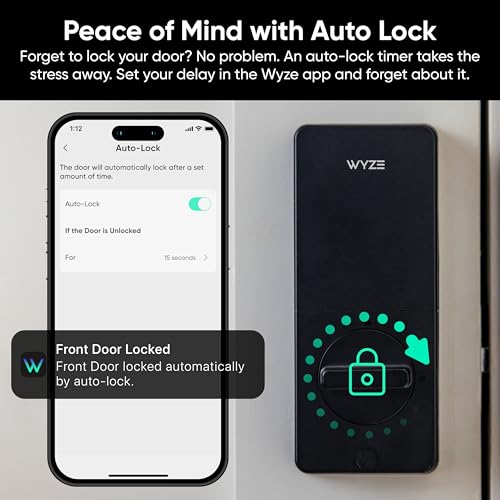
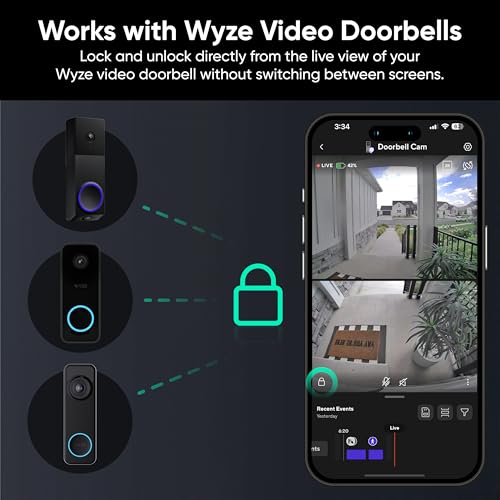
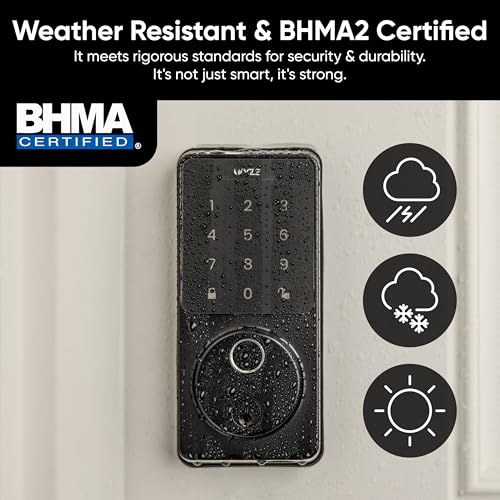
The Wyze Auto-Lock Bolt v2 combines impressive battery life, AI-powered fingerprint learning, and seamless smart home integration at a competitive price point. The fingerprint scanner unlocks in just 0.5 seconds and features scratch and smudge-resistant tempered glass for reliable reads and a pristine appearance. The standout AI learning technology continuously improves recognition accuracy with every touch, eliminating failed scans and creating an increasingly personalized entry experience. The lock includes eight AA batteries providing up to eight months of battery life—the longest in this comparison—with a USB-C emergency backup port accepting any common power bank if batteries expire. Built-in Wi-Fi enables remote access and management through the Wyze App, with seamless integration into the Wyze ecosystem. When paired with a Wyze Video Doorbell, you can unlock directly from the live feed, visually verifying visitors before granting access. Multiple unlock methods include fingerprint for speed, app for control, keypad codes for convenience, and physical backup keys as a guaranteed fallback. The lock achieves BHMA2 certification and IP53 weather resistance, meeting industry security and durability standards. The anti-peep keypad prevents unauthorized code observation. Limitations include no existing customer reviews for real-world validation, Wi-Fi dependency for remote access which may be unreliable in areas with poor signal, and potential fingerprint scanner challenges with wet, dirty, or heavily worn fingerprints despite the tempered glass design. Wyze ecosystem compatibility is strong, but compatibility with other smart home platforms remains unclear. At $79, the Wyze Auto-Lock Bolt v2 offers exceptional value for Wyze ecosystem users prioritizing battery longevity and AI-enhanced fingerprint recognition.

Wyze Auto-Lock Bolt v2 Smart Lock - Fingerprint & Wi-Fi
- Effortless Entry, Lasting Clarity: Unlock in 0.5 seconds with Wyze Lock Bolt v2's fingerprint scanner. Its scratch and smudge-resistant tempered glass ensures reliable reads and maintains a pristine look.
- The Lock That Learns with You: Our AI smart lock learns from every touch, constantly improving to deliver faster, more accurate recognition over time. This eliminates failed scans and creates a seamlessly adaptive entry experience just for you.
- 8-Month Power with Emergency Backup: Includes 8 AA batteries for up to 8 months of use. If batteries die, the USB-C port lets you power it with any common power bank to unlock the door.
- Total Control in the Wyze App: Remotely check and manage your lock via built-in Wi-Fi. When paired with a Wyze Video Doorbell, unlock directly from the live feed to visually verify and welcome visitors instantly.
- Your Door, Your Way: Enjoy total unlocking freedom. Choose what fits your moment: fingerprint for speed, the app for control, a code for convenience, or the physical keys as a guaranteed backup. Experience ultimate flexibility and peace of mind.







As an Amazon Associate we earn from qualifying purchases. Product prices and availability are accurate as of the date/time indicated.
What Should You Look for When Choosing a Smart Lock with Fingerprint Scanner?
Selecting the right fingerprint smart lock requires evaluating multiple technical and practical factors beyond just the biometric component. Understanding these criteria helps you choose a lock that balances security, convenience, compatibility with your home setup, and long-term reliability.
Fingerprint Recognition Speed and Accuracy represents the most critical biometric specification. In July 2026, leading models achieve recognition times between 0.2 and 0.5 seconds with accuracy ratings of 99.99 percent. Faster recognition (under 0.3 seconds) proves more convenient for daily use, while accuracy claims should be verified against real-world testing rather than manufacturer specifications alone. Advanced AI learning systems, like those in the Veise VE017 and Wyze Auto-Lock Bolt v2, continuously improve accuracy over time as the lock learns your unique fingerprint patterns. Consider whether the lock handles wet, dirty, or worn fingerprints reliably—critical for households with young children, outdoor workers, or elderly family members with less distinct prints.
Multiple Unlock Methods ensure you never get locked out and accommodate different household situations. The best fingerprint locks combine five to eight access methods: fingerprint, numeric keypad codes, mobile app access, physical mechanical keys, voice commands, NFC/IC cards, and fob cards. Numeric passcodes should support both permanent codes for family and temporary codes for guests, cleaners, and service providers. Voice control integration with Alexa or Google Assistant adds hands-free convenience when your hands are full. Mechanical key backup remains essential for emergencies when batteries fail or Wi-Fi connectivity drops. The more unlock methods available, the greater flexibility for different household members and scenarios.
Wi-Fi Connectivity and Remote Access determines whether you can control your lock from anywhere or only in-person. Built-in Wi-Fi eliminates the need for a separate hub, simplifying setup and reducing costs—the Philips Wi-Fi models and Wyze Auto-Lock Bolt v2 exemplify this approach. However, Wi-Fi-dependent locks require stable internet connectivity and router proximity (typically 33-65 feet depending on obstacles). Locks limited to 2.4GHz networks may face compatibility issues with newer dual-band routers. If remote access isn’t essential—such as for bedroom or office locks—Wi-Fi-free models like the Evanshow options offer cost savings and simpler installation. Evaluate whether your home’s Wi-Fi coverage reaches your intended door location before committing to a Wi-Fi-enabled model.
Battery Life and Emergency Power directly impact reliability and maintenance frequency. In July 2026, quality fingerprint locks achieve 6 to 8 months of battery life with standard AA alkaline batteries. The Wyze Auto-Lock Bolt v2’s eight-month rating leads the category. Check whether batteries are included or require separate purchase—most models ship without batteries, adding to your initial cost. Emergency power options vary: USB-C ports (Wyze), USB ports (Evanshow), or no emergency backup. USB emergency backup proves valuable if batteries unexpectedly fail, allowing temporary power via any common power bank. Calculate your household’s expected battery consumption based on daily lock usage—high-traffic doors drain batteries faster than secondary entrances.
Data Security and Privacy warrant careful consideration, especially with biometric systems. Local encryption (like the Veise VE017’s AES128) stores fingerprints and access credentials on the lock itself rather than cloud servers, significantly reducing privacy risks from data breaches. Cloud-dependent systems offer remote access convenience but introduce security vulnerabilities if the cloud service is compromised. Review the manufacturer’s privacy policy and encryption standards before purchasing. Anti-peeping code features (entering extra digits before or after your PIN) prevent shoulder surfers from observing your access code. Activity logs and real-time alerts help you monitor unauthorized access attempts.
Installation Difficulty and Door Compatibility affect your total cost and timeline. All six models reviewed support DIY installation without drilling or professional help, completing in 15-30 minutes with basic tools. However, door thickness compatibility varies: most fingerprint locks fit doors 1.18 to 2 inches thick, accommodating standard residential doors but potentially excluding thick commercial doors or thin apartment doors. Measure your door thickness before purchasing. Some models require configuration adjustments for left-opening doors, adding complexity. Deadbolt-style locks (Philips, Wyze, Veise) replace your existing deadbolt, while knob-style locks (Evanshow) replace the entire door knob. Consider whether your door’s existing hardware aligns with your chosen lock style.
Smart Home Integration determines compatibility with your existing ecosystem. The Philips models integrate with Alexa and Google Assistant voice ecosystems. The Wyze Auto-Lock Bolt v2 excels within the Wyze ecosystem, especially when paired with Wyze Video Doorbells for visual verification before unlocking. The Veise VE017 requires a separate G1 Gateway for voice control and remote access. Evaluate whether the lock’s integration aligns with your preferred smart home platform—misalignment forces you to manage multiple separate apps and limits automation possibilities.
Price and Value Assessment should balance features against your actual needs. Budget options under $35 (Evanshow models) lack Wi-Fi and app control but suit renters and secondary doors. Mid-range locks ($75-$80) like the Philips Wi-Fi Door Lock and Wyze Auto-Lock Bolt v2 offer excellent feature-to-price ratios with Wi-Fi, app control, and strong biometric performance. Premium options ($115+) like the Philips WiFi Keypad with Handle include complete hardware sets eliminating additional purchases. Avoid paying for features you won’t use—if remote access isn’t important, save money with Wi-Fi-free models.
Frequently Asked Questions
How fast do fingerprint scanners on smart locks recognize your fingerprint?
Modern fingerprint smart locks in July 2026 recognize fingerprints in 0.2 to 0.5 seconds. The fastest models include the Philips WiFi Keypad Door Lock (0.3 seconds) and Veise VE017 (0.2 seconds). Speed depends on sensor quality, AI optimization, and fingerprint clarity. Advanced AI learning systems continuously improve recognition speed and accuracy with each use, adapting to your unique fingerprint patterns over time for faster unlocking.
Can you unlock a fingerprint smart lock with a phone if the batteries die?
Most fingerprint smart locks cannot unlock via phone if batteries die because the lock’s internal electronics require power. However, several models offer USB emergency power ports: the Wyze Auto-Lock Bolt v2 includes USB-C, while Evanshow models include USB ports. Connect any power bank to the emergency port to temporarily power the lock for unlocking. All models retain mechanical key backup as a guaranteed fallback when electronics fail completely.
Do fingerprint smart locks work if your fingers are wet or dirty?
Quality fingerprint scanners handle wet or slightly dirty fingers, but performance varies. The Wyze Auto-Lock Bolt v2 features scratch and smudge-resistant tempered glass designed for reliability despite moisture or dirt. The Veise VE017’s AI learning adapts to your fingerprint variations over time. However, heavily soaked or extremely dirty fingers may cause temporary rejection. All models include backup passcode or app access if fingerprint recognition fails temporarily.
What happens if you forget your passcode on a fingerprint smart lock?
If you forget your passcode, use alternative unlock methods: fingerprint recognition, app control (if Wi-Fi-enabled), physical mechanical key backup, or voice commands (if supported). Most models allow you to reset or create new passcodes through the mobile app if you have access. For locks without app control, contact the manufacturer’s customer support for password reset procedures. Always store your mechanical keys in a secure location as a guaranteed backup.
Are fingerprint smart locks compatible with renters or do they require permanent installation?
Fingerprint smart locks suit renters because they install without drilling or permanent modifications—all six reviewed models support quick removal and reinstallation. However, verify your lease permits smart lock installation before purchasing. Knob-style locks (Evanshow models) replace the existing knob and restore easily when moving. Deadbolt-style locks require removing your current deadbolt but leave no permanent damage. Always inform your landlord and plan for restoration before moving.
How many fingerprints can you store on a smart lock with fingerprint recognition?
Storage capacity varies significantly: the Evanshow Fingerprint Door Lock supports up to 100 fingerprints, while the Philips models support multiple fingerprints for family members without specifying exact limits. The Veise VE017 allows adding, renaming, or deleting fingerprints via app without stated capacity limits. The Wyze Auto-Lock Bolt v2 supports multiple stored fingerprints without specifying maximum count. For large households or multi-tenant properties, choose models explicitly supporting 100+ fingerprints to accommodate all residents and frequent guests.
Which Smart Lock with Fingerprint Scanner Should You Buy?
Your ideal fingerprint smart lock depends on your specific priorities, home setup, and budget. The July 2026 market offers compelling options across multiple price tiers, each excelling in different scenarios.
Best Overall: Veise VE017 Fingerprint Smart Door Lock ($59.99) delivers the most comprehensive feature set at the lowest price point. Eight unlock methods, advanced AI fingerprint recognition with 99.99% accuracy, local AES128 encryption, anti-peeping codes, and DIY installation make this the top pick for security-conscious homeowners wanting maximum flexibility. The 0.2-second recognition speed and self-learning AI that improves accuracy over time represent industry-leading biometric performance. IP55 waterproofing and extreme temperature tolerance suit virtually any climate. The primary consideration is purchasing the separate Veise G1 Gateway ($additional cost) for remote access and voice control features. If remote access isn’t essential, the Veise VE017 alone provides exceptional security and convenience at an unbeatable price. For detailed security information, see our guide on how smart locks keep your home secure in July 2026.
Best for Remote Access: Philips Wi-Fi Door Lock ($59.99) offers built-in Wi-Fi, app control, and voice assistant compatibility without requiring a separate hub. Five unlock methods including fingerprint, 100 customizable passcodes with one-time or scheduled options, and real-time access notifications provide excellent smart home integration. The 65-foot operating range and straightforward setup make this ideal for homeowners wanting smartphone control from anywhere. The primary limitation is 2.4GHz-only support, which may conflict with newer routers. This lock delivers outstanding value for Wi-Fi-enabled smart home ecosystems.
Best Battery Life: Wyze Auto-Lock Bolt v2 ($79.00) combines impressive eight-month battery life with AI-learning fingerprint technology and seamless Wyze ecosystem integration. The 0.5-second recognition speed, USB-C emergency backup, and BHMA2 certification meet professional security standards. Seamless integration with Wyze Video Doorbells for visual verification before unlocking adds unique value. This lock excels for Wyze ecosystem users prioritizing battery longevity and AI-enhanced biometric performance. For information on smart lock power resilience, review our guide on what happens to smart locks when the power goes out in July 2026.
Best Budget Option: Evanshow Fingerprint Door Lock (check current price) serves renters and secondary door applications where Wi-Fi and app control aren’t essential. Four unlock methods, 100-fingerprint capacity, and 0.5-second recognition provide solid biometric performance at the lowest price point. No drilling installation and quick setup make this ideal for temporary installations. The lack of Wi-Fi and app control limits this option to in-person access only, making it unsuitable for homeowners wanting remote control.
Best for Premium Features: Philips WiFi Keypad Door Lock with Handle ($109.98) includes a complete handle set eliminating additional hardware purchases, ultra-fast 0.3-second fingerprint recognition, and six-month battery life. Flexible passcode management with permanent, one-time, periodic, and recurring codes suits Airbnb hosts and shared households. Built-in Wi-Fi and voice assistant compatibility provide full smart home integration. This premium option suits homeowners wanting the fastest biometric recognition and a complete hardware solution without additional purchases.
Best for Apartments: Evanshow Smart Door Lock with Knob ($32.98) provides knob-style installation ideal for renters and apartments where deadbolt replacement isn’t permitted. Tuya app management, fingerprint recognition, and auto-lock functionality deliver solid security without Wi-Fi dependency. The lowest price point and reversible installation make this perfect for temporary living situations. For budget-conscious shoppers, explore our guide on best smart locks under $100 in July 2026.
In July 2026, fingerprint smart locks have matured into reliable, affordable home security solutions. Whether prioritizing biometric performance, Wi-Fi connectivity, battery longevity, or budget constraints, these six models cover all major use cases. The Veise VE017 remains the top overall choice for comprehensive features at an exceptional price, while the Philips Wi-Fi Door Lock and Wyze Auto-Lock Bolt v2 offer compelling alternatives for homeowners wanting built-in Wi-Fi and smart home integration. Evaluate your specific needs—remote access requirements, door type, household size, and Wi-Fi availability—then select accordingly. All six models deliver genuine security improvements over traditional mechanical locks while eliminating the need to carry physical keys. For additional smart lock guidance, review our comprehensive resources on best smart locks for front doors in July 2026 and how smart locks work and how to install them in July 2026.








Write Your Review
No reviews yet. Be the first to share your experience!