

How Do Smart Locks Work and Which Models Are Best for Your Home in July 2026?
Quick Answer: Smart locks use electronic mechanisms controlled via smartphone apps, keypads, biometric sensors, or voice commands to unlock doors remotely or locally. The August Home Smart Lock Pro + Connect Hub stands out as the top pick for Wi-Fi connectivity and seamless integration with Alexa and Google Assistant, offering remote control from anywhere. For budget-conscious buyers, the GHome Smart Fingerprint Door Lock delivers excellent value at under $50, featuring AI-powered fingerprint recognition and app control without requiring a separate hub. The HANDAILY Smart Lock offers premium features like 3D facial recognition and Matter compatibility for advanced smart home integration. Smart locks typically cost between $50 and $250, with installation taking 30 minutes to an hour for most homeowners. The key takeaway: smart locks combine convenience, security, and remote access, making them essential upgrades for modern home security alongside video doorbells with smart detection.
Smart locks have revolutionized home security and convenience in 2026, replacing traditional deadbolts with electronic systems that offer multiple unlocking methods. Unlike conventional locks that require physical keys, smart locks use motors, solenoids, and wireless technology to control bolt movement. They integrate with your smartphone, voice assistants, and smart home ecosystems, allowing you to lock or unlock your door from anywhere in the world. The technology combines hardware components—the lock mechanism itself—with software that communicates through Wi-Fi, Bluetooth, or cellular networks. Understanding how these systems work helps you choose the right model for your needs and ensures proper installation that maintains security and functionality. Most smart locks retain the ability to use traditional keys as a backup, providing peace of mind if technology fails or batteries drain.
How Do Smart Locks Operate Mechanistically and Electronically?
Smart locks function through a combination of mechanical and electronic components working together. At the core is an electric motor or solenoid that replaces the manual turning action of a traditional key. When you send an unlock command through your smartphone app, voice assistant, or keypad, the signal travels through your home’s Wi-Fi network to the lock’s receiver. The receiver processes the command and activates the motor, which rotates the bolt mechanism to unlock the door. Most smart locks maintain the traditional deadbolt design, so they appear normal on your door’s exterior while housing advanced electronics inside.
The electronic control system includes a circuit board, battery compartment, and wireless communication module. Batteries power the lock—typically four to eight AA batteries lasting six to twelve months depending on usage frequency. When battery levels drop, the lock sends alerts to your smartphone, and many models include USB emergency charging ports for backup access. The wireless communication happens through Bluetooth for nearby control or Wi-Fi for remote access from anywhere. Some advanced models use cellular backup to ensure functionality even if your home internet fails. Biometric sensors—fingerprint readers and facial recognition cameras—scan your unique biological data and compare it against stored profiles to verify your identity before unlocking.
Which Smart Locks Stand Out in 2026 for Features and Reliability?
August Home Smart Lock Pro + Connect Hub: Premium Wi-Fi Connectivity and Voice Control

August Smart Lock Pro + Hub: Voice Control Keyless Entry
- Control and monitor your door from anywhere.Note: Measure your door's backset, cross bore and thickness to ensure you find the right fit.Note: Measure your door's backset, cross bore and thickness to ensure you find the right fit.Control Method:Voice
- Always know who is coming and going.
- Keep your existing lock and keys.
- Features Auto-Lock and Auto-Unlock.


As an Amazon Associate we earn from qualifying purchases. Product prices and availability are accurate as of the date/time indicated.
The August Home Smart Lock Pro + Connect Hub represents the premium option for homeowners prioritizing remote access and voice control integration. This model works directly with Alexa and Google Assistant, allowing you to lock or unlock your door using voice commands from anywhere. The Connect Hub provides true Wi-Fi connectivity, eliminating the need to be within Bluetooth range of your lock. You can monitor who enters and exits your home in real-time through the companion app, receiving instant notifications whenever someone unlocks the door. The lock features auto-lock and auto-unlock functionality, automatically securing your door when you leave and unlocking it as you approach home.
Installation requires measuring your door’s backset, cross bore, and thickness before purchase to ensure compatibility. The lock keeps your existing deadbolt and keys intact, adding a layer of security since you maintain traditional key access as a backup. The device supports multiple user profiles, making it ideal for families, rental properties, and shared living situations. Battery life typically extends eight to twelve months with regular use. The main consideration is that the Connect Hub adds to the overall cost, though it’s essential for reliable Wi-Fi connectivity. This lock works exceptionally well when combined with remote door viewing systems for comprehensive home security monitoring.
GHome Smart Fingerprint Door Lock: Budget-Friendly Biometric Security with AI Learning

GHome Smart Fingerprint Door Lock - AI Self-Learning Keyless Entry
- [ Secure Keyless Entry for Busy Homes & Front Doors ] Stop hiding spare keys or worrying about getting locked out. Unlock your front door using fingerprint, passcode, app control, or physical key—perfect for busy families, homeowners, apartment residents, Airbnb hosts, or anyone juggling groceries, gym bags, or children. Works for front doors, garages, side entrances, and rental properties, providing safe and efficient daily access without fumbling for keys
- [ AI Self-Learning Fingerprint — Faster & Smarter Over Time ] GHome Smart smart door lock upgraded AI fingerprint sensor continuously adapts to your fingerprint habits for faster and more accurate unlocking with up to 98.9% recognition accuracy. Even dry fingers, or frequent daily use become smoother over time, allowing quick entry after runs, bike rides, errands, or returning from work—unlock in about 1 second without fumbling for keys
- [ Custom Auto Lock & Anti-Peeping Protection ] Never worry about leaving your front door unlocked. Set the auto-lock timer from 1–1800 seconds for automatic security after closing the door. Anti-peeping passcode technology lets you enter random digits before or after the real code, keeping your password safe in public, shared housing, or high-traffic areas
- [ Smart App Control & Flexible Guest Access Management ] Create one-time, temporary, scheduled, or permanent passcodes directly from the app. Easily manage fingerprints and user access for guests, cleaners, dog walkers, delivery personnel, Airbnb visitors, family members, or tenants—without distributing physical keys. Perfect for households with kids, pet owners, or vacation rental managers
- [ Emergency USB Power & Easy DIY Installation ] Powered by 4 AA batteries (not included) with low-battery reminders through the app, plus USB emergency charging for backup access when power runs low. Installs easily on most standard US exterior doors using just a screwdriver—ideal for homeowners, apartments, garages, offices, and vacation rentals. No professional tools or wiring required


As an Amazon Associate we earn from qualifying purchases. Product prices and availability are accurate as of the date/time indicated.
The GHome Smart Fingerprint Door Lock delivers exceptional value for homeowners seeking biometric security without premium pricing. This model features AI self-learning fingerprint technology that improves recognition accuracy over time, reaching up to 98.9% accuracy even with dry or dirty fingers. Unlock speed is remarkably fast—approximately one second from fingerprint scan to bolt release—making it practical for busy mornings when you’re juggling groceries, gym bags, or children. The lock offers four unlocking methods: fingerprint recognition, custom passcodes, smartphone app control, and traditional mechanical keys for backup access.
Custom auto-lock functionality lets you set timers from one to 1800 seconds, automatically securing your door after closing. Anti-peeping passcode technology allows you to enter random digits before or after your real code, protecting your PIN in public or shared housing situations. The app enables flexible guest access management, creating one-time, temporary, scheduled, or permanent passcodes for family members, cleaners, dog walkers, delivery personnel, and Airbnb visitors without distributing physical keys. Installation requires only a screwdriver and takes approximately 30 minutes on most standard US exterior doors. Powered by four AA batteries with USB emergency charging backup, this lock suits apartments, vacation rentals, and homes where professional installation isn’t desired. At under $50, it represents the most affordable option among our three selections while maintaining strong security features and smart home integration.
HANDAILY Smart Lock: Advanced Facial Recognition and Matter-Compatible Smart Home Integration

HANDAILY Smart Lock: 7-in-1 Matter-Compatible Gate Lock
- APP REMOTE CONTROL:Seamlessly integrates with all Matter-compatible ecosystems. Without any additional devices or complicated setup, you can easily manage access permissions, view access logs, and create temporary PIN codes—allowing you to control everything anytime, anywhere, without being tied to multiple apps
- ENHANCED 3D FACE CAMERA:The infrared night vision motion camera captures clear video footage even in the dark. Combined with 3D facial recognition, it identifies users with greater precision, quickly recognizing faces even at night
- ADAPTIVE AI FINGERPRINT:AI fingerprint recognition adapts and learns based on your usage habits over time. It ensures accurate fingerprint recognition—whether your fingers are wet or dirty—delivering a smooth, secure, and convenient access experience
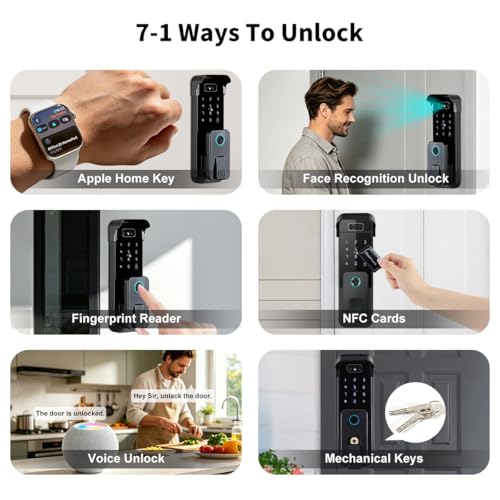
- 7-IN-1 UNLOCKING METHOD:This lock offers seven unlocking methods: facial recognition, fingerprint recognition, remote unlocking via a smartphone app, PIN code, IC card, electronic key, mechanical key. It can store up to 100 fingerprints and 50 facial profiles. It can be unlocked with any combination of 150 PIN codes and IC cards
- SEAMLESS INTEGRATION:The HANDAILY smart lock integrates with Matter-enabled ecosystems. It supports voice control via Siri, Alexa, and Google Assistant. Pair multiple Matter-enabled devices through a single app to automate your smart home and say goodbye to cumbersome apps
- PROFESSIONAL PROTECTION RATING:This smart lock is built to last and operates flawlessly within a wide temperature range of -15°C to 60°C,Humidity 20%~93%.It is particularly well-suited for outdoor applications such as main entrances. With an IP65 protection rating, it is fully dustproof and waterproof, ensuring reliable performance in all weather conditions—from scorching heat and bitter cold to heavy rain
- RELIABLE BATTERY LIFE AND PROFESSIONAL SECURITY:This smart lock is equipped with a high-capacity lithium battery, its low-battery alert keeps you informed of the battery status at all times. In an emergency, simply connect any USB power bank to instantly provide temporary power



As an Amazon Associate we earn from qualifying purchases. Product prices and availability are accurate as of the date/time indicated.
The HANDAILY Smart Lock represents the most technologically advanced option, featuring 3D facial recognition with infrared night vision motion camera capability. The integrated camera captures clear video footage even in darkness, combining with 3D facial recognition to identify users with exceptional precision. This dual-layer biometric approach provides superior security compared to fingerprint-only systems. The lock offers seven unlocking methods: facial recognition, fingerprint recognition, smartphone app remote control, PIN codes, IC cards, electronic keys, and mechanical keys. It can store up to 100 fingerprints and 50 facial profiles, with support for 150 different PIN codes and IC card combinations.
Matter compatibility makes this lock exceptional for advanced smart home integration in 2026. It seamlessly integrates with Matter-enabled ecosystems, supporting voice control via Siri, Alexa, and Google Assistant without requiring multiple apps or complicated setup procedures. The AI fingerprint recognition adapts to your usage habits over time, ensuring accurate recognition whether your fingers are wet or dirty. The app provides remote access control, permission management, access logs, and temporary PIN code creation from anywhere. It bridges the gap between the budget GHome option and the premium August model, offering cutting-edge facial recognition technology without the additional hub requirement. This lock pairs excellently with best smart doorbells for comprehensive home security coverage.
What Should You Look for When Choosing a Smart Lock for Your Home?
Selecting the right smart lock requires evaluating multiple factors beyond initial cost. Connectivity type significantly impacts functionality—Wi-Fi locks like the August Home offer remote access from anywhere, while Bluetooth-only locks require proximity to your phone. Wi-Fi models typically need a separate hub or bridge device, adding to total cost but ensuring reliable connectivity. Consider whether your home’s Wi-Fi signal reaches your front door, as dead zones can prevent remote access.
Installation compatibility is crucial and often overlooked. Smart locks must fit your door’s specific measurements: backset distance (typically 2.375 or 2.75 inches), cross bore diameter, and door thickness. Measure before purchasing to avoid incompatibility issues. Most smart locks replace only the interior mechanism, keeping your existing exterior deadbolt appearance, though some models require complete deadbolt replacement. Check whether installation requires professional help or if DIY installation with basic tools suffices. The GHome lock requires only a screwdriver, while the August Home requires precise measurements to ensure proper fit.
Unlocking methods should match your lifestyle. Fingerprint recognition offers fast, keyless access but may struggle with wet or very dirty fingers—though AI learning improves accuracy over time. Facial recognition provides touchless access but requires good lighting and camera positioning. PIN codes offer simplicity but risk shoulder-surfing in public areas; anti-peeping technology scrambles your actual code. App-based control enables remote access but depends on smartphone battery and internet connectivity. Mechanical keys provide essential backup when technology fails. Consider which methods suit your daily routine and household composition.
Battery life and power backup deserve serious attention. Most smart locks use four to eight AA batteries lasting six to twelve months depending on usage frequency and features like cameras or fingerprint sensors. Verify that the model sends low-battery notifications to your phone. USB emergency charging ports provide backup access when batteries are critically low. Some premium models offer solar charging or hardwired power options for locations where frequent battery replacement is inconvenient. Always maintain spare batteries on hand.
Smart home ecosystem compatibility determines integration ease. Locks supporting Alexa, Google Assistant, and Apple Home enable voice control and automation. Matter compatibility, new in 2026, allows single-app control across multiple smart home devices without vendor lock-in. Check whether the lock requires a separate hub or bridge device—some do, adding $50-100 to total cost but improving reliability. Research whether the manufacturer regularly updates firmware to address security vulnerabilities.
Security features extend beyond the locking mechanism. Look for encryption protocols protecting your access credentials. Anti-peeping technology prevents shoulder-surfers from stealing your PIN. Access logs showing who unlocked the door and when provide accountability. Temporary passcode creation allows you to grant time-limited access to guests or service providers. Fingerprint and facial recognition storage should be local, not cloud-dependent, so unlocking works even if internet fails. Consider whether the manufacturer has experienced security breaches—research their track record.
User management capabilities matter for families, rental properties, and shared housing. The app should let you create multiple user profiles with individual passcodes or biometric data. Temporary access codes for guests should expire automatically. You should receive notifications when specific people unlock the door. For Airbnb hosts or property managers, the ability to create one-time codes for each guest streamlines operations. Check whether user limit restrictions exist—some locks support only five to ten users, while others handle 50 or more.
Weather resistance and durability ensure longevity. Your lock faces temperature extremes, moisture, and physical stress. Verify that the lock has appropriate IP ratings for weather resistance. Stainless steel or powder-coated finishes resist corrosion better than bare metal. Read user reviews about performance in extreme climates—some fingerprint sensors struggle in very cold or very hot weather. Consider whether the lock’s design prevents water intrusion into the battery compartment.
Warranty and manufacturer support provide peace of mind. Reputable manufacturers offer one to three-year warranties covering defects. Check whether technical support is available 24/7 and through multiple channels (phone, email, chat). Read reviews about customer service responsiveness. Verify that replacement parts are readily available and reasonably priced. Some manufacturers offer lifetime warranties on certain components, indicating confidence in their product quality.
How Do You Install a Smart Lock Properly to Ensure Security and Functionality?
Proper installation is essential for both security and reliable operation. Before purchase, measure your door carefully. Backset measurement determines the distance from the door edge to the center of the lock hole—standard measurements are 2.375 inches or 2.75 inches. Cross bore measures the hole diameter where the lock cylinder passes through the door, typically 1.125 inches. Door thickness should fall within the lock’s supported range, usually 1.375 to 2 inches. Most smart locks include templates showing exact measurement points. Take photos of these measurements and keep them handy when shopping.
Gather required tools before starting installation. Most smart locks require only a screwdriver (Phillips and possibly flathead), though some may need a drill for adjustment holes. Check the instruction manual for the complete tool list. Clear your work area and ensure good lighting. Have a flashlight ready for seeing inside the door mechanism. Keep the original lock hardware and keys safe in case you need to revert to the old lock.
Remove the existing lock carefully. Open your door fully and locate the screws holding the interior lock mechanism. Remove these screws and gently pull the interior assembly straight out—don’t force it, as the exterior cylinder may still be connected. Some locks have a retaining clip or pin holding the exterior and interior together; locate and release this before separating components. Keep all original hardware organized in a labeled container. Take photos of the disassembled mechanism for reference during reinstallation if needed.
Prepare the door for the new lock. Inspect the lock hole for damage or debris. If the hole is damaged, you may need to drill a new one—this requires professional help if you’re uncomfortable with power tools. For most installations, the existing hole works perfectly. Clean any dirt or rust from the hole area. If the door has a beveled edge around the lock hole, ensure your new lock’s escutcheon (decorative plate) covers it adequately.
Install the exterior assembly first. Insert the exterior cylinder and any connecting components through the door hole from outside. Ensure the lock mechanism aligns properly with the door’s interior surface. Check that the bolt operates smoothly by manually testing it before securing. Some locks require alignment pins or spacers to ensure proper fit—follow the manufacturer’s instructions carefully. Secure the exterior assembly with provided screws, but don’t overtighten, as this can strip threads or crack plastic components.
Attach the interior mechanism by sliding it onto the connecting shaft from inside the door. Align all components carefully—misalignment prevents proper locking. Insert and tighten all retaining screws, working in a cross pattern to ensure even pressure. Test the lock mechanism before proceeding—it should turn smoothly and engage the bolt fully. If resistance occurs, stop and check alignment rather than forcing components together.
Install batteries according to the manufacturer’s specifications. Most smart locks use AA batteries in a compartment on the interior mechanism. Insert batteries with correct polarity (+ and – markings visible). Some locks require specific battery types or have minimum battery quantity requirements. Close the battery compartment securely. Power on the lock using the designated button or method specified in the instructions.
Test basic functionality before connecting to your smartphone. Manually lock and unlock the door using the physical mechanism. Test any physical keypad by entering a default code. If the lock has a mechanical key, verify it operates smoothly. Test the battery backup feature if available. Only after confirming mechanical operation should you proceed to app installation and connectivity setup.
Download the manufacturer’s app and create an account. Follow the in-app setup wizard to add your lock. Most apps use Bluetooth to communicate with the lock during initial pairing—stay within Bluetooth range (typically 30-50 feet) during this process. Once paired, the app will guide you through Wi-Fi connection setup if your lock supports remote access. Follow security best practices: use a strong, unique password for your account; enable two-factor authentication if available; never share your login credentials.
Configure lock settings through the app. Set auto-lock timers, create user profiles, and establish temporary access codes for guests. Enable notifications so you receive alerts when the door is unlocked. Test remote locking and unlocking from different locations to confirm connectivity. If your lock integrates with voice assistants, complete that setup now. Document your settings and save backup codes in a secure location separate from your phone.
Secure your mechanical key in a safe location. While smart locks offer convenient keyless entry, keeping a physical key hidden (not under a doormat or planter) provides emergency access if electronics fail. Some homeowners keep a spare key with a trusted neighbor or family member. Never hide keys in obvious locations that burglars check first.
What Are Frequently Asked Questions About Smart Locks in 2026?
Do smart locks work without Wi-Fi or internet connection?
Yes, Bluetooth-based smart locks operate without Wi-Fi—you can unlock them from your phone when nearby. However, Wi-Fi models require internet for remote access from away from home. Mechanical keys always work regardless of technology status. Many locks include offline PIN codes that function even during internet outages. Some advanced models include cellular backup ensuring access even if home Wi-Fi fails. Always verify offline functionality before purchasing if reliability during outages is important.
How often do smart lock batteries need replacement?
Battery life typically ranges from six to twelve months depending on usage frequency, weather conditions, and lock features. Locks with cameras, fingerprint sensors, or Wi-Fi connectivity drain batteries faster than simple Bluetooth models. Most locks send smartphone notifications when battery levels drop, giving you time to purchase replacements. USB emergency charging provides backup access when batteries are critically low. Keep spare AA batteries on hand and replace them proactively before receiving low-battery alerts to avoid lockouts.
Are smart locks secure against hacking or forced entry?
Quality smart locks use military-grade encryption protecting access credentials from remote hacking. Physical forced entry remains possible against any lock, but smart locks often include reinforced strike plates and deadbolts resisting forced entry. Local biometric authentication (fingerprint, facial recognition) doesn’t transmit data over networks, improving security. However, always research manufacturer security records and apply firmware updates promptly. Combine smart locks with wireless smart security cameras for comprehensive security monitoring beyond just the lock.
Can smart locks be installed on apartment doors or rental properties?
Many smart locks install without permanent modifications, making them suitable for rentals. Models like the GHome lock replace only interior components, leaving the exterior deadbolt unchanged. Check your lease for restrictions before installing. Some landlords prohibit modifications; others allow removable smart locks. Always restore the original lock before moving out. For Airbnb hosts, smart locks with temporary passcode creation streamline guest check-in without physical key exchanges. Verify that your rental agreement permits smart lock installation before purchasing.
What happens if my smartphone is lost or stolen?
Immediately log out of the smart lock app on your account through the manufacturer’s website or another device. This revokes the lost phone’s access. Change your account password to prevent unauthorized access. Remove the lost device from your authorized devices list in the app settings. Most smart locks allow multiple authentication methods—use fingerprint, PIN codes, or physical keys to access your door while the phone is missing. Consider enabling two-factor authentication on your smart lock account for additional security. Keep your account recovery email and phone number current.
Do smart locks work with all door types and deadbolt styles?
Smart locks work with standard residential deadbolts but may not fit specialty locks like mortise locks, sliding door locks, or commercial-grade deadbolts. Measure your door’s backset, cross bore, and thickness before purchasing—these specifications determine compatibility. Some doors with unusual configurations require custom installation or professional help. Always verify compatibility before buying. If your door has an uncommon lock style, contact the manufacturer’s customer support with photos and measurements to confirm fitment before purchase.
Which Smart Lock Should You Buy Based on Your Needs and Budget in July 2026?
Your ideal smart lock depends on your specific priorities, budget, and smart home ecosystem. For remote access and voice control, the August Home Smart Lock Pro + Connect Hub remains the top choice despite its higher price point. The Wi-Fi connectivity through the Connect Hub ensures you can lock or unlock your door from anywhere—whether you’re at work, traveling, or simply away from home. Integration with Alexa and Google Assistant enables voice commands like “Alexa, lock my front door,” providing ultimate convenience. The auto-lock and auto-unlock features automatically secure your home as you leave and welcome you as you return. This model suits homeowners with existing smart home setups who prioritize remote access and voice control above all else. The main investment consideration is the additional cost of the Connect Hub, but the reliability and convenience justify the expense for most users.
For budget-conscious buyers seeking biometric security, the GHome Smart Fingerprint Door Lock delivers exceptional value that’s hard to beat. At under $50, this lock provides AI-powered fingerprint recognition, app control, PIN codes, and mechanical key backup—features found on locks costing three to five times more. The AI self-learning fingerprint technology improves accuracy over time, reaching 98.9% recognition even with challenging finger conditions. Installation requires only a screwdriver and takes approximately 30 minutes. The anti-peeping passcode feature and flexible guest access management make it perfect for Airbnb hosts, apartment dwellers, and families. USB emergency charging ensures backup access when batteries are low. If you’re new to smart locks or uncertain about committing significant funds, this model provides an excellent entry point with genuine security features and smart home integration.
For advanced smart home integration and facial recognition, the HANDAILY Smart Lock represents the sweet spot between innovation and value. It costs less than the August Home while offering more advanced biometric features. The 3D facial recognition with infrared night vision provides touchless access and superior security compared to fingerprint-only systems. Matter compatibility positions this lock perfectly for 2026’s smart home landscape, where Matter is becoming the standard protocol for device interoperability. Seven unlocking methods—facial recognition, fingerprint, app control, PIN codes, IC cards, electronic keys, and mechanical keys—provide flexibility for various situations. The ability to store 100 fingerprints and 50 facial profiles suits larger households, property managers, and Airbnb hosts. This lock pairs exceptionally well with smart doorbell camera setup for comprehensive entry monitoring.
For families prioritizing convenience, combine the GHome Smart Fingerprint Door Lock with a smart camera with night vision for comprehensive coverage. The fingerprint lock enables fast, keyless access for family members while the camera provides security monitoring. This combination costs less than the August Home alone while offering excellent functionality.
For rental property managers, the GHome lock’s temporary passcode creation and affordable price make it ideal for managing multiple properties. Create unique codes for each guest or tenant, set expiration dates, and monitor access through the app. The budget-friendly price means you can outfit multiple doors without excessive capital investment.
For users prioritizing security and automation, the HANDAILY lock’s facial recognition and Matter compatibility enable sophisticated automations. Imagine your lock recognizing your face as you approach and automatically unlocking the door while simultaneously turning on interior lights and adjusting the thermostat. This level of integration represents the future of smart home technology.
Ultimately, all three models represent excellent choices for different priorities. The August Home excels at remote access and voice control, the GHome delivers unbeatable value for biometric entry, and the HANDAILY provides cutting-edge facial recognition with Matter compatibility. Evaluate your budget, desired features, and existing smart home ecosystem to determine which lock best serves your needs. Remember that smart locks work best as part of a comprehensive home security strategy that includes smart camera monitoring and two-way audio communication. Invest in quality and reliability rather than the cheapest option, as your front door lock is critical infrastructure protecting your home and family.







Write Your Review
No reviews yet. Be the first to share your experience!