
What Are the Best Smart Home Devices for Beginners in June 2026?
Quick Answer: The Aeotec Smart Home Hub stands out as the top pick for beginners seeking a versatile central control system, offering Matter, Z-Wave, and Zigbee compatibility with seamless integration into Alexa and Google Assistant ecosystems. For those on a tighter budget, the GHome Smart Power Strip Surge Protector at check current price provides an excellent entry point with voice control and app management, requiring no hub. Most beginner-friendly smart home devices range from $15 to $230, with starter kits offering the best all-in-one value. The key takeaway: beginners should start with either a central hub for long-term scalability or a simple smart plug to test automation before committing to a full ecosystem.
Starting your smart home journey in June 2026 has never been more accessible. The smart home market has matured significantly, with devices now designed specifically for beginners who want simplicity without sacrificing functionality. Whether you’re looking to control lights remotely, automate daily routines, or build a comprehensive home automation system, the six products reviewed here represent the best options across different price points and use cases. This guide walks you through each device’s strengths, helping you choose the right entry point into home automation based on your budget, technical comfort level, and long-term vision for your connected home.
Which Smart Home Devices Stand Out for Beginners in 2026?
Aeotec Smart Home Hub – Best Overall Hub for Beginners

Aeotec Smart Home Hub - Matter, Z-Wave, Zigbee Gateway for Alexa & Google


As an Amazon Associate we earn from qualifying purchases. Product prices and availability are accurate as of the date/time indicated.
The Aeotec Smart Home Hub serves as the central nervous system for a beginner’s smart home, offering exceptional versatility at $159.99. This hub supports Matter, Z-Wave Plus, Zigbee, and Wi-Fi protocols, making it compatible with thousands of devices from leading manufacturers. The SmartThings app interface is intuitive, allowing beginners to set up custom automations without coding knowledge. Setup takes just minutes—plug in via Ethernet or Wi-Fi, open the SmartThings app, and start adding devices. The hub runs many automations locally, meaning your lights and sensors respond instantly even during internet outages.
What makes this hub particularly beginner-friendly is its compatibility with both Amazon Alexa and Google Home voice assistants. You can control devices through the app, voice commands, or automated routines that trigger based on time, location, or sensor activity. The hub supports thousands of compatible devices, giving you flexibility to expand your system as your comfort grows. Pros include reliable local automation execution, broad device compatibility, and straightforward setup. The main con is the initial $149.99 investment, though this becomes cost-effective when building a multi-device system. This hub is ideal for beginners planning to expand their smart home significantly over time.
GHome Smart Power Strip Surge Protector – Budget-Friendly Starter Device

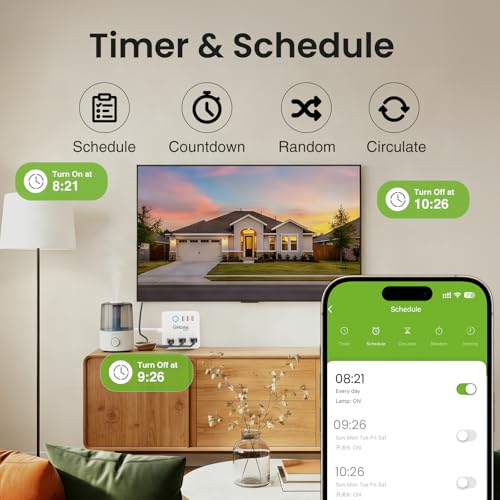
GHome 6-Outlet Smart Power Strip with Alexa & Google Home




As an Amazon Associate we earn from qualifying purchases. Product prices and availability are accurate as of the date/time indicated.
, the GHome Smart Power Strip Surge Protector represents the most affordable entry into smart home automation. This six-outlet power strip requires no hub—it connects directly to your 2.4GHz Wi-Fi network and integrates with Alexa or Google Assistant voice control. Beginners can control lamps, coffee makers, fans, and small appliances through voice commands or the mobile app from anywhere. The device supports individual outlet control, allowing you to manage each plug separately or group them for coordinated activation.
The timer and scheduling features make it perfect for beginner automation routines. Set your coffee maker to brew at 6 AM, program lights to turn on at sunset, or create random schedules to simulate occupancy when away. The power strip includes surge protection and is ETL and FCC certified for safety, rated at 120V/10A with a maximum 1200W capacity. Key advantages include zero hub requirement, simple setup, and immediate voice control capability. Limitations include 2.4GHz Wi-Fi only compatibility and a maximum 1200W power rating, making it unsuitable for high-draw appliances. This is the ideal first smart home device for testing automation before investing in a complete system.
Hubitat Elevation C-8 Pro – Best Hub for Privacy-Conscious Beginners

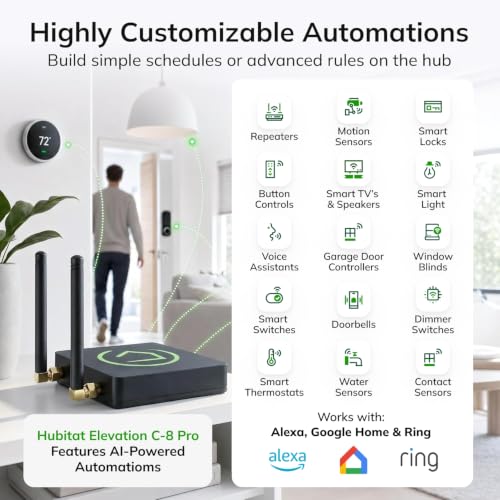
Hubitat Elevation C-8 Pro: Local Smart Home Hub with Matter & Z-Wave




As an Amazon Associate we earn from qualifying purchases. Product prices and availability are accurate as of the date/time indicated.
The Hubitat Elevation C-8 Pro at $194.95 represents the premium choice for beginners prioritizing privacy and local control. Unlike cloud-dependent systems, this hub runs all automations locally on your home network, meaning your smart home continues functioning during internet outages and your data never leaves your house. The hub supports the latest protocols including Matter 1.5, Z-Wave 800 Series with Long Range, Zigbee 3.0, and Bluetooth, compatible with over 1,000 devices from 100+ brands including Ring products.
Hubitat excels at balancing beginner accessibility with advanced capabilities. Newcomers can create simple schedules within minutes using the intuitive interface, while experienced users can build complex automation rules without subscriptions or external services. The platform receives continuous software updates that expand device compatibility and introduce new features like AI-assisted automations. Setup involves connecting the hub to your network and adding devices through the Hubitat app. Advantages include exceptional privacy protection, local automation execution, no subscription fees, and future-proof updates. The main drawback is the steeper $179.95 price point compared to cloud-based alternatives. This hub is perfect for privacy-conscious beginners who value data security and want a system that improves over time through software updates.
Smart Home Starter Kit with Echo Hub – Best All-in-One Package for Beginners

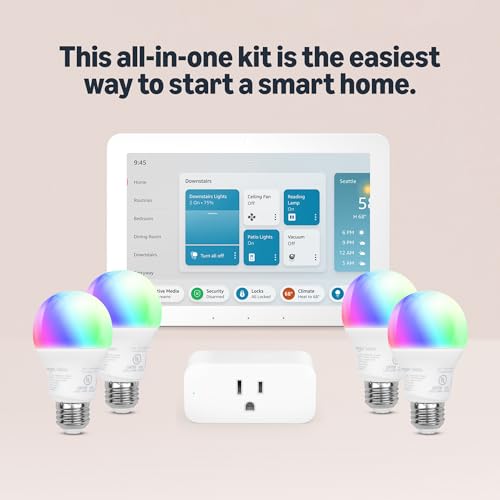
Echo Hub Smart Home Starter Kit with Alexa+ & Smart Bulbs


As an Amazon Associate we earn from qualifying purchases. Product prices and availability are accurate as of the date/time indicated.
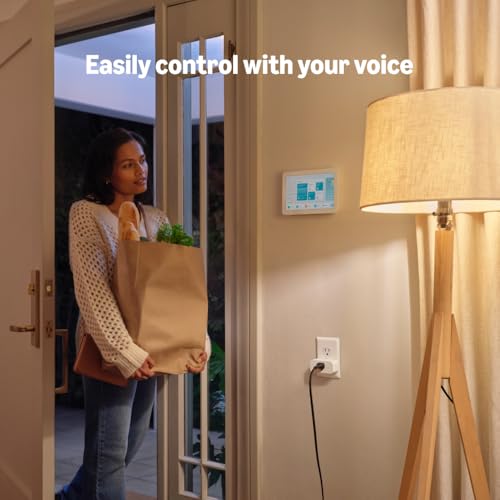
Amazon’s Smart Home Starter Kit at $229.99 provides everything a beginner needs to start automating immediately. This comprehensive package includes the Echo Hub (the central control device), one Amazon Smart Plug, and four Amazon Basics Smart Bulbs—everything needed to control lighting and plugged-in devices throughout a room. The guided setup process takes just minutes: unbox, plug in the hub, and follow the on-screen instructions in the Alexa app. No technical knowledge required.
The Echo Hub integrates seamlessly with Alexa voice control, allowing you to command lights and devices hands-free. The included smart bulbs are dimmable, color-capable, and respond to voice commands and app controls. The starter kit approach eliminates decision paralysis—beginners get a cohesive system rather than choosing individual components. The included plug lets you convert any standard appliance into a smart device. The kit works with thousands of Alexa-compatible devices from other brands, enabling gradual expansion. Major advantages include complete out-of-box functionality, intuitive Alexa integration, and included devices that work immediately. The limitation is lock-in to Amazon’s ecosystem, though Alexa compatibility is extensive. This kit is ideal for beginners who want immediate smart home functionality without researching individual components.
AiSeek Tuya ZigBee 3.0 Hub – Budget Hub for Tuya Device Users

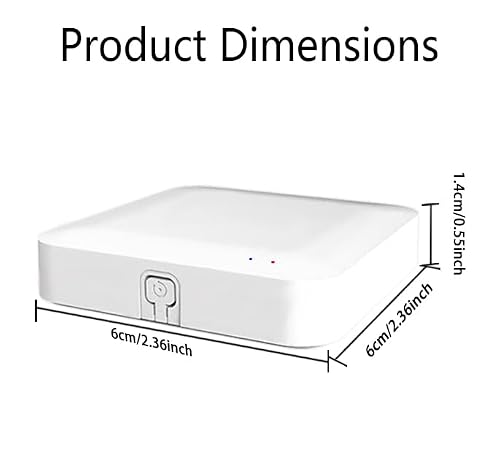
AiSeek Tuya ZigBee 3.0 Hub - Smart Home Gateway Controller




As an Amazon Associate we earn from qualifying purchases. Product prices and availability are accurate as of the date/time indicated.
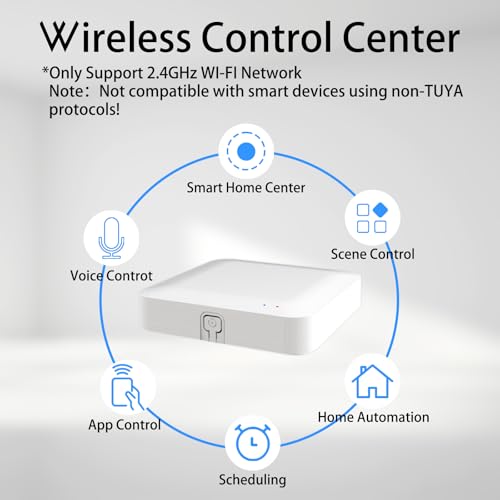
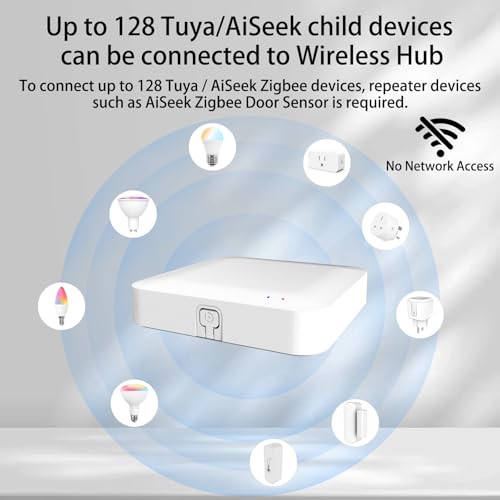
The AiSeek Tuya ZigBee 3.0 Hub offers an exceptionally affordable gateway for beginners already committed to the Tuya/Smart Life ecosystem. This dual-mode hub supports both ZigBee 3.0 and Bluetooth 5.0 protocols, connecting to compatible Tuya smart devices through the Smart Life or Tuya Smart app. Setup requires only plugging in the hub and scanning a QR code in the app—no network cables needed. Once connected to your 2.4GHz Wi-Fi, you can control ZigBee and Bluetooth devices remotely from anywhere.
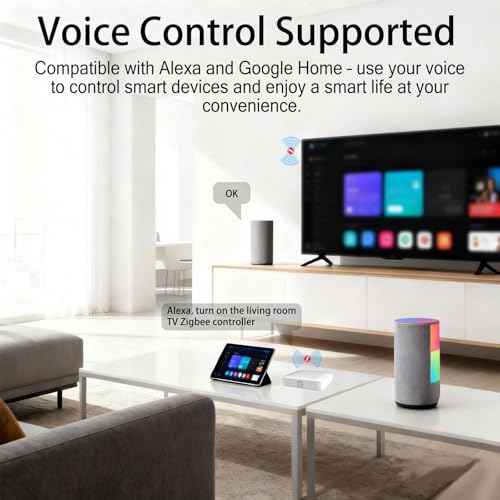
The hub extends ZigBee mesh network coverage, allowing devices to communicate through each other for improved range and reliability. It’s particularly valuable for beginners with existing Tuya-compatible devices like smart switches, sensors, or thermostats. The compact design fits easily on a shelf or nightstand. Critical limitations include compatibility only with Tuya protocol devices—it won’t work with Alexa, Google Home, or non-Tuya products like Sengled bulbs or door locks. Setup requires confirming device compatibility beforehand. Advantages include ultra-low cost, simple setup, and stable Zigbee mesh networking. This hub is best suited for budget-conscious beginners already invested in the Tuya ecosystem or planning to use exclusively Tuya-compatible devices.
SONOFF MINI-ZBD Zigbee Relay – Best Specialized Device for Advanced Beginners

SONOFF MINI-ZBD Zigbee Dry Contact Relay for Smart Home


As an Amazon Associate we earn from qualifying purchases. Product prices and availability are accurate as of the date/time indicated.
The SONOFF MINI-ZBD at $14.90 is the most affordable device in this review and serves a specialized purpose: converting traditional garage doors, gates, boilers, and motorized systems into smart-controlled devices. This Zigbee 3.0 dry contact relay works with any Zigbee hub (like those reviewed above) and supports both AC (110-240V) and DC (12-48V) inputs, making it versatile across home automation scenarios. The relay can control low-power motors up to 8W directly or work with external relays for high-power devices.
Beginners with garage doors or automated gates can upgrade these systems to smart control without replacing existing hardware. The relay acts as a signal repeater, extending your Zigbee mesh network coverage while controlling devices. Setup involves connecting the relay to power, adding it to your Zigbee hub through the hub’s app, and configuring control through Alexa or Google Home. The dry contact relay supports both NO (normally open) and NC (normally closed) modes for flexible automation logic. Advantages include ultra-low cost, wide voltage compatibility, and DIY-friendly installation. The limitation is specialized use—this device is most valuable for specific automation tasks like garage doors rather than general home control. This relay is ideal for advanced beginners tackling specific automation projects or those expanding an existing Zigbee system.
What Should You Look for When Choosing Smart Home Devices for Beginners?
Selecting your first smart home devices requires understanding several key factors that impact your long-term satisfaction and system flexibility. The most critical decision is choosing between hub-based and hub-free systems. Hub-based systems like the Aeotec, Hubitat, or Echo Hub provide central control, local automation execution, and support for multiple device protocols simultaneously. These hubs enable complex automations and support thousands of devices, making them ideal for beginners planning significant expansion. Hub-free devices like the GHome Smart Power Strip work standalone via Wi-Fi but lack local automation and typically support fewer protocols. Beginners should choose hub-based systems if they plan to automate multiple rooms or want advanced scheduling; hub-free devices suit those testing automation with a single device.
Protocol compatibility represents the second crucial factor. Smart home devices communicate using different wireless standards: Wi-Fi, Zigbee, Z-Wave, Matter, and Bluetooth. Wi-Fi devices connect directly to your internet but consume more power and bandwidth. Zigbee and Z-Wave create mesh networks where devices relay signals through each other, extending range and improving reliability while using less power. Matter is the new industry standard designed to improve cross-brand compatibility. Beginners should understand which protocols their desired devices use before selecting a hub. The Aeotec and Hubitat hubs support multiple protocols, offering flexibility. If you already own devices using a specific protocol, ensure your hub supports that standard.
Voice assistant integration significantly impacts daily usability. Amazon Alexa dominates the market with the broadest device compatibility, while Google Home offers strong integration with Google services and Android devices. Apple HomeKit provides the most privacy-focused option but has fewer compatible devices. Most beginner hubs support multiple voice assistants, though some like Amazon’s Echo Hub favor Alexa. Consider which voice assistant you already use or prefer. If you use multiple voice assistants in your home, prioritize hubs supporting all three platforms.
Setup complexity varies dramatically between devices. The GHome Smart Power Strip and AiSeek Tuya Hub offer the simplest setup—plug in and scan a QR code. The Echo Hub Starter Kit includes guided setup through the Alexa app. The Aeotec and Hubitat hubs require slightly more configuration but remain beginner-friendly with clear app instructions. Beginners uncomfortable with technology should prioritize pre-configured starter kits or devices with video setup guides. Test your Wi-Fi signal strength at the intended device location before purchasing, as weak Wi-Fi causes connectivity issues.
Budget planning should account for both initial costs and expansion expenses. A $22 smart plug lets you test automation inexpensively, but expanding to multiple rooms typically requires a hub ($150-180) plus multiple devices ($15-50 each). A starter kit ($230) provides better value if you’re committed to automation. Consider your budget for the entire first year, not just the initial purchase. Smart home devices under $100 provide excellent beginner options without overwhelming investment. Also evaluate long-term costs—some systems require subscriptions for advanced features, while others like Hubitat operate subscription-free.
Local versus cloud control affects both privacy and reliability. Cloud-based systems (most Wi-Fi devices and hubs) send commands through internet servers, providing remote access but raising privacy concerns and creating internet outage vulnerabilities. Local control systems like Hubitat run automations on your home network, protecting privacy and maintaining function during outages. Beginners prioritizing privacy and reliability should choose local-control hubs, while those valuing remote access and simplicity may prefer cloud-based systems. Most modern hubs offer hybrid approaches, running critical automations locally while maintaining cloud backup for remote access.
Device ecosystem lock-in deserves consideration. Amazon Alexa, Google Home, and Tuya ecosystems each have thousands of compatible devices, but devices built for one ecosystem may not work optimally with others. Matter aims to reduce this fragmentation, but most existing devices still favor specific ecosystems. Beginners should research which devices they want to control and verify compatibility before committing to a hub. The Aeotec and Hubitat hubs minimize lock-in by supporting multiple protocols and voice assistants, offering more flexibility than single-ecosystem solutions.
Frequently Asked Questions
Do I need a smart home hub to get started with automation?
No, beginners can start with individual Wi-Fi smart plugs or bulbs that connect directly to your router without a hub. However, hubs enable more sophisticated automation, local control, and support for lower-power Zigbee and Z-Wave devices. For simple single-device control, hub-free options work fine. For multi-device automation and reliability, hubs are recommended.
Which smart home hub is best for beginners with no technical experience?
The Echo Hub Starter Kit offers the easiest beginner experience with included devices, guided setup, and intuitive Alexa voice control. The GHome Smart Power Strip is the simplest individual device. For more flexibility without technical requirements, the Aeotec Smart Home Hub balances ease-of-use with powerful features through its straightforward SmartThings app.
Can I use smart home devices from different brands together?
Yes, if they use compatible protocols or connect through the same hub. Matter-certified devices work together regardless of brand. Devices using the same hub protocol (Zigbee or Z-Wave) also interoperate. However, devices from different ecosystems may have limited integration. Most modern hubs support multiple protocols, enabling cross-brand compatibility. Always verify protocol compatibility before purchasing.
What’s the difference between Zigbee, Z-Wave, and Wi-Fi smart home devices?
Wi-Fi devices connect directly to your internet router but consume more power. Zigbee and Z-Wave create mesh networks where devices relay signals, extending range and improving reliability with lower power consumption. Wi-Fi suits individual devices; Zigbee and Z-Wave suit whole-home systems. Hubs supporting all three protocols offer maximum flexibility and compatibility with the broadest device selection.
How much does it cost to build a beginner smart home system?
Entry-level costs range from $23 (single smart plug) to $230 (complete starter kit). A basic multi-room system with hub and four devices typically costs $200-300. Budget-conscious beginners should start with a single device ($20-30) to test automation before investing in a hub. Smart home devices under $50 provide affordable expansion options.
Will my smart home devices work if my internet goes down?
Hub-based systems with local automation (like Hubitat) continue functioning during internet outages. Cloud-dependent devices and hubs stop working without internet. Beginners prioritizing reliability during outages should choose local-control hubs. Most modern hubs offer hybrid approaches, maintaining local automation while cloud backup enables remote access when internet returns.
Which Smart Home Devices Should You Buy?
Your choice depends on your specific needs, budget, and technical comfort level. For comprehensive beginners seeking maximum flexibility and long-term scalability, the Aeotec Smart Home Hub at $159.99 is the best choice. Its support for Matter, Z-Wave, and Zigbee protocols, combined with compatibility for thousands of devices and seamless Alexa and Google Home integration, positions it perfectly for building a sophisticated smart home over time. The SmartThings app is intuitive enough for beginners yet powerful enough for advanced automations. Setup takes minutes, and the hub runs many automations locally for reliability.
For budget-conscious beginners wanting to test automation before significant investment, the GHome Smart Power Strip at check current price provides an unbeatable entry point. No hub required, voice control works immediately, and the device includes surge protection. Start here, learn automation basics, and upgrade to a hub once you’re ready to expand beyond a single room. This approach minimizes financial risk while building confidence.
For privacy-focused beginners or those in homes with unreliable internet, the Hubitat Elevation C-8 Pro at $194.95 offers the best combination of local control, privacy protection, and future-proof updates. All automations run on your home network, your data stays private, and continuous software updates keep the system current without requiring hardware replacement. The slightly higher cost pays dividends for privacy-conscious users.
For beginners wanting immediate, comprehensive functionality without decision-making, Amazon’s Smart Home Starter Kit at $229.99 delivers everything needed in one box. The included hub, plug, and four smart bulbs create a complete lighting control system immediately. Alexa voice control is intuitive, and the ecosystem supports thousands of additional devices for future expansion. This kit eliminates research paralysis and provides best value for committed beginners.
For budget-conscious beginners already using Tuya-compatible devices, the AiSeek Tuya ZigBee Hub at $26.99 provides an affordable gateway to whole-home automation. If you’re building a Tuya-exclusive system, this hub’s low cost and stable Zigbee mesh networking make it excellent value. However, verify all your devices use Tuya compatibility before purchasing.
For advanced beginners tackling specific automation projects like garage door control, the SONOFF MINI-ZBD at $14.90 provides specialized functionality at exceptional value. This device shines for converting traditional motorized systems to smart control but shouldn’t be your first purchase unless you have a specific project in mind.
Start with your use case: testing automation with a single device suggests the GHome Smart Power Strip; building a multi-room system suggests the Aeotec or Echo Hub; prioritizing privacy suggests Hubitat; wanting everything included suggests the Amazon Starter Kit. Most beginners should plan to invest $200-300 in their first year to build a functional multi-room system. Complete smart home systems and comprehensive device reviews provide additional guidance as your system grows. For deeper understanding of how these systems work, explore how smart homes function and Alexa integration specifics.








Write Your Review
No reviews yet. Be the first to share your experience!