

What Is Geofencing on Smart Thermostats? Quick Answer
Geofencing on smart thermostats uses your smartphone’s location to automatically adjust your home’s temperature when you leave or arrive. The thermostat creates an invisible boundary around your house. When your phone crosses that boundary, the system triggers preset heating or cooling adjustments. This location-based automation reduces energy waste and cuts utility bills by 10-15 percent for many users. Geofencing works seamlessly with most modern smart thermostats from brands like Nest, Ecobee, and Honeywell. The feature requires your phone’s GPS and a connected smart thermostat to function properly. No manual adjustments needed—your home climate adapts to your schedule automatically.
Geofencing represents one of the most practical energy-saving features available in 2026. It eliminates the common problem of heating or cooling an empty home. Your thermostat learns when you’re typically away and adjusts settings without user input. This passive automation appeals to busy homeowners who forget to adjust temperatures before leaving. The technology integrates with your smartphone’s location services, making setup straightforward for most users.
How Does Geofencing Technology Work on Smart Thermostats?
Geofencing combines GPS location tracking with smart thermostat controls. Your phone continuously reports its location to your thermostat’s cloud service. When you cross the virtual boundary around your home, the thermostat receives a signal. The system then executes your pre-programmed temperature settings instantly. This process happens automatically without requiring any manual input from you.
The technology relies on three core components working together seamlessly. Your smartphone’s GPS provides real-time location data. Your home WiFi network connects the thermostat to the internet. The thermostat’s cloud platform processes location information and triggers temperature changes. All three elements must function properly for geofencing to work reliably.
Understanding the Geofencing Boundary
The geofence boundary is an invisible circle drawn around your home address. You set the radius during setup, typically between 500 feet and 2 miles. Smaller boundaries trigger faster responses but may cause false alarms. Larger boundaries provide buffer zones but delay temperature adjustments. Most users find 1 mile to be the optimal distance for reliable operation.
- Boundary size determines when your thermostat responds to your location.
- Smaller circles trigger faster responses but increase false alarm risk.
- Larger circles provide buffer zones but delay temperature changes.
- Optimal radius varies by neighborhood density and commute patterns.
Location Data and Privacy Considerations
Your thermostat’s geofencing feature requires location permissions on your smartphone. The system tracks when you’re home and away to optimize temperature settings. Most reputable manufacturers encrypt this data and store it securely. You can disable location sharing at any time through your phone’s settings. Review your thermostat app’s privacy policy to understand data collection practices.
Key Takeaway: Geofencing uses GPS location data to trigger automatic temperature adjustments when you leave or arrive home.
What Are the Energy Savings Benefits of Geofencing?
Geofencing delivers measurable energy savings by preventing unnecessary heating or cooling. When nobody is home, your thermostat reduces temperature in winter or raises it in summer. This prevents wasted energy on an empty house. Users typically see 10-15 percent reductions in monthly heating and cooling costs. Over a year, this translates to significant savings on utility bills.
The savings accumulate quickly across all seasons. Summer cooling costs drop when the system raises temperatures while you’re away. Winter heating expenses decrease when your thermostat lowers temperatures during work hours. Spring and fall transitions benefit from reduced HVAC runtime. These benefits compound monthly, making geofencing one of the fastest ROI smart home investments.
Real-World Savings Examples
A homeowner in a moderate climate spending $150 monthly on heating and cooling could save $15-22 monthly with geofencing. That’s $180-264 annually from a single feature. Homes in extreme climates see even larger savings. Northern homes heating through long winters save more in winter months. Southern homes cooling through extended summers benefit most during summer seasons.
- Moderate climate homes: save $180-264 annually on average.
- Cold climate homes: save up to $400+ annually in heating costs.
- Hot climate homes: save up to $350+ annually in cooling costs.
- Energy savings increase with larger temperature setback ranges.
Seasonal Variations in Savings
Winter savings depend on how cold your area gets and how long heating season lasts. Cold regions with long winters see the biggest winter savings. Summer savings correlate with heat intensity and cooling season length. Temperate climates with mild seasons see smaller percentage savings but still benefit. Homes with multiple occupants away during work hours maximize geofencing benefits.
Key Takeaway: Geofencing typically reduces heating and cooling costs by 10-15 percent annually through automated temperature adjustments.
How Do You Set Up Geofencing on Your Smart Thermostat?
Setting up geofencing takes just 10-15 minutes for most users. Download your thermostat’s mobile app and create an account if you haven’t already. Navigate to the geofencing or location settings menu. Enable location permissions on your smartphone when prompted. Your app will automatically detect your home’s address or let you enter it manually.
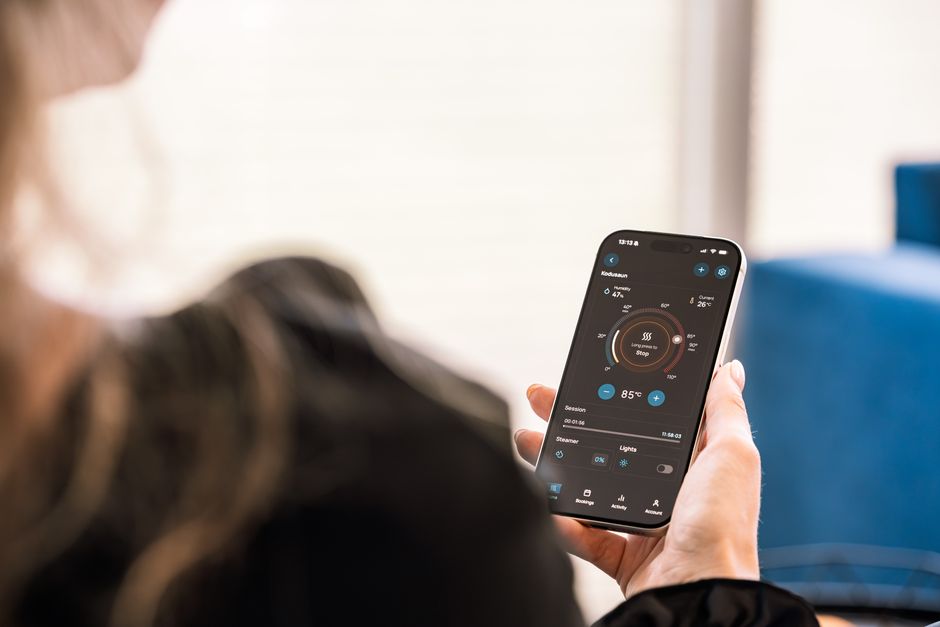
The next step involves configuring your temperature settings for away and home modes. Choose your desired away temperature—typically 68°F in winter or 78°F in summer. Set your home temperature to your comfort preference. Decide your geofence radius and save these settings. Test the system by leaving your home and monitoring temperature changes.
Step-by-Step Setup Instructions
- Download your thermostat’s official mobile app from Apple App Store or Google Play.
- Create an account and sign in with your email address and password.
- Grant location permissions when the app requests access to your GPS.
- Confirm your home address or manually enter your street address.
- Set your away temperature preference in the settings menu.
- Set your home temperature to your desired comfort level.
- Adjust geofence radius between 500 feet and 2 miles as preferred.
- Save all settings and exit the configuration menu.
Troubleshooting Common Setup Issues
If geofencing isn’t working, first verify location permissions are enabled on your phone. Check that your thermostat has a strong WiFi connection. Ensure your smartphone’s GPS is activated. Restart both your phone and thermostat to reset connections. Update your thermostat app to the latest version available. Contact manufacturer support if problems persist after these steps.
Key Takeaway: Most smart thermostats enable geofencing in under 15 minutes through their mobile apps with basic location and temperature settings.
What Are the Limitations and Challenges of Geofencing?
Geofencing technology has several practical limitations you should understand. GPS accuracy varies depending on weather conditions and urban environments. Tall buildings and dense structures can interfere with location signals. If you drive near home frequently, false triggers may occur. Multiple household members require individual phone setups for reliable operation. These challenges don’t eliminate geofencing benefits but require realistic expectations.
Battery drain represents another consideration for smartphone users. Continuous GPS tracking uses more battery power than typical usage. Your phone’s location services may consume 5-10 percent additional battery daily. Newer phones handle this more efficiently than older models. Charging overnight typically offsets this minor power consumption increase.
GPS Accuracy and False Triggers
GPS accuracy typically ranges from 15-30 feet in open areas but degrades in urban canyons. Tall buildings can create 100+ foot errors in location data. Tunnels and parking garages block GPS signals entirely. These inaccuracies occasionally trigger false geofence entries or exits. Your thermostat may adjust temperatures when you’re still nearby but GPS shows you’ve left.
- Open areas: GPS accuracy within 15-30 feet is typical.
- Urban areas: Tall buildings reduce accuracy to 50-100+ feet.
- Tunnels and garages: GPS signals become unreliable or unavailable.
- Weather conditions: Heavy clouds slightly reduce GPS accuracy.
Multi-Person Household Considerations
Geofencing works best when one person controls the thermostat. Households with multiple occupants need everyone’s phones configured. If one person leaves but others remain home, the thermostat receives conflicting signals. Most systems prioritize “someone is home” status, preventing unwanted temperature drops. You may need to adjust settings or use manual override for complex household situations.
Key Takeaway: Geofencing has GPS accuracy limitations and works best in single-occupant households or with all household members’ phones configured.
Which Smart Thermostats Offer Geofencing in 2026?
Most major smart thermostat brands include geofencing as a standard feature in 2026. Google Nest Learning Thermostat offers geofencing through its mobile app. Ecobee SmartThermostat includes location-based scheduling capabilities. Honeywell Home thermostats feature geofencing in their premium models. Carrier’s smart thermostat lineup supports geofencing across multiple tiers. Check your specific model’s specifications to confirm geofencing availability.
Budget-friendly options increasingly include geofencing functionality. Wyze Smart Thermostat offers geofencing at an affordable price point. Emerson Sensi thermostats provide geofencing in their connected models. Midea smart thermostats include location features in most recent releases. Compatibility with your HVAC system matters more than brand choice.
Comparing Geofencing Features Across Brands
- Google Nest: Geofencing with machine learning that adapts to your patterns.
- Ecobee: Geofencing with voice control integration through Alexa.
- Honeywell: Geofencing with remote access and scheduling flexibility.
- Carrier: Geofencing with professional installation support options.
- Wyze: Geofencing at budget-friendly price point with basic features.
Integration with Smart Home Ecosystems
Geofencing works better when integrated with other smart home devices. Your thermostat can trigger smart lights when you arrive home. Door locks can unlock automatically as you approach. Security systems can disarm based on geofence entry. These integrations require compatible smart home hubs or platforms. Matter protocol support in 2026 improves cross-brand compatibility significantly.
Key Takeaway: Most major thermostat brands offer geofencing in 2026, with Google Nest, Ecobee, and Honeywell leading the market.
Practical Tips for Maximizing Geofencing Effectiveness
Optimize your geofence radius based on your specific commute pattern. Test different radius sizes to find the sweet spot between responsiveness and false triggers. Most users find 0.75-1.5 miles optimal for suburban areas. Urban dwellers may prefer smaller 0.5-mile radius to avoid false triggers from nearby traffic. Rural residents might use 2-mile radius for longer approach distances.
Adjust your away temperature more aggressively to maximize savings. Setting away temperature 5-8 degrees different from home temperature increases savings significantly. In winter, set away temperature to 62-65°F. In summer, set away temperature to 80-82°F. These settings remain comfortable for brief home visits while maximizing energy savings.
Best Practices for Geofencing Setup
- Test geofencing for one week before finalizing radius settings.
- Keep your smartphone’s GPS enabled for reliable operation.
- Ensure all household members have location sharing enabled.
- Review temperature settings monthly and adjust seasonally.
- Monitor your energy bills to track actual savings achieved.
- Use manual override when geofencing creates discomfort.
- Update your thermostat app regularly for improved accuracy.
Combining Geofencing with Other Features
Geofencing works best alongside scheduling features. Create schedules for predictable patterns like work hours. Use geofencing for unpredictable absences or early returns home. Combine both approaches to cover all scenarios. Smart learning features like Google Nest’s algorithms improve accuracy over time. Manual overrides provide flexibility when geofencing doesn’t match your needs.
Key Takeaway: Maximize geofencing savings by testing your optimal radius, setting aggressive away temperatures, and combining it with scheduling features.
How Does Geofencing Compare to Traditional Scheduling?
Geofencing and scheduling serve different purposes in smart thermostat management. Scheduling adjusts temperatures at fixed times regardless of your location. Geofencing responds to your actual location in real time. Scheduling works well for predictable routines like weekday work hours. Geofencing handles unexpected absences or early arrivals better. Most effective systems combine both approaches for maximum flexibility and savings.
Scheduling requires you to set specific times for temperature changes. You must anticipate when you’ll leave and return home. Geofencing adapts automatically to your actual movements. If you leave early, geofencing responds immediately. If you come home late, geofencing adjusts temperatures accordingly. This flexibility makes geofencing superior for unpredictable schedules.
Advantages of Geofencing Over Scheduling
- Responds automatically to actual location instead of fixed times.
- Handles unexpected schedule changes without manual adjustments.
- Works for early departures and late arrivals automatically.
- Reduces energy waste from heating or cooling empty homes.
- Requires no manual thermostat adjustments or reminders.
When to Use Scheduling Instead
Scheduling excels for predictable routines and multiple occupants. If everyone leaves at the same time daily, scheduling is reliable. Scheduling doesn’t drain smartphone batteries like geofencing. Families with complex schedules benefit from combining both methods. Elderly users without smartphones can use scheduling exclusively. Scheduling provides consistent results without GPS accuracy concerns.
Key Takeaway: Geofencing offers flexibility for unpredictable schedules while scheduling works better for consistent routines; combining both maximizes efficiency.
What Privacy and Security Considerations Apply to Geofencing?
Geofencing requires sharing your location data with your thermostat’s cloud service. Reputable manufacturers encrypt this data in transit and at rest. Your location history is typically stored securely on company servers. You can disable location sharing at any time through your phone settings. Review privacy policies carefully before enabling geofencing on your thermostat.
Consider the security implications of revealing when your home is empty. Geofencing data could theoretically indicate when nobody is home. Established companies like Google and Ecobee maintain strong security practices. Smaller manufacturers may have weaker data protection standards. Use strong passwords and enable two-factor authentication on your thermostat account. Keep your thermostat app updated to receive security patches.
Privacy Best Practices for Geofencing Users
- Review your thermostat manufacturer’s privacy policy before enabling geofencing.
- Enable two-factor authentication on your thermostat account.
- Use a strong, unique password for your thermostat app login.
- Disable location sharing when away for extended periods.
- Check location permission settings regularly on your smartphone.
- Update your thermostat app monthly for security patches.
- Review connected devices that have access to your thermostat.
Key Takeaway: Geofencing requires careful privacy management; use strong passwords, enable two-factor authentication, and review manufacturer privacy policies.
Frequently Asked Questions
Does geofencing work if my phone is off?
No, geofencing requires your smartphone to be powered on and running. GPS tracking cannot function on a powered-off phone. Your thermostat won’t receive location data if your phone is offline. If you frequently turn off your phone, geofencing won’t be reliable. Consider keeping location services enabled during your typical away hours for consistent operation.
Can geofencing work with multiple family members?
Yes, most thermostats support multiple user accounts with geofencing. Each family member’s phone can trigger geofence responses independently. However, conflicting signals require careful configuration. If one person is home and another leaves, the thermostat prioritizes “someone is home” status. Some systems allow setting a minimum number of people away before temperature adjustments occur.
How accurate is GPS geofencing for smart thermostats?
GPS accuracy typically ranges from 15-30 feet in open areas to 50-100+ feet in urban environments. Tall buildings and dense structures reduce accuracy. Weather conditions slightly impact GPS precision. Most geofencing systems work reliably despite these limitations. False triggers occasionally occur but improve as you adjust radius settings.
Will geofencing work without a smart home hub?
Most geofencing systems work through cloud connectivity without requiring a smart home hub. Your thermostat connects directly to the manufacturer’s cloud service. Your smartphone communicates with the cloud, which updates your thermostat. Some premium systems integrate better with hubs like Apple Home or Google Home. Check your specific thermostat model for hub requirements.
Does geofencing significantly drain my phone’s battery?
Geofencing uses continuous GPS tracking, which drains 5-10 percent additional battery daily. Modern smartphones handle this more efficiently than older models. Newer phones with optimized location services minimize battery impact. Overnight charging typically offsets battery drain from geofencing. If battery life is critical, disable geofencing during extended outings.
Can I disable geofencing if it causes problems?
Yes, you can disable geofencing at any time through your thermostat app settings. Simply turn off location sharing or delete the geofence. Your thermostat will continue operating with manual controls or scheduling. Disabling geofencing doesn’t affect other thermostat features. You can re-enable it later if you want to try again with adjusted settings.
Is Geofencing the Right Choice for Your Home in 2026?
Geofencing is an excellent investment for homeowners with unpredictable schedules. If your departure and arrival times vary daily, geofencing adapts automatically. Single-occupant households and couples benefit most from this technology. Homes in extreme climates see larger energy savings from geofencing. The feature works best when combined with scheduling for maximum efficiency.
Geofencing may not suit everyone equally. Households with multiple family members require careful configuration. Users uncomfortable sharing location data should skip this feature. People with consistent daily schedules might prefer simple scheduling instead. Rural areas with weak GPS signals may experience reliability issues. Evaluate your specific situation before deciding.
The technology continues improving as of July 2026. Newer thermostat models offer better geofencing accuracy and reliability. Integration with smart home ecosystems becomes increasingly seamless. Privacy protections strengthen across the industry. If you’ve dismissed geofencing before, recent improvements might change your perspective. Consider trying geofencing with a 30-day trial period to evaluate actual benefits for your home.
Key Takeaway: Geofencing delivers real energy savings for most homes, especially those with variable schedules, and works best when combined with traditional scheduling features.




Write Your Review
No reviews yet. Be the first to share your experience!