

What Are the Best Smart Door Locks in July 2026?
Quick Answer: The Schlage Encode Smart WiFi Deadbolt Lock with Greenwich Trim is the best overall smart door lock in 2026, offering built-in WiFi connectivity, support for up to 100 access codes, voice control compatibility, and BHMA highest-rated security certification—all with tool-free installation. For budget-conscious buyers, the Philips Wi-Fi Door Lock at $79.97 delivers multiple unlock methods, built-in WiFi, and voice control without breaking the bank. Smart door locks typically range from $70 to $230, with premium models offering advanced security features and seamless smart home integration. Whether you prioritize fingerprint recognition, remote access, or keypad entry, today’s smart locks eliminate the need for physical keys while providing real-time monitoring and flexible access management for your entire household.
Smart door locks have evolved dramatically since their introduction, transforming from novelty gadgets into essential smart home security devices. In July 2026, the market offers diverse options catering to different budgets, installation preferences, and security requirements. The category spans from affordable keypad-only models starting around $70 to premium WiFi-enabled deadbolts exceeding $230. Modern smart locks integrate with voice assistants like Alexa and Google Home, support biometric fingerprint recognition, enable remote access through smartphone apps, and maintain detailed access logs for enhanced security awareness. The shift toward built-in WiFi eliminates the need for separate hubs, while self-learning AI fingerprint technology and flexible PIN code management make these locks increasingly practical for families, renters, and property managers. Battery life has also improved significantly, with many models now lasting 6-8 months on standard AA batteries.
Which Smart Door Locks Stand Out in July 2026?
Schlage Encode Smart WiFi Deadbolt Lock with Greenwich Trim, Matte Black
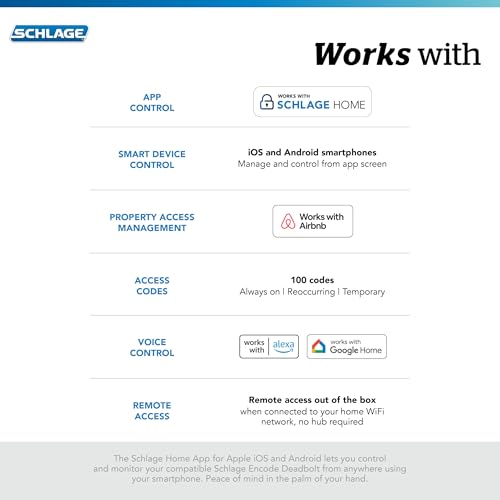
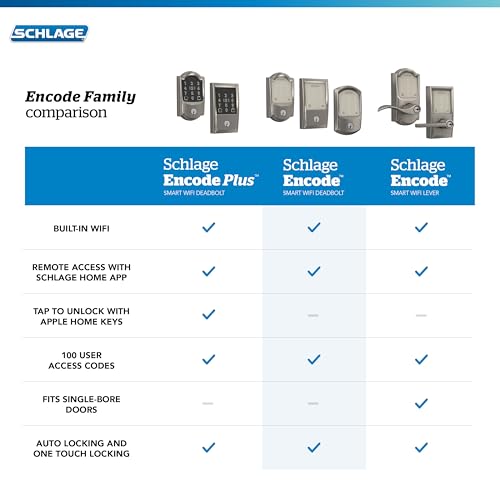
The Schlage Encode represents the premium tier of smart door locks, combining professional-grade security with user-friendly features. Its built-in WiFi connectivity allows you to lock, unlock, and monitor your door from anywhere using the Schlage Home app, without requiring a separate hub. The lock supports up to 100 unique access codes, making it ideal for households with multiple family members or properties with frequent guest access. Integration with Alexa and Google Home enables voice-controlled locking, adding convenience for hands-free operation.
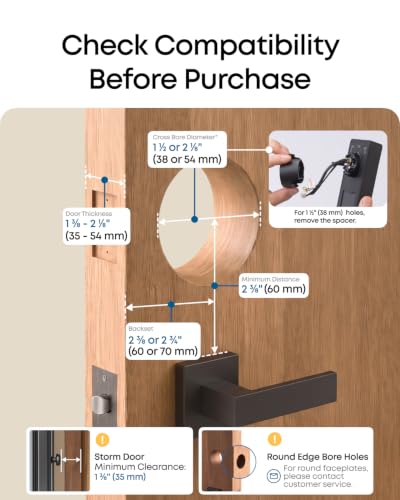
Security is a defining strength—Schlage achieved the highest BHMA (Builders Hardware Manufacturers Association) ratings for residential security, durability, and finish quality. The lock includes a customizable alarm system that alerts you to door movement and forced entry attempts, providing peace of mind when you’re away. The six-month battery life with low-battery notifications prevents unexpected lockouts. Installation takes minutes with just a screwdriver, thanks to the Snap ‘n Stay design that keeps the lock secured during installation. The fingerprint-resistant touchscreen maintains a clean appearance despite frequent use. This lock fits standard doors with 1-3/8 to 1-3/4 inch thickness and 2-3/8 or 2-3/4 inch backsets.
Pros: Built-in WiFi eliminates hub dependency; supports 100 access codes; BHMA highest-rated security certification; tool-free installation; six-month battery life; customizable security alarms; Alexa and Google Home compatible.
Cons: Premium pricing at the top of the market; requires stable WiFi for remote features; limited offline functionality; no customer reviews yet available.

Schlage Encode Smart WiFi Deadbolt Lock - Matte Black





As an Amazon Associate we earn from qualifying purchases. Product prices and availability are accurate as of the date/time indicated.
eufy Security Smart Lock C220, Fingerprint Keyless Entry Door Lock
The eufy Security Smart Lock C220 delivers impressive value with built-in WiFi, no bridge required, and self-learning fingerprint AI that improves accuracy with every use. This lock offers six different unlock methods: fingerprint recognition (under 1.5 seconds), smartphone app control, physical keypad, mechanical key, Apple Watch compatibility, and voice commands through Alexa or Google Assistant. The self-learning AI fingerprint technology is particularly noteworthy—it adapts to your unique biometric patterns, reducing failed unlock attempts over time.
Battery life reaches an impressive eight months on four AA batteries, significantly reducing maintenance frequency compared to competitors. The lock features IP53 waterproof rating and operates reliably across extreme temperatures from -22°F to 158°F, making it suitable for diverse climates. Installation is straightforward—no drilling required—and takes approximately 15 minutes on compatible standard US and Canadian deadbolts. The lock integrates seamlessly with the eufy ecosystem, allowing you to create automation routines combining your smart lock with other eufy devices like video doorbells. Real-time notifications alert you to access events, and detailed history logs help you track who enters and when.
Pros: No bridge required with built-in WiFi; self-learning fingerprint AI improves over time; six unlock methods provide maximum flexibility; exceptional eight-month battery life; fast 1.5-second fingerprint recognition; IP53 waterproof rating; wide temperature operating range; 15-minute installation; 18-month protection warranty.
Cons: No customer reviews available yet; limited to standard US/CA deadbolt compatibility; battery life claims vary based on usage frequency; may require WiFi optimization for reliable remote access.

eufy Security Smart Lock C220: Wi-Fi Fingerprint Deadbolt


As an Amazon Associate we earn from qualifying purchases. Product prices and availability are accurate as of the date/time indicated.
Yamiry Keypad Smart Door Lock with Knob, Fingerprint Electronic Knob
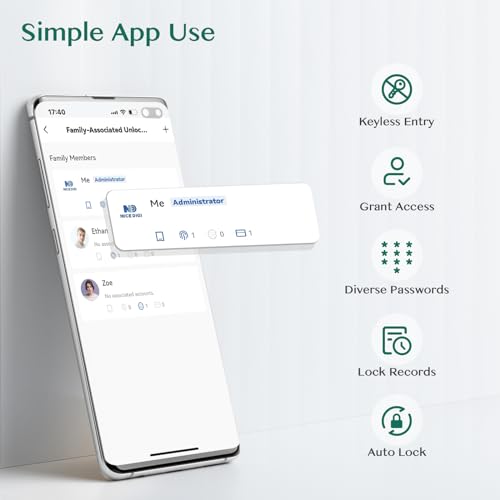
The Yamiry smart lock offers a budget-friendly entry point into keypad and fingerprint door security, priced at $64.50. This integrated handle and lock system features aluminum construction for durability and corrosion resistance, protecting against external tampering. The lock stores up to 50 passwords and fingerprints plus key fob codes, providing flexible access management for household members and guests. Bluetooth connectivity enables app control directly from your smartphone, while optional WiFi gateway (sold separately) unlocks remote access capabilities for when you’re away from home.
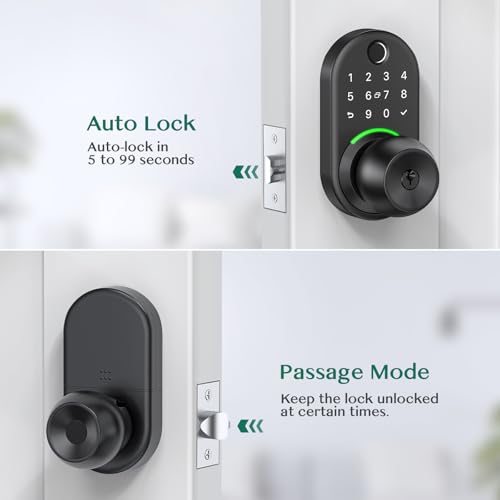
The Yamiry supports five unlock methods: app control, numeric password entry, physical key fob, fingerprint recognition, and traditional mechanical key. Locking offers three options: automatic locking, app-based locking, or manual button press. The lock is compatible with most American standard doors and installs easily with just a screwdriver. The company backs the product with a 30-day money-back guarantee, one-year product coverage, and lifetime after-sales support, demonstrating confidence in long-term reliability. This makes it an excellent choice for renters or homeowners reluctant to commit significant capital to smart lock technology.
Pros: Affordable $69.99 price point; integrated handle and lock design; aluminum construction resists corrosion; stores 50 passwords and fingerprints; five unlock methods; three lock options; simple app control; 30-day money-back guarantee; lifetime after-sales support.
Cons: WiFi gateway sold separately (additional cost); Bluetooth-only without gateway limits remote access; no customer reviews available; may lack advanced security features of premium models.

Yamiry Smart Door Lock: 5-in-1 Keyless Entry with Fingerprint



As an Amazon Associate we earn from qualifying purchases. Product prices and availability are accurate as of the date/time indicated.
Philips Wi-Fi Door Lock, WiFi Smart Lock Keyless Entry Deadbolt
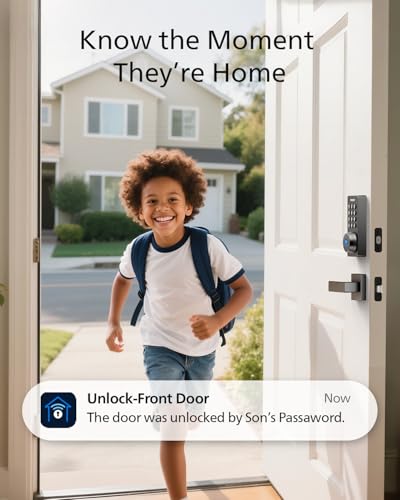
The Philips Wi-Fi Door Lock stands out as an exceptional value proposition at $109.98, combining multiple unlock methods with built-in WiFi and no hub requirement. This deadbolt supports five different unlock approaches: smartphone app, numeric passcode, fingerprint biometric, physical key, and voice commands through Alexa or Google Assistant. The lock stores multiple fingerprints for family members and can manage up to 100 custom passcodes with flexible scheduling options—perfect for guests, cleaners, or rental property management.
Built-in WiFi eliminates the need for additional hub hardware, simplifying setup and reducing overall system cost. Remote access through the Philips smartphone app lets you lock or unlock from anywhere, monitor access history, and receive real-time notifications when the door is accessed. The auto-lock feature (adjustable 10-180 seconds) ensures your door automatically secures after entry, preventing accidental lockouts. Real-time access logging helps you track who enters and when, supporting household security awareness and accountability. The lock accommodates standard US door thicknesses and includes a physical key backup for emergency access.
Pros: Exceptional value at $79.97; multiple unlock methods (fingerprint, passcode, app, voice, key); built-in WiFi with no hub needed; supports 100 custom passcodes; one-time and scheduled access options; auto-lock feature; real-time notifications; access history logging; Alexa and Google Assistant compatible.
Cons: Batteries not included (requires 4-8 AA alkaline batteries); 2.4GHz WiFi only (may not support newer dual-band routers); no door sensor to detect if door is physically open; requires 65-foot router proximity for reliable remote control; no customer reviews available yet; installation requires pre-measurement of door thickness.

Philips Wi-Fi Smart Door Lock with Fingerprint & Voice Control




As an Amazon Associate we earn from qualifying purchases. Product prices and availability are accurate as of the date/time indicated.
Philips WiFi Keypad Door Lock with Handle (Matte Black), Built-in WiFi
The Philips 4200 Series WiFi Keypad Door Lock (matte black finish) combines integrated handle design with advanced smart features at $109.98. This complete lock set eliminates the need for separate hardware purchases, as it includes both the smart lock mechanism and matching handle. The lock connects directly to 2.4GHz WiFi networks without requiring a separate hub or bridge, simplifying installation and reducing system complexity. Fast 0.3-second fingerprint recognition provides nearly instantaneous unlock, while the lock supports multiple stored fingerprints for family members and trusted guests.
Passcode flexibility is a standout feature—the lock supports permanent codes, one-time temporary codes, periodic recurring codes, and scheduled access windows. This versatility makes it ideal for Airbnb hosts, property managers, or families who frequently host guests. The Philips Home Access app provides complete remote control, allowing you to lock/unlock, manage user codes and fingerprints, check door status, and review detailed access history. Voice assistant compatibility with Alexa and Google Assistant enables hands-free operation. The lock operates on a 6-month battery life with low-battery alerts. Installation works with standard door thicknesses (1-3/8 to 1-3/4 inches), though left-opening doors require manual reconfiguration.
Pros: Complete handle set included eliminates additional hardware costs; no hub required—direct WiFi connection; ultra-fast 0.3-second fingerprint unlock; multiple fingerprint storage for family; flexible passcode options (permanent, one-time, periodic, recurring); 6-month battery life; app-based remote control; voice assistant compatible; detailed access history logging.
Cons: No customer reviews available yet; WiFi router must be within 33 feet with minimal obstacles; auto-lock feature disabled by default (requires manual app activation); limited to standard door thicknesses; left-opening doors need reconfiguration; requires 2.4GHz WiFi network.

Philips WiFi Smart Door Lock with Fingerprint & App Control


As an Amazon Associate we earn from qualifying purchases. Product prices and availability are accurate as of the date/time indicated.
Philips WiFi Keypad Door Lock with Handle (Satin Nickel), Built-in WiFi
The Philips 4200 Series WiFi Keypad Door Lock in satin nickel finish offers identical functionality to the matte black version but in a premium metallic aesthetic. At $109.98, this complete lock set provides the same advanced features: built-in WiFi without hub requirement, 0.3-second fingerprint recognition, flexible passcode management, and full app-based remote control. The satin nickel finish complements contemporary and traditional door hardware styles, making it suitable for diverse home aesthetics. Like its matte black counterpart, this lock includes the complete handle assembly, eliminating the need for separate hardware purchases.
The satin nickel variant maintains all the same capabilities: support for multiple fingerprints, permanent and temporary PIN codes, periodic access scheduling, voice assistant integration with Alexa and Google Home, and detailed access logging through the Philips Home Access app. The lock delivers the same impressive 0.3-second fingerprint unlock speed and 6-month battery life. Installation requirements and limitations are identical—standard door thicknesses (1-3/8 to 1-3/4 inches), 33-foot WiFi router proximity, and manual reconfiguration for left-opening doors. The primary distinction from the matte black model is aesthetic, allowing homeowners to choose finishes matching their existing door hardware.
Pros: Identical smart features to matte black model; premium satin nickel finish suits diverse decor styles; complete handle set included; no hub required; 0.3-second fingerprint recognition; flexible passcode management; 6-month battery life; app and voice control; detailed access logging.
Cons: No customer reviews available yet; finish preference is subjective; WiFi router must be within 33 feet; auto-lock disabled by default; limited to standard door thicknesses; left-opening doors require reconfiguration; 2.4GHz WiFi network required.

Philips WiFi Smart Door Lock with Fingerprint & App Control


As an Amazon Associate we earn from qualifying purchases. Product prices and availability are accurate as of the date/time indicated.
What Should You Look for When Choosing the Best Smart Door Lock?
Selecting the ideal smart door lock requires evaluating multiple factors beyond price, including connectivity options, unlock methods, security certifications, battery life, and compatibility with your existing smart home ecosystem. Understanding these considerations helps you find a lock that balances convenience, security, and long-term reliability.
Connectivity and Hub Requirements: Modern smart locks use either WiFi or Bluetooth connectivity. WiFi-enabled models with built-in connectivity (like Schlage Encode, eufy C220, and Philips models) allow remote access from anywhere without requiring a separate hub, simplifying installation and reducing costs. Bluetooth-only locks require proximity to your smartphone and often need a separate WiFi hub for remote access. Built-in WiFi is generally preferable for convenience, though it requires a stable home network. Consider your WiFi router’s location and signal strength—most manufacturers recommend 33-65 feet proximity with minimal obstacles like walls or metal objects. The FCC provides guidance on optimizing WiFi performance for connected devices.
Unlock Methods and Flexibility: The best smart locks offer multiple unlock options to accommodate different situations and user preferences. Common methods include smartphone app control, numeric PIN codes, fingerprint biometric recognition, physical keys, voice commands, and wearable integration (Apple Watch). Fingerprint recognition is increasingly reliable thanks to self-learning AI that improves accuracy over time. PIN code flexibility matters significantly—look for locks supporting permanent codes, one-time temporary codes, and scheduled access windows. This flexibility is essential for Airbnb hosts, property managers, and families with frequent guests. The eufy C220 and Philips models excel in offering six or more unlock methods, maximizing accessibility for different scenarios.
Security Certifications and Standards: Prioritize locks with BHMA (Builders Hardware Manufacturers Association) certification, which independently verifies security, durability, and finish quality. The Schlage Encode holds the highest BHMA ratings, indicating professional-grade security suitable for residential and commercial applications. Look for encrypted connections between the lock and your smartphone to prevent unauthorized access. Advanced security features include customizable alarms for door movement or forced entry attempts, detailed access history logging, and real-time notifications. These features help you monitor suspicious activity and maintain awareness of who accesses your property and when.
Battery Life and Maintenance: Smart lock battery life directly impacts convenience and long-term satisfaction. Most quality locks operate 6-8 months on standard AA batteries, with the eufy C220 reaching up to eight months. Low-battery alerts prevent unexpected lockouts by warning you before power depletes. Consider whether your lock uses common AA batteries (easily replaceable) or proprietary batteries (potentially more expensive). Calculate total cost of ownership by factoring in battery replacement frequency—a lock lasting eight months costs less in annual battery expenses than one requiring replacement every three months. The Philips models offer six-month battery life, while the Schlage Encode matches this duration.
Installation Requirements and Compatibility: Smart locks must fit your door’s physical specifications. Standard measurements include door thickness (typically 1-3/8 to 2 inches) and backset distance (2-3/8 or 2-3/4 inches). Most modern locks accommodate these standard dimensions, but verify compatibility before purchasing. Installation difficulty varies—some locks require only a screwdriver and take 15 minutes, while others may need drilling or professional installation. The Schlage Encode and eufy C220 both offer tool-free installation with quick setup times. Consider whether you’re replacing an existing lock (potentially easier) or installing on a new door. Left-opening doors sometimes require manual reconfiguration, adding complexity for some models.
Smart Home Ecosystem Integration: Ensure your smart lock integrates with your existing smart home platform. Most modern locks support Alexa and Google Assistant for voice control, but integration depth varies. Some locks work with Apple HomeKit, while others integrate with brand-specific ecosystems (eufy integrates with eufy devices for automation routines). Check whether the lock requires WiFi connection for voice control or if it works offline. Advanced integration enables automation scenarios like unlocking when you arrive home or locking when everyone leaves. Review the manufacturer’s app quality and update frequency—well-maintained apps receive security patches and feature improvements.
Price and Value Proposition: Smart lock pricing ranges from $70 to $230, with price correlating to features and build quality. Budget models ($70-100) like the Philips Wi-Fi Door Lock and Yamiry offer essential smart features with fewer unlock methods. Mid-range options ($100-150) like the Philips 4200 Series add fingerprint recognition and integrated handles. Premium models ($200+) like the Schlage Encode provide BHMA certification, advanced security features, and maximum unlock flexibility. Calculate value based on features you’ll actually use—premium certification matters for rental properties but may be unnecessary for personal residences. Consider total cost of ownership including batteries, potential hub purchases, and long-term maintenance.
Customer Support and Warranty: Quality manufacturers provide responsive customer support and meaningful warranties. The Yamiry offers a 30-day money-back guarantee and lifetime after-sales support, reducing purchase risk. Most quality locks include 1-2 year warranties covering defects. Read customer reviews on independent platforms to assess real-world reliability and support responsiveness. Check whether the manufacturer provides detailed installation guides, video tutorials, and troubleshooting resources. Responsive support becomes crucial if you encounter WiFi connectivity issues or need to reconfigure access codes.
Frequently Asked Questions
Are smart door locks secure compared to traditional deadbolts?
Modern smart locks with BHMA certification (like the Schlage Encode) meet or exceed traditional deadbolt security standards. They use encrypted connections, customizable alarms, and detailed access logging to enhance security. However, security depends on proper installation, strong WiFi encryption, and regular password updates. Smart locks add convenience without compromising security when properly configured.
Do smart locks work if my WiFi goes down?
Most smart locks include physical key backups and local unlock methods (fingerprint, PIN codes) that work without WiFi. Remote app access requires WiFi, but local access remains functional during outages. This offline capability ensures you’re never locked out due to connectivity issues, though you lose remote monitoring until WiFi restores.
How often do I need to replace smart lock batteries?
Quality smart locks typically operate 6-8 months on standard AA batteries, depending on usage frequency and unlock method. The eufy C220 reaches eight months, while others average six months. Most locks alert you when battery is low, preventing unexpected lockouts. Budget approximately $10-20 annually for battery replacement on heavily-used locks.
Can smart locks work with rental properties and Airbnb?
Yes, smart locks are ideal for rental properties. The Philips 4200 Series and similar models support one-time temporary codes and scheduled access windows, allowing you to grant time-limited access to guests without sharing permanent codes. Detailed access logs track check-in and check-out times, supporting property management workflows.
What’s the difference between WiFi and Bluetooth smart locks?
WiFi locks enable remote access from anywhere without additional hubs, while Bluetooth locks require smartphone proximity for direct control. Bluetooth locks typically need separate WiFi hubs for remote access, adding cost and complexity. Built-in WiFi (found in most 2026 models) is generally preferable for convenience and cost-effectiveness.
Do I need a smart home hub to use a smart door lock?
Most 2026 smart locks include built-in WiFi, eliminating hub requirements. Models like the eufy C220 and Philips WiFi locks connect directly to your home WiFi network. Only Bluetooth-only locks typically require separate hubs for remote access. Check product specifications to confirm built-in WiFi before purchasing.
Which Smart Door Lock Should You Buy?
Choosing the best smart door lock depends on your specific priorities, budget, and household needs. The market in July 2026 offers excellent options across multiple price points, each excelling in different areas.
Best Overall: Schlage Encode Smart WiFi Deadbolt Lock with Greenwich Trim, Matte Black — The Schlage Encode deserves the top position for homeowners prioritizing security, reliability, and comprehensive features. Its BHMA highest-rated security certification provides professional-grade protection, while built-in WiFi enables remote access without hub dependency. Support for 100 access codes accommodates large households or properties with frequent guests. The customizable alarm system alerts you to door movement and forced entry attempts, providing security awareness beyond typical smart locks. Tool-free installation with the Snap ‘n Stay design takes minutes, and the six-month battery life with low-battery alerts prevents unexpected lockouts. Alexa and Google Home integration enables voice control for hands-free convenience. At $229, it’s the most expensive option, but the premium is justified for buyers who demand maximum security and features.
Best Budget Option: Philips Wi-Fi Door Lock, WiFi Smart Lock Keyless Entry Deadbolt — For budget-conscious homeowners unwilling to sacrifice essential features, the Philips Wi-Fi Door Lock at $109.98 delivers exceptional value. It includes multiple unlock methods (fingerprint, passcode, app, voice, key), built-in WiFi without hub requirement, and support for 100 custom passcodes. Real-time notifications and access history logging provide security awareness comparable to premium models. Auto-lock functionality prevents accidental lockouts. The primary compromises are missing door sensor detection and requirement for 2.4GHz WiFi networks, but these limitations rarely impact typical home use. This lock is ideal for first-time smart lock buyers testing the technology before committing significant capital.
Best for Fingerprint Recognition: eufy Security Smart Lock C220, Fingerprint Keyless Entry Door Lock — The eufy C220 stands out for biometric security enthusiasts who value fingerprint recognition quality. Its self-learning AI fingerprint technology improves accuracy with every use, reducing failed unlock attempts over time. The lock offers six unlock methods, including fast 1.5-second fingerprint recognition, and achieves an impressive eight-month battery life—the longest in this comparison. No hub requirement, IP53 waterproof rating, and wide temperature operating range (-22°F to 158°F) make it suitable for diverse climates. The 15-minute installation and 18-month warranty provide added confidence. It offers excellent value for fingerprint-focused buyers.
Best for Rental Properties: Philips WiFi Keypad Door Lock with Handle, Built-in WiFi — Property managers and Airbnb hosts should consider the Philips 4200 Series (available in matte black or satin nickel at $109.98). Its flexible passcode management supporting permanent, one-time, periodic, and scheduled access perfectly accommodates guest management workflows. The complete integrated handle set eliminates additional hardware purchases. Fast 0.3-second fingerprint recognition provides security for frequent access scenarios. Detailed access history logging tracks guest check-ins and check-outs. Built-in WiFi without hub requirement simplifies multi-property management. The satin nickel finish option suits upscale properties requiring aesthetic coordination.
Best Budget Alternative: Yamiry Keypad Smart Door Lock with Knob, Fingerprint Electronic Knob — Renters and budget-constrained homeowners should explore the Yamiry. This integrated handle and lock system offers five unlock methods, stores 50 passwords and fingerprints, and includes a 30-day money-back guarantee with lifetime after-sales support. The aluminum construction resists corrosion, and the simple app control provides basic smart features. The primary limitation is that WiFi gateway (enabling remote access) is sold separately, requiring additional investment. This lock excels for users seeking basic keypad and fingerprint functionality without premium price tags.
Final Recommendation: For most homeowners in July 2026, the Schlage Encode Smart WiFi Deadbolt Lock represents the best overall choice, combining maximum security, comprehensive features, and professional reliability. However, the Philips Wi-Fi Door Lock at $109.98 offers the best value proposition, delivering 80% of the Schlage’s features at 35% of the price. The eufy C220 provides the best fingerprint technology for biometric enthusiasts, while the Philips 4200 Series serves rental property managers perfectly. Consider your specific priorities—security certification, fingerprint quality, budget constraints, or rental property management—and select accordingly. All six models reviewed here represent significant improvements over traditional locks, offering convenience, security awareness, and flexible access management that justify the investment for most households.



Write Your Review
No reviews yet. Be the first to share your experience!