

How to Monitor Energy Usage with Smart Plugs in 2026: Quick Answer
Smart plugs in 2026 offer real-time energy monitoring by tracking watts, kilowatt-hours, and cost data directly through smartphone apps. Most modern smart plugs display live power consumption, historical usage patterns, and cost estimates for any connected device. Simply plug in your device, connect the smart plug to your home Wi-Fi, and open the manufacturer’s app to view detailed energy reports. This data helps you identify energy-hungry appliances, set consumption alerts, and make informed decisions about reducing electricity waste. Advanced models integrate with home automation systems for automated scheduling and optimization.
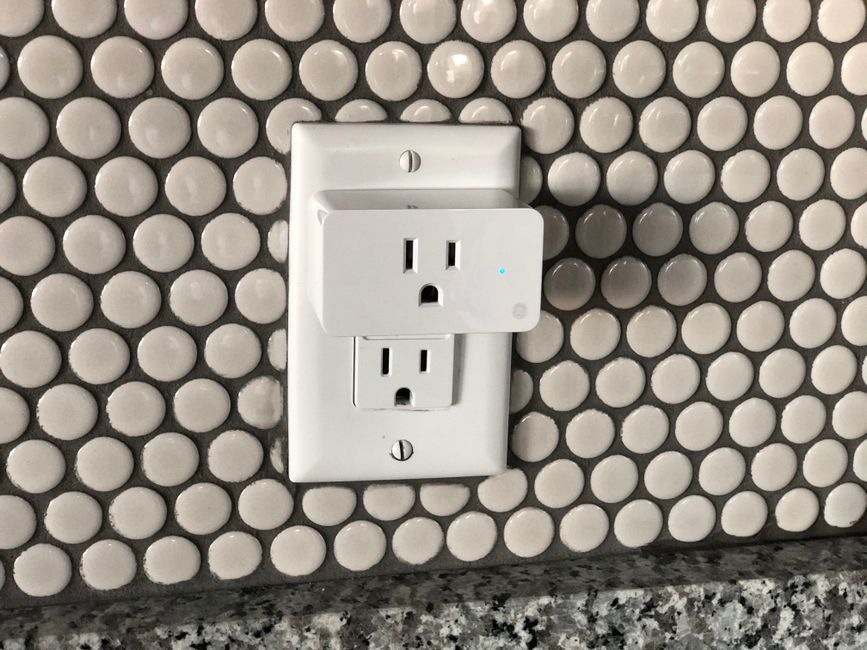
Energy monitoring with smart plugs has become essential for households seeking cost savings and environmental responsibility. In 2026, smart plug technology is more affordable and feature-rich than ever before. Most smart plugs now include built-in energy metering chips that measure consumption with high accuracy. They work with virtually any household appliance—from coffee makers to air conditioning units. Understanding how to use these devices effectively can reduce your energy bills by 10-30 percent annually.
Key Takeaway: Smart plugs provide affordable, real-time energy monitoring that empowers you to identify wasteful devices and optimize consumption patterns.
What Features Make Smart Plugs Effective for Energy Monitoring?
Modern smart plugs in 2026 include several critical features that make energy monitoring practical and accurate. Real-time power measurement displays current wattage instantly. Historical data tracking shows consumption over days, weeks, and months. Cost calculation translates kilowatt-hours into actual dollar amounts based on your local electricity rates. These features work together to give you a complete picture of your home’s energy patterns.
The most important feature is real-time wattage display. This shows exactly how much power a device is consuming at any moment. A smart plug on your refrigerator might show 150 watts during compressor cycles. Your gaming PC could spike to 400 watts during intense sessions. This granular data helps you understand which appliances consume the most energy.
Essential Energy Monitoring Capabilities
- Real-time wattage measurement (updated every 1-5 seconds).
- Cumulative kilowatt-hour tracking over custom time periods.
- Automatic cost calculation using your electricity rate.
- Historical graphs showing usage trends and peak times.
- Consumption alerts when devices exceed preset thresholds.
- Export data to CSV or PDF for detailed analysis.
Historical tracking is equally valuable. Most smart plugs store data for months or years, allowing you to spot seasonal patterns. Your heating system might consume 2,000 kilowatt-hours in winter but only 100 in summer. This historical perspective reveals optimization opportunities you might otherwise miss.
Key Takeaway: Real-time measurement, historical tracking, and cost calculation are the three pillars of effective smart plug energy monitoring.
How Do You Set Up Energy Monitoring on Your Smart Plugs?
Setting up energy monitoring requires just a few straightforward steps. First, physically install the smart plug in your outlet and power it on. Connect it to your home Wi-Fi network using the manufacturer’s mobile app. Add your local electricity rate to enable cost calculations. Finally, configure any alerts or automation rules you want. Most users complete this process in under five minutes per plug.
The initial app setup is the most critical step. Download the official app for your smart plug brand—whether that’s TP-Link Kasa, Meross, Wyze, or another manufacturer. Create an account or log in with existing credentials. Follow the in-app pairing wizard to connect the plug to your Wi-Fi. Ensure your plug and phone are on the same network for successful pairing.
Step-by-Step Setup Process
- Unbox the smart plug and plug it into an outlet near your target device.
- Download the manufacturer’s app and create an account.
- Open the app and select “Add Device” or “Pair New Plug.”
- Follow the app’s Wi-Fi connection wizard and enter your network password.
- Name the plug descriptively (e.g. “Kitchen Coffee Maker”).
- Enter your local electricity rate in the app settings.
- Enable real-time monitoring and set consumption alerts if desired.
Naming each plug descriptively is crucial for long-term monitoring. Instead of “Smart Plug 1,” use “Living Room TV” or “Bedroom AC Unit.” This naming convention makes it easy to identify which device is consuming energy when you review your reports. Most apps also allow you to assign plugs to rooms, creating an organized dashboard.
Key Takeaway: Proper setup takes minutes but requires attention to naming conventions and electricity rate configuration for accurate cost tracking.
Which Devices Should You Monitor with Smart Plugs?
Prioritize monitoring devices that run frequently or consume high wattage. Refrigerators, HVAC systems, water heaters, and air conditioning units are excellent candidates. These appliances often account for 50-70 percent of household energy consumption. Monitoring them reveals whether they’re operating efficiently. A smart plug on your refrigerator might reveal it’s running constantly due to a failing compressor, prompting timely repair.
Electronics in standby mode are another priority. Many devices consume “phantom power” even when off. Your TV might draw 10 watts continuously. Your gaming console could consume 5 watts in standby. Over a month, this phantom power adds up significantly. Smart plugs expose this waste, allowing you to unplug devices or use automation to cut power during non-use periods.
High-Priority Devices for Smart Plug Monitoring
- Refrigerators and freezers (run 24/7 year-round).
- HVAC systems and space heaters (seasonal heavy usage).
- Water heaters (continuous operation in most homes).
- Air conditioning units (peak summer consumption).
- Televisions and entertainment systems (phantom power drain).
- Home office equipment (computers, monitors, printers).
- Laundry machines (high wattage during cycles).
Secondary monitoring targets include entertainment systems, home office equipment, and kitchen appliances. These devices typically consume less power individually but collectively represent significant energy usage. A 65-inch smart TV might draw 150 watts during viewing but 5 watts in standby. Monitoring reveals whether automation can reduce standby consumption without sacrificing convenience.
Key Takeaway: Monitor high-consumption appliances first, then expand to entertainment and office equipment to identify phantom power waste.
How Can You Interpret and Act on Energy Monitoring Data?
Smart plug apps present data through graphs, charts, and cost summaries. Weekly graphs show consumption patterns across days. Monthly reports highlight peak usage times. Cost breakdowns display how much each device costs to operate. Understanding these visualizations transforms raw data into actionable insights. A graph showing your AC unit running continuously might prompt you to check your thermostat settings.
Look for consumption spikes and anomalies. If your refrigerator suddenly shows double its normal wattage, it may need servicing. If your water heater runs constantly instead of cycling, the heating element might be failing. These early warnings can prevent costly repairs and energy waste. Most apps allow you to set alerts that notify you when consumption exceeds normal ranges.
Interpreting Common Energy Patterns
- Flat, steady consumption indicates continuous-operation devices like refrigerators.
- Cyclical patterns show devices with compressors or heating elements cycling on/off.
- Sudden spikes reveal high-demand activities like laundry or dishwashing.
- Baseline phantom power appears as minimal consumption when devices are off.
- Seasonal variations show increased heating in winter or cooling in summer.
Use cost data to prioritize efficiency improvements. If your AC unit costs $150 monthly, upgrading to a programmable thermostat offers high ROI. If your entertainment system costs $20 monthly in phantom power, automating it with a smart plug saves money immediately. This cost-benefit analysis guides smart spending on energy improvements.
For deeper optimization strategies, explore how to use smart plugs to save electricity in 2026. You can also combine monitoring with scheduling appliances with smart plugs to reduce peak-hour consumption.
Key Takeaway: Convert monitoring data into action by identifying high-cost devices and setting consumption alerts for anomalies.
What Advanced Monitoring Features Are Available in 2026?
Advanced smart plugs in 2026 offer machine learning, predictive analytics, and integration with home automation platforms. Machine learning algorithms learn your typical consumption patterns and alert you to deviations. Predictive analytics estimate your monthly bill based on current usage trends. These features move beyond simple data display into intelligent energy management.
Integration with platforms like Apple HomeKit, Google Home, and Amazon Alexa enables voice-controlled monitoring. Ask your smart speaker “How much energy is my AC using?” and receive instant answers. Some plugs integrate with smart home hubs that create automated efficiency routines. For example, a routine might reduce thermostat settings when no one is home, automatically cutting AC consumption.
Advanced Features to Look For
- Machine learning pattern recognition for anomaly detection.
- Predictive billing estimates based on current consumption trends.
- Voice assistant integration for hands-free monitoring queries.
- Automation routines that optimize consumption automatically.
- Multi-device dashboards showing whole-home energy profiles.
- Integration with renewable energy systems like solar panels.
- Detailed circuit-level analysis when used with smart breakers.
Some premium models offer energy disaggregation, breaking down whole-home consumption by appliance category. This requires installing multiple smart plugs throughout your home and using advanced analytics software. The result is a complete picture of where your electricity goes, enabling precise optimization. This approach works exceptionally well for homes with 10+ smart plugs across major appliances.
Key Takeaway: Advanced features like machine learning and voice integration transform energy monitoring from passive observation into active, intelligent optimization.
Practical Tips for Maximizing Smart Plug Energy Monitoring
Start with three to five plugs on your highest-consumption devices. This focused approach provides maximum insight without overwhelming complexity. Monitor for two to four weeks before making changes. This baseline period reveals your normal consumption patterns. After establishing baselines, implement changes one at a time and measure their impact.
Create a spreadsheet tracking monthly costs for major appliances. This simple tool reveals which devices deserve investment in upgrades or automation. If your AC costs $200 monthly, a smart thermostat or HVAC upgrade offers strong ROI. If your entertainment system costs $5 monthly, the ROI on automation is lower.
Actionable Monitoring Strategies
- Start with 3-5 plugs on high-consumption appliances to avoid complexity.
- Establish baseline consumption patterns over 2-4 weeks before making changes.
- Set consumption alerts at 110-120% of normal usage to catch anomalies.
- Review weekly reports every Sunday to stay aware of usage trends.
- Compare month-to-month costs to measure the impact of efficiency changes.
- Share monitoring data with family members to promote energy awareness.
- Combine smart plug monitoring with scheduling for maximum savings.
Share monitoring data with household members to build energy awareness. When family members see their TV watching costs $10 monthly, they may voluntarily reduce consumption. Gamifying energy reduction—tracking savings as a household goal—increases engagement and results. Many apps include family sharing features that display consumption to all household members.
Combine smart plug monitoring with other smart home features for multiplied benefits. Use smart plug setup guides to install multiple plugs efficiently. Then layer in smart lighting for additional savings.
Key Takeaway: Methodical monitoring with family engagement and strategic upgrades yields the best long-term energy and cost savings.
Frequently Asked Questions
How accurate are smart plug energy measurements?
Most quality smart plugs in 2026 measure energy consumption with 95-99% accuracy. They use calibrated integrated circuits that meet international metering standards. Budget models may have slightly lower accuracy (90-95%), while premium plugs often exceed 99%. For practical household purposes, even 95% accuracy is sufficient for identifying energy waste and optimizing consumption patterns.
Can smart plugs work with appliances that draw high wattage?
Yes, but with limitations. Most standard smart plugs safely handle up to 15 amps (1,800 watts) continuously. Heavy-duty models support up to 20 amps (2,400 watts). Never exceed your plug’s rated capacity, as this creates fire hazards. For high-wattage appliances like electric ranges or central AC systems, use dedicated smart breakers or consult an electrician about safe monitoring options.
What electricity rate should I enter in my smart plug app?
Enter your average electricity rate per kilowatt-hour (kWh) from your utility bill. In the US, rates typically range from $0.10 to $0.25 per kWh depending on location and season. Check your most recent bill for the exact rate. Some utilities charge tiered rates that increase with usage; in these cases, use your average rate for accurate estimates. Update this rate annually as utility companies adjust pricing.
How many smart plugs do I need for effective whole-home monitoring?
Start with 5-10 plugs on your highest-consumption appliances to capture 60-80% of household energy usage. This provides excellent insights without overwhelming complexity. As you become comfortable with monitoring, expand to 15-20 plugs for more detailed analysis. Some enthusiasts use 30+ plugs for circuit-level granularity. Your budget and interest level determine the optimal number for your home.
Do smart plugs work with smart home automation systems?
Yes, most modern smart plugs integrate seamlessly with major platforms including Apple HomeKit, Google Home, Amazon Alexa, and Samsung SmartThings. This integration enables automation routines that optimize consumption automatically. For example, you can create a routine that turns off entertainment devices when everyone leaves home. Cross-platform compatibility varies, so verify compatibility before purchasing plugs for your specific ecosystem.
Can I monitor my entire home’s energy usage with smart plugs?
Smart plugs monitor individual devices, not whole-home consumption directly. However, installing plugs on all major appliances and combining their data provides a comprehensive household picture. For true whole-home monitoring, install a smart meter or energy monitor on your main electrical panel. This shows total consumption while smart plugs reveal which devices drive that consumption. Together, they provide complete energy visibility.
How Should You Choose the Right Smart Plugs for Energy Monitoring in 2026?
Prioritize accuracy, app quality, and platform compatibility when selecting smart plugs. Look for plugs certified by independent testing organizations like UL or ETL. Read recent reviews focusing on energy measurement accuracy and app reliability. Verify that your chosen plugs integrate with your existing smart home platform—whether that’s Apple HomeKit, Google Home, or Amazon Alexa. A plug that doesn’t work with your system creates frustration and wasted investment.
Consider your budget and scale. Budget plugs ($10-15) offer basic monitoring but may lack advanced features. Mid-range plugs ($20-35) provide excellent accuracy and feature-rich apps. Premium plugs ($40-60) include advanced analytics and superior build quality. Calculate your expected ROI based on your home’s energy consumption. If you spend $500 annually on electricity, investing in $100-150 worth of smart plugs offers quick payback through identified savings.
Comparison of Popular Smart Plug Options
- TP-Link Kasa Smart Plugs: Excellent accuracy, intuitive app, broad ecosystem.
- Meross Smart Plugs: Premium build quality, HomeKit integration, detailed analytics.
- Wyze Smart Plugs: Budget-friendly, good accuracy, functional monitoring features.
- Amazon Smart Plugs: Seamless Alexa integration, solid performance, limited advanced features.
- Eve Energy Smart Plugs: Premium HomeKit integration, high accuracy, comprehensive data export.
Test one or two plugs before buying a large batch. This approach lets you evaluate the app interface, measurement accuracy, and integration quality without major investment. Many manufacturers offer trial periods or generous return policies. After confirming you like a particular brand, purchasing additional plugs becomes straightforward.
Key Takeaway: Choose plugs based on accuracy, app quality, and platform compatibility, then test with one or two units before scaling up.
Conclusion: Taking Control of Your Home Energy Usage in 2026
Smart plugs have become indispensable tools for understanding and controlling household energy consumption in 2026. They provide real-time measurement, historical tracking, and cost analysis that transform abstract electricity usage into concrete, actionable data. By monitoring your highest-consumption appliances, you identify optimization opportunities that reduce monthly bills and environmental impact. The technology is affordable, accessible, and proven effective for homeowners at every technical skill level.
Start your energy monitoring journey with three to five plugs on major appliances. Establish baseline consumption patterns over several weeks. Use the data to identify wasteful devices and prioritize efficiency improvements. Combine monitoring with automation and scheduling to multiply your savings. Share your progress with family members to build collective energy awareness. This methodical approach yields 10-30% electricity reductions for most households within six months.
The future of home energy management belongs to households that understand their consumption patterns. Smart plugs are your gateway to that understanding. Whether your goal is reducing bills, lowering your carbon footprint, or simply satisfying curiosity about your home’s energy use, smart plug monitoring delivers measurable results. Begin today, and within weeks you’ll have the data needed to make informed decisions about your home’s energy future.




Write Your Review
No reviews yet. Be the first to share your experience!